Subsequent to the HP acquisition of PolyServe, Oracle has updated the Linux RAC Technology Compatibility Matrix to include RAC support for PolyServe on HP Proliant Servers:
Linux RAC Technology Compatibility Matrix
Platform, Database and Storage Topics
Subsequent to the HP acquisition of PolyServe, Oracle has updated the Linux RAC Technology Compatibility Matrix to include RAC support for PolyServe on HP Proliant Servers:
Linux RAC Technology Compatibility Matrix
Padraig O’Sullivan has a good blog entry on Swingbench. Included is the topic of using Swingbench to test direct versus buffed UFS on Solaris 10. Good post—check it out.
You faithful readers of this blog know my position on NAS for Oracle. Clustered Storage is getting hot and HP has just stepped up to the plate by acquiring PolyServe. Here is a link to HP’s website with details:
As you regular readers can imagine, my blogging will certainly sound a lot different going forward.
Bob Sneed makes a good point about direct I/O with regards to preparation for moving to RAC (should you find yourself in that position). I know exactly what he is talking about as I’ve seen people hit with the rude awakening of switching from buffered to unbuffered I/O while trying to implement RAC. The topic is related to the troubles people see when they migrate to RAC from a non-RAC setup where regular buffered filesystems are being used. Implementing RAC forces you to use direct I/O (or RAW) so if you’ve never seen your application work without the effect of external caching in the OS page cache, going to RAC will include this dramatic change in I/O dynamic. All this at the same time as experiencing whatever normal RAC phenomenon your application may hit as well.
In this blog entry, Bob says:
If you ever intend to move a workload to RAC, tuning it to an unbuffered concurrent storage stack can be a crucial first step! Since there are no RAC storage options that use OS-level filesystem buffering […]
Direct I/O
Bob stipulates “unbuffered concurrent” since Solaris has a lot of different recipes for direct I/O some of which do not throw in concurrent I/O automatically. If you’ve been following my blog, you’ve detected that I think it is a bit crazy that there are still technology solutions out there that do not automatically include concurrent I/O along with direct I/O.
Here are some links to my recent thread on direct I/O :
Standard File Utilities with Direct I/O
Oracle Direct I/O Brought to You By Deranged Monkeys
Direct I/O Can Crash Dataguard. Tricky ORA-01031.
DBWR with CIO on JFS2. Resource Starvation?
What Performs Better, Direct I/O or Direct I/O? There is No Such Thing As a Stupid Question!
Some things can never be said often enough. Buffer cache hit ratio is a worthless indicator of performance when Oracle is pounding the daylights out of a few cache buffer chains. I see Hemant Chitale has just blogged on this topic:
Buffer Cache Hit Ratio GOOD or BAD ?
About Logical Reads
All logical reads in Oracle start with a hash algorithm on the database block address. Since there is an unknown number of blocks in the database (dba), this cannot be a “perfect hash” so there are hash collisions. Oracle resolves this by “chaining” dbas with equal hash values. Chains hang off of “buckets” and each bucket has a latch. To walk a chain (looking for the exact dba your session needs), the latch is first aquired. These are db block gets and db block consistent gets depending on the type of block you are looking for (versioning). Applications that clone a lot of blocks can have a “piling up” affect on the buckets that govern these hot chains. Fix that problem at the application level before worrying about hit ratio and long before trying to deal with latch dynamics (e.g., spin count, increasing buckets, etc).
In my last blog entry about Direct I/O, I covered the topic of what Direct I/O can mean beyond normal Oracle database files. A reader followed up with a comment based on his experience with Direct I/O via Solaris –forcedirectio mount option:
I’ve noticed that on Solaris filesystems with forcedirectio , a “compress” becomes quite significantly slower. I had a database where I was doing disk-based backups and if I did “cp” and “compress” scripting to a forcedirectio filesystem the database backup would be about twice as long as one on a normally mounted filesystem.
I’m surprised it was only twice as slow. He was not alone in pointing this out. A fellow OakTable Network member who has customers using PolyServe had this to say in a side-channel email discussion:
Whilst I agree with you completely, I can’t help but notice that you ‘forgot’ to mention that all the tools in fileutils use 512-byte I/Os and that the response time to write a file to a dboptimised filesystem is very bad indeed…
I do recall at one point cp(1) used 512byte I/Os by default but that was some time ago and it has changed. I’m not going to name the individual that made this comment because if he wanted to let folks know who he is, he would have made the comment on the blog. However, I have to respectfully disagree with this comment. It is too broad and a little out of date. Oh, and fileutils have been rolled up into coreutils actually. What tools are those? Wikipedia has a good list.
When it comes to the tools that are used to manipulate unstructured data, I think the ones that matter the most are cp, dd, cat, sort, sum, md5sum, split, uniq and tee. Then, from other packages, there are tar and gzip. There are others, but these seem to be the heavy hitters.
Small Bites
As I pointed out in my last blog entry about DIO, the man page for open(2) on Enterprise Linux distributions quotes Linus Torvalds as saying:
The thing that has always disturbed me about O_DIRECT is that the whole interface is just stupid, and was probably designed by a deranged monkey on some serious mind-controlling substances
I beg to differ. I think he should have given that title to anyone that thinks a program like cp(1) needs to operate with little itsy-bitsy-teenie-weenie I/Os. The following is the current state of affairs (although not exhaustive) as per measurements I just took with strace on RHEL4:
So as you can see these tools vary, but the majority do operate with insidiously ridiculous small I/O sizes. And 10KB as the default for tar? Huh? What a weird value to pick out of the air. At least you can override that by supplying an I/O size using the –blocking-factor option. But still, 10KB? Almost seems like the work of “deranged monkeys.” But is all lost? No.
Open Source
See, I just don’t get it. Supposedly Open Source is so cool because you can read and modify source code to make your life easier and yet people are reluctant to actually do that. As far as that list of coreutils goes, only cp(1) causes a headache on a direct I/O mounted filesystem because you can’t pipeline it. Can you imagine the intrusive changes one would have to make to cp(1) to stop doing these ridiculous 4KB operations? I can, and have. The following is what I do to the coreutils cp(1):
copy.c:copy_reg()
/* buf_size = ST_BLKSIZE (sb);*/
buf_size = 8388608 ;
Eek! Oh the horror. Imagine the testing! Heaven’s sake! But, Kevin, how can you copy a small file with such large I/O requests? The following is a screen shot of two copy operations on a direct I/O mounted filesystem. I copy once with my cp command that will use a 8MB buffer and then again with the shipping cp(1) which uses a 4KB buffer.
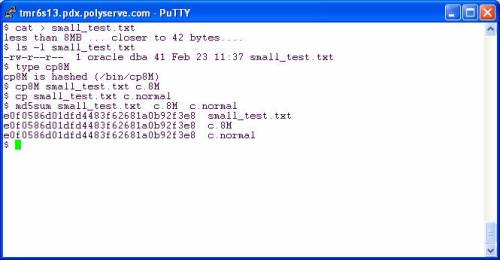
Folks, in both cases the file is smaller than the buffer size. The custom cp8M will use an 8MB buffer but can safely (and quickly) copy a 41 byte file the same way the shipping cp(1) does with a 4KB buffer. The file is smaller than the buffer in both cases—no big deal.
So then you have to go through and make custom file tools right? No, you don’t. Let’s look at some other tools.
Living Happily With Direct I/O
…and reaping the benefits of not completely smashing your physical memory with junk that should not be cached. In the following screen shot I copy a redo log to get a working copy. My current working directory is a direct I/O mounted PSFS and I’m on RHEL4 x86_64. After copying I used gzip straight out of the box as they say. I then followed that with a pipeline command of dd(1) reading the infile with 8MB reads and writing to the pipe (stdout) with 8MB writes. The gzip command is reading the pipe with 32KB reads and in both cases is writing the compressed output with 16KB writes.
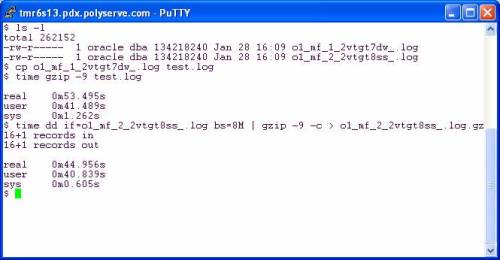
It seems gzip was written by monkeys who were apparently not deranged. The effect of using 32KB input and 16KB output is apparent. There was only a 16% speedup when I slammed 8MB chucks into gzip on the pipeline example. Perhaps the sane monkeys that implemented gzip could talk to the deranged monkeys that implemented all those tools that do 4KB operations.
What if I pipeline so that gzip is reading and writing on pipes but dd is adapted on both sides to do large reads and writes? The following screen shot shows that using dd as the reader and writer does pick up another 5%:

So, all told, there is 20% speedup to be had going from canned gzip to using dd (with 8MB I/O) on the left and right hand of a pipeline command. To make that simpler one could easily write the following scripts:
#!/bin/bash
dd if=$1 bs=8M
and
#!/bin/bash
dd of=$1 bs=8M
Make these scripts executable and use as follows:
$ large_read.sh file1.dbf | gzip –c -9 | large_write.sh file1.dbf.gz
But why go to that trouble? This is open source and we are all so very excited that we can tweak the code. A simple change to any of these tools that operate with 4KB buffers is very easy as I pointed out above. To demonstrate the benefit of that little tiny tweak I did to coreutils cp(1), I offer the following screen shot. Using cp8M offers a 95% speedup over cp(1) by moving 42MB/sec on the direct I/O mounted filesystem:

More About cp8M
Honestly, I think it is a bit absurd that any modern platform would ship a tool like cp(1) that does really small I/Os. If any of you can test cp(1) on, say, AIX, HP-UX or Solaris you might find that it is smart enough to do large I/O requests if is sees the file is large. Then again, since OS page cache also comes with built-in read-ahead, the I/O request size doesn’t really matter since the OS is going to fire off a read-ahead anyway.
Anyway, for what it is worth, here is the README that we give to our customers when we give them cp8M:
$ more README
INTRODUCTION
Files stored on DBOPTIMIZED mounted filesystems do not get accessed with buffered I/O. Therefore, Linux tools that perform small I/O requests will suffer a performance degradation compared to buffered filesystems such as normal mounted PolyServe CFS , Ext3, etc. Operations such as copying a file with cp(1) will be very slow since cp(1) will read and write small amounts of data for every operation.
To alleviate this problem, PolyServe is providing this slightly modified version of the Open Source cp(1) program called cp8M. The seed source for this tool is from the coreutils-5.2.1 package. The modification to the source is limited to changing the I/O size that cp(1) issues from ST_BLOCKSIZE to 8 MB. The following code snippet is from the copy.c source file and depicts the entirety of source changes to cp(1):
copy.c:copy_reg()
/* buf_size = ST_BLKSIZE (sb);*/
buf_size = 8388608 ;
This program is statically linked and has been tested on the following filesystems on RHEL 3.0, SuSE SLES8 and SuSE SLES9:
* Ext3
* Regular mounted PolyServe CFS
* DBOPTIMIZED mounted PSFS
Both large and small files have been tested. The performance improvement to be expected from the tool is best characterized by the following terminal session output where a 1 GB file is copied using /bin/cp and then with cp8M. The source and destination locations were both DBOPTIMIZED.
# ls -l fin01.dbf
-rw-r–r– 1 root root 1073741824 Jul 14 12:37 fin01.dbf
# time /bin/cp fin01.dbf fin01.dbf.bu
real 8m41.054s
user 0m0.304s
sys 0m52.465s
# time /bin/cp8M fin01.dbf fin01.dbf.bu2
real 0m23.947s
user 0m0.003s
sys 0m6.883s
If you have an Linux system, check the “bugs” section of the man page for the open(2) system call and you’ll see the following quote from Linus Torvalds:
The thing that has always disturbed me about O_DIRECT is that the whole interface is just stupid, and was probably designed by a deranged monkey on some serious mind-controlling substances -Linus
I’m not joking, read that man page and you’ll see. Now, while I much prefer a mount option approach to direct I/O, I don’t think the O_DIRECT style of direct I/O was the brain child of a deranged monkey. I wonder if Linus is insinuating that the interface would be better if it was written by a sane monkey—or perhaps even a deranged monkey that is not on some serious mind-controlling substances?
There is nothing strange about O_DIRECT and most of the Unix derivations I am aware of are happy to offer it (Solaris being the notable exception offering directio(3C) instead). I’d love to know more about the context of that Linus quote. I’ve been around O_DIRECT since the very early 1990s. Sequent supported O_DIRECT opens on DYNIX/ptx file system files way back in 1991.
The Linux kernel development community still languishes over the fact that software like Oracle does not like to kernel-dive to access buffered data, preferring to do its own buffering instead.
A Mount-Option Approach
Why? Well, if you have programs that perform properly aligned I/O calls (e.g., cat(1), dd(1), cp(1), etc) but you don’t want them “polluting “ your system page cache, then you either need a mount-option approach to do Direct I/O or the tools need to be re-coded to open O_DIRECT. Back in 2001 I had the opportunity to make that choice for PolyServe and I haven’t regretted it once. Let me explain.
Let’s say, for instance, you generate and compress a few gigabytes of archived redo logs per day—or roughly ~40KB per second. It doesn’t sound like much, I know. But let’s look at page cache costs. When ARCH spools an offline redo log to the archive log destination the OS page cache will be used to buffer the I/O. When your compression tool (e.g. compress(P), gzip(1)) reads the file, page cache will once again be used. As the output of compress needs to be written page cache is used. Finally, when the archived redo is copied off the system (e.g., to tape), page cache will again be used. All this caching for data that is not used again—save for emergencies. But really, caching sequentially read archived files and compress output? Makes little sense.
The only way to not cache this sort of data is O_DIRECT, but I/Os issued against an O_DIRECT opened file must be multiples of the underlying disk block size (generally 512 bytes). The buffer in the calling process used for the I/O must also be a aligned on an address that is a multiple of the OS page size. It turns out that most OS tools perform proper alignment of their I/O buffers. So where is the rub? The I/O sizes! Even if you coded your compress tool to use O_DIRECT (deranged monkey syndrome), the odds that the output file will be a multiple of 512 bytes is nil. Let’s look at an example.
Direct I/O for Better Memory Utilization
In the following session I performed 6 steps to see the effect of direct I/O:

OK, hold it, in step 5 I copied a 128MB file and yet the free memory available only changed by 176KB (from step 4 to step 6). My copy of an online log closely resembles what ARCH does—it simply copies the inactive online redo log to the archive log destination. I like the ability to not consume 256MB of physical memory to copy a file that is no longer really part of the database! The cp(1) command performs I/O with requests that are 512byte multiples, so the PolyServe CFS mounted in the DBOptimized mode simply “renders” the I/O through the direct I/O code path. No, cp(1) does not open with O_DIRECT, yet I relieved the pressure on free memory by copying with Direct I/O via the mount option. That’s good.
File Compression with Direct I/O Mounted Filesystem
But what about compressing files in a direct I/O filesystem? Let’s take a look. In the next session I did the following:
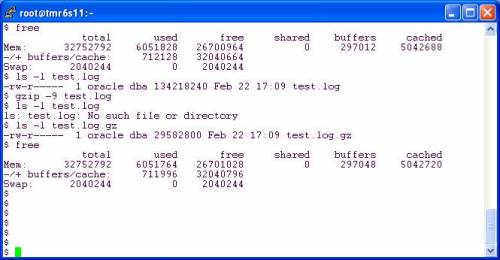
OK, this is good. I take a 128MB redo log file and compress it down to 29,582,800 bytes—which is, of course, 57,778 512 byte chunks plus one 464 byte chunk. According to the differences in free memory from step 1 and step 5, only 64KB of system memory was “wasted” in the act of compressing that file. Why do I say wasted? Because cache is best used for sharing data such as in the SGA, however, here I was able to read in 128MB and write out 28.2MB and only used 64KB of page cache in the process. Memory costs money and efficiency matters. This is the reason I prefer a mount option approach to direct I/O.
Back to the example. How did I write an amount that included a stray 464 bytes with direct I/O? That is not a multiple of the underlying disk driver requirement which is 512 bytes.
Under The Covers
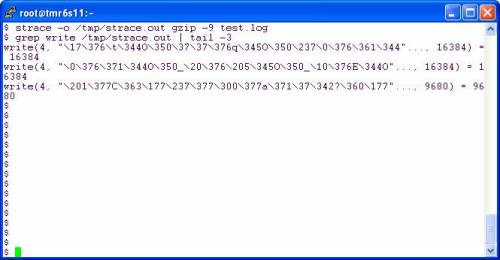
On Linux, gzip(1) uses 32KB reads and 16KB writes. The output file created by gzip(1) is 29,839,295 bytes which is 1,805 writes at 16KB and one last odd-ball write of 9,680 bytes—something that would be impossible to do with direct I/O were it not for the direct I/O mount option. Let’s look at strace. The last write was 9,680 bytes:
Direct I/O Without Compile-Time O_DIRECT
I can’t speak about other direct I/O mount implementations, but I can explain how PolyServe does this. All I/O bound for files in a DBOptimized mounted PSFS filesystem are quickly examined to see if the I/O meets the underlying device driver DMA requirements. In the kernel we use simple arithmetic to determine if the I/O size is a multiple of the underlying disk block size (satisfies DMA requirement) and whether the I/O buffer is aligned on a page boundry. If both conditions are true, the I/O is DMAed directly from the process address space to the disk. If not, we simply grab an OS page cache buffer, perform the I/O and then immediately invalidate that page so no other process can read dirty data (PolyServe is sort of big on cache coherency if you get my drift).
Best of Both Worlds
In the end, Linus might be right about O_DIRECT, but sitting here at PolyServe makes me say, “Who cares.” We supported direct I/O on Linux before Linux supported O_DIRECT (it was just a patch at that time). In fact, we did a 10-node Oracle9i RAC, 10 TB, 10,000 user OLTP Proof of Concept way back in 2002—before Linux O_DIRECT was mainstream. Here is a link to the paper if you are interested in that proof point.
BLOG CORRECTION: When explaining the use of the ORASYM environment variable to a reader, I noticed I typed it and assigned it to the wrong value. A double-decker bug! This entry corrects that bug. Please read the comments for context.
If improperly configured as per your platform, that is.
A Tricky ORA-01031 Error Case
I noticed something very odd today in the Linux x86_64 port of Oracle10gR2. If you set filesystemio_options=directIO and start up the instance (without connecting through the listener), subsequent connects as SYSDBA through the listener will open the orapw file with O_DIRECT. Huh? Yes, a normal, non-shared file opened O_DIRECT. I don’t know when that started, or what other platforms do this, but if the orapw file is located on a filesystem that does not support open(2) with O_DIRECT, you get an ORA-01031. This was no big deal really, other than the mystery, since I store my database on PolyServe with the direct I/O mount option. That is, the filesystemio_options=directIO is redundant for the database files and—as it turns out—creates a problem if the orapw file is on PSFS with regular mount options. I could simply omit the init.ora setting. But I’d like to cover this anyway.
It seems this was hit before by someone back in Oracle9iR2 days as per Metalink 3312751. So, as I was saying, I have a couple of simple solutions for my particular case where I hit this, but I thought there might be someone out there that would enjoy seeing the way I figured out it was the orapw file that was causing me trouble. But first, what did this do to Dataguard in my environment?
Mixing Dataguard, O_DIRECT and the orapw File
It may be that nobody on earth will ever hit this problem. I don’t know. But when it happened to me I had shut down my Dataguard primary, set filesystemio_options= directIO (for some test or another) and then went off and did other things. You know the memory is the first thing to go. “All of the sudden”, my Dataguard setup was not working and I could not remember what had changed (test gear). After starting my Dataguard primary back up (with filesystemio_options=directIO), I saw the following little treat in my alert log:
Thu Feb 22 10:12:46 2007
Errors in file /u01/app/oracle/admin/PROD/bdump/prod_arc0_6977.trc:
ORA-01017: invalid username/password; logon denied
ORA-27041: unable to open file
Linux-x86_64 Error: 22: Invalid argument
Additional information: 2
Thu Feb 22 10:12:46 2007
Error 1017 received logging on to the standby
————————————————————
Check that the primary and standby are using a password file
and remote_login_passwordfile is set to SHARED or EXCLUSIVE,
and that the SYS password is same in the password files.
returning error ORA-16191
It may be necessary to define the DB_ALLOWED_LOGON_VERSION
initialization parameter to the value “10”. Check the
manual for information on this initialization parameter.
OK, forget for a moment that Metalink note 259142.1 states that DB_ALLOWED_LOGON_VERSION is replaced by a setting in the sqlnet.ora file yet this Oracle10gR2 Dataguard primary is spitting out mention of that as possible remedy for the problem. I want to go over how I figured out what the problem actually was.
Oracle Binary Wrapper
Since the problem at hand was the inability to connect as SYSDBA through the listener, I would not be able to simply run sqlplus under strace (or truss). The listener is the parent of the dedicated server process in that situation. So, I had to implement a wrapper around the Oracle binary. To do this you simply mv $ORACLE_HOME/bin/oracle to something like $ORACLE_HOME/bin/oracle.bin and then create a script like this:
-bash-3.00$ cat $ORACLE_HOME/bin/oracle
#!/bin/bash
export ORASYM=/u01/app/oracle/product/10.2.0/db_1/bin/oracle.bin
if [ -f /tmp/trace ]
then
strace -f -o /tmp/trace.$$ /u01/app/oracle/product/10.2.0/db_1/bin/oracle.bin
else
exec /u01/app/oracle/product/10.2.0/db_1/bin/oracle.bin $*
fi
I didn’t create the /tmp/trace file until after I started the instance. This is how you can have background processes executing without single stepping (e.g., strace, truss) all Oracle processes. Instead you target a specific connection to the database by creating the /tmp/trace file immediately before connecting and then removing the file so that other connections are normal. I then ran sqlplus and generated the ORA-01031 error:
-bash-3.00$ sqlplus /nolog
SQL*Plus: Release 10.2.0.1.0 – Production on Thu Feb 22 12:44:28 2007
Copyright (c) 1982, 2005, Oracle. All rights reserved.
SQL> conn sys@PROD/test as sysdba
ERROR:
ORA-01031: insufficient privileges
SQL> exit
The shadow process PID was 20209 so I grep(1)ed for orapw from /tmp/trace.20209 and found the culprit:
NOTE: Right click-> view the image

As the strace output revealed, the shadow process created through the listener uses O_DIRECT when opening the orapw file. Trivial pursuit!
Solution
The solution is very platform specific as I was saying, but it is not inconceivable to hit this on other platforms. In my case I simply don’t run with filesystemio_options= directIO because I store all my database files in PolyServe(HP) PSFS with the direct I/O mount option anyway. Works just fine, but I thought I’d elaborate on the point by relocating the orapw file to a mount that supports O_DIRECT and then use a symlink to $ORACLE_HOME/dbs followed by a successful connection as follows:
-bash-3.00$ cp /u01/app/oracle/product/10.2.0/db_1/dbs/orapwPROD \ /u01/app/oracle/oradata/PROD/orapwPROD
-bash-3.00$ rm /u01/app/oracle/product/10.2.0/db_1/dbs/orapwPROD
-bash-3.00$ ln -s /u01/app/oracle/oradata/PROD/orapwPROD \ /u01/app/oracle/product/10.2.0/db_1/dbs/orapwPROD
-bash-3.00$ df /u01/app/oracle/oradata/PROD
Filesystem 1K-blocks Used Available Use% Mounted on
/dev/psd/psd2p2 1225017312 3617672 1221399640 1% /u02
-bash-3.00$ mount | grep u02
/dev/psd/psd2p2 on /u02 type psfs (rw,dboptimize,shared,data=ordered)
-bash-3.00$ sqlplus /nolog
SQL*Plus: Release 10.2.0.1.0 – Production on Thu Feb 22 12:52:01 2007
Copyright (c) 1982, 2005, Oracle. All rights reserved.
SQL> conn sys@PROD/test as sysdba
Connected.
SQL> show parameter filesystem
NAME TYPE VALUE
———————————— ———– ——————————
filesystemio_options string directIO
Forward Look
I’ll be making a blog entry quite soon about how O_DIRECT can save memory for non-database activity like archived redo log compression.
In a recent post to the oracle-l email list, a participant posted the following:
We are running Oracle 9.2.0.7 & 10.2.0.2 on Aix 5.2. I am seeing the following warnings in the DB Writer trace file:
Warning: lio_listio returned EAGAINPerformance degradation may be seen.
There have been several very interesting threads on the list lately about Oracle on AIX with JFS2 filesystems. I’d like to blog quickly about this thread.
The error message in the DBWR trace file indicates that lio_listio() calls are being starved for resources, but what resources?
A lio_listio() Backgrounder
The error message in the DBWR trace file indicates that lio_listio() calls are being starved for resources. For those who don’t know, lio_listio() is the traditional POSIX gathered write system call. Most Oracle ports use it. It supports DBWR’s need to flush multiple buffers to multiple files in one call, but completion processing is a little rough. The way the call works is your program (e.g., DBWR) either issues a long list of requests and blocks until they are all done (mode=LIO_WAIT), or the mode argument is set to LIO_NWAIT which means your process can continue to do other work. When all the LIO_NWAIT requests are completed, your process gets delivered a signal also specified at call time. So, if for some reason, DBWR is doing a lot of small burst writes, it will likely be handling a lot of signals. No big deal really, but that is how it works. The way I/O completion handling works with POSIX AIO is one of the main reasons Oracle was motivated to define the Oracle Disk Manager library specification(ODM). The differences between ODM and POSIX AIO is a topic for a different blog entry.
About lio_listio() on Filesystem Files
Details, details. The way AIO is implemented from one filesystem to the next varies greatly—unfortunately. I prefer simplicity and that is why the cluster filesystem coupled with PolyServe Matrix Server supports the same Linux kernel internals for AIO as are exercised when using raw devices. If you mount a PSFS in DBoptimized mode, calls to lio_listio(3) are met with the same kernel handling as if the call was targeting raw partitions. But, this blog entry is not about PolyServe since the oracle-l post was about Oracle9i and Oracle10g on AIX.
AIO on JFS2
So, I sent an email to the poster to make sure that this error was being hit on JFS2 and he confirmed it was. You see, AIO on JFS2 is handled by kernel processes of which there are only 10 per processor by default. The number of system wide AIO in flight is limited by the number of these AIO “handlers” as specified in IBM’s AIO documentation (see maxervers). To get around this lio_listio() error, more AIO kernel processes are needed, but how many? That IBM documenation suggests:
The value should be about the same as the expected number of concurrent AIO requests.
How Many is Enough. How Many is Too Many?
Hmmm, that is going to be a very difficult number to guess for the original poster who had both 9i and 10g running on the same pSeries server. Remember, there is no way to control DBWR. If you have a really dirty SGA, DBWR will do really large write batches. That is a good thing.
In cases like this I tend to generally work out what safe ceilings are. I know Bret Olszewski and if he gives a reasonable value for a tunable, I tend to take his word. In this paper about database performance on JFS, Bret and his co-authors state:
[…] the number of aioservers in the system limits the number of asynchronous I/O operations that can be in progress simultaneously. The maximum number of aioservers that can be created is controlled by the maxservers attribute, which has a default value of 10 per processor. For our experiments, we used a maxservers value of 400 per processor.
The paper also points out that there are 4 CPUs in the System p 680 test system. So while the default is 10 per CPU, it looks like if the collective DBWR in-flight I/O are bursting at high rates—such as as 1600 concurrent I/Os—setting aioservers to 400 per processor is not unreasonable.
The paper also covers a technique used to determine if you have too many aioservers. Basically, if you have a bunch of these kernel processes that do not get CPU time then the I/O load is sufficiently being handled by the processes that are burning CPU. You can then reduce the number if it seems important to you. Makes sense, but I can’t imagine having sleeping kernel processes around costs much.
A Word About Filesystem Performance
OK, if Bret specifies a tunable, I take his advice. On the other hand, I have to call out a problem in that JFS2 paper. In the analysis section, the conclusion is that Concurrent I/O performs 200% better than plain Direct I/O, and comes within 8% of raw logical volumes.That makes sense since CIO implicitly invokes DIO and DIO should be as fast as raw disk with the exception of write serialization (which CIO addresses). The test was 100% processor bound and I/O intensive so any processor overhead in the I/O code path will account for that 8%–there is, after all, more software in the filesystem case than the raw logical volume case but is it really code path that costs the 8 percent? The paper states:
The Concurrent I/O run has a higher %system and lower %user than the raw LV run because of the additional context switches due to traversing down the file system path for I/O, and due to the use of AIO server threads for servicing AIO requests […]
OK, the bit about “additional context switches due to traversing down the file system path” is really weird. There is no such thing unless you are opening files for every I/O—which, of course, Oracle does not do. Oracle keeps files open and I/O is nothing more than a position and read/write (e.g., pread(), pwrite()) or an asynchronous write (e.g., lio_listio()). It is true that converting a pathname to an inode costs (e.g., the namei()/lookup() kernel routines), but that is paid in the open(2) call. Once a file is open there is no cost associated with the pathname because I/O routines do not even use a pathname—they use the file descriptor. In short, there is no “traversing down the file system path” associated with I/O on an open file. If I had $50 to bet, I would wager the 1600 AIO handlers jumping on and off those 4 CPUs would account for the 8%, but what do I know?
Tim Hall has posted a blog entry about installing Oracle on RHEL 5. There are URLs in the blog entry that provide very step-by-step install directions. I wanted to point out, however, that in one of the URLs the stipulation is made that Secure Linux (SELinux) is presumed to be disabled but I didn’t see tips on how to do that. The topic of disabling SELinux also came up in the comments thread of a post I did about applying the 10.2.0.3 patchset on RHEL4.
Red Hat dedicates a webpage to the topic of disabling SELinux.
All that aside, a friend of mine (works for Red Hat) is actually doing the Oracle Certification of RHEL5. I think I’ll wait until he is done before I “try the water.”
Required reading for anyone who is really serious about database internals is what I always called the “big Red Book”. Readings in Database System by Michael Stonebraker sits prominently in my personal library. I recommend it to anyone interested in the fundamentals. Hold it, I just realized that this Amazon link for the book is Amazon.ca and the price is $256.40 Loonies and only US $57.00 on this Amazon.com site. Wow, I bet Stonebraker would rather sell his stuff in Canada! Or then again, he might be too busy.
According to this Network World article, Michael Stonebraker has been leading a startup called Vertica Systems. Vertica is going to bring a new database system to market. Vertica has Jerry Held and Ray Lane in the head-shed. I just blogged about some interesting perspectives Ray Lane has on the “traditional software” model in my blog entry entitled Scalable NFS Powered by Open Source Cluster Filesystems. I recommend you check it out to see if those views seem congruous given Ray’s involvement in Vertica. Or is this stealth-news that Vertica is some amalgam of Open Source and “Ad-Revenue funded Software.” Either way, I think bringing yet another database management system to market would be quite the challenge. CA spun off Ingres to go do battle with Oracle recently as well. Doing battle with Oracle is a good way to wind up floating face down in murky water somewhere.
I also noted that the latest round of funding raised by Vertica included money from New Enterprise Associates. Hmm, My company, PolyServe, was also seeded by NEA. Maybe we are all one big happy family. After all, the Network World article states:
It is designed to handle data warehousing, business intelligence, fraud detection and other applications, even in environments with hundreds of terabytes of data.
PolyServe customers build tremendously large clusters for unstructured and structured data alike. I know of one of our Oil and Gas customers that has more than one cluster handling over 250TB but I digress…
We’ll have to keep an eye on Vertica; it is Michael Stonebraker after all!
When I was just starting out in IT, one of my first mentors told me that the only stupid question is the one you don’t ask. I really appreciated that mentality because I asked a lot of them—a lot. I’m not blogging about a stupid question, per se, but one that does get asked so often that it seems it shouldn’t have to be answered ever again. The topic is Oracle performance with direct/raw disk I/O versus buffered filesystems.
In a side-channel discussion with a reader, I was asked the following question:
We have created table with same size of data into three different tablespaces respetively. To our surprise, the query was so quick on normal filesystem, unfortunately, query where the table resides on ASM disk groups, ran very slow comparatively to the normal filesystem.
If an AIX filesystem is using both direct I/O and concurrent I/O, there should be no difference in I/O service times between the filesystem and ASM tests. Note to self: The whole direct I/O plus concurrent I/O deserves another blog entry.
My reply to the question was:
If it was dramatically quicker on the AIX filesystem (JFS?) then you are likely getting cached in the OS buffer cache and comparing to raw transfers with ASM. If the dataset is small enough to stay cached in the OS cache, then it will always be quicker than raw/direct IO (e.g., ASM or a filesystem with direct mount options).
The reader followed up with:
But, Kevin,
People say, sometime is direct IO, i.e. bypassing the OS cache is more faster.
If so, what we are doing with raw device is the same, i.e. direct IO?
And the thread continued with my reply:
Complex topic. “Faster” is not the word. Faster means service times and there is no way an I/O direct from the disk into the address space of an Oracle process can have faster service times because it is raw. In fact, the opposite is true. If the block being read is in the OS page cache, then the service time (from Oracle’s perspective) will be very fast. If it isn’t in the cache, or if the I/O is a write then the story is entirely different. The overhead associated with acquiring an OS buffer, performing the DMA into that buffer from disk and then copied into the SGA/PGA is too costly in processor terms than most systems can afford. Not to mention at that time the buffer is in memory twice…which is not very efficient by any means.
In the end it really depends on what your workload is. If for some reason you have a workload that you just can’t seem to get resident in Oracle’s buffering, then the OS page cache can be helpful.
In the past I’ve taken the rigid stance that direct or raw I/O is the only acceptable deployment option only to be proven wrong by peculiar customer workloads. Over time I started to realize that it is insane for someone like me—or anyone out there for that matter—to tell a customer that direct or raw I/O is the only answer to their problems in spite of what their actual performance is. I’m not saying that it is common for workloads to benefit from OS buffering, but if it does for some particular workload then fine. No religion here.
It turned out that the reader increased his SGA and found parity between the filesystem and ASM test cases as is to be expected. I’ll add, however, that only a filesystem gives you the option of both buffered and unbuffered I/O including mixed on a per-tablespace basis if it helps solve a problem.
My old buddy Glenn Fawcett puts a little extra coverage on the topic from a Solaris perspective here.
The fact remains that there is no such thing as a stupid question.


Click It

 Kevin Closson's Blog: Platforms, Databases and Storage
Recent Comments