Archive for the 'oracle' Category


Oracle over NFS Performance is “Glacial”, But At Least It Isn’t “File Serving.”

I assert that Oracle over NFS is not going away anytime soon—it’s only going to get better. In fact, there are futures that make it even more attractive from a performance and availability standpoint, but even today’s technology is sufficient for Oracle over NFS. Having said that, there is no shortage of misunderstanding about the model. The lack of understanding ranges from clear ignorance about the performance characteristics to simple misunderstanding about how Oracle interacts with the protocol.

Perhaps ignorance is not always the case when folks miss the mark about the performance characteristics. Indeed, when someone tells me the performance is horrible with Oracle over NFS—and the say they actually measured the performance—I can’t call them a bold-faced liar. I’m sure nay-sayers in the poor-performance crowd saw what they saw, but they likely had a botched test. I too have seen the results of a lot of botched or ill-constructed tests, but I can’t dismiss an entire storage and connectivity model based on such results. I’ll discuss possible botched tests in a later post. First, I’d like to clear up the common misunderstanding about NFS and Oracle from a protocol perspective.

The 800lb Gorilla
No secrets here; Network Appliance is the stereotypical 800lb gorilla in the NFS space. So why not get some clarity on the protocol from Network Appliance’s Dave Hitz? In this blog entry about iSCSI and NAS, Dave says:

The two big differences between NAS and Fibre Channel SAN are the wires and the protocols. In terms of wires, NAS runs on Ethernet, and FC-SAN runs on Fibre Channel.

Good so far—in part. Yes, most people feed their Oracle database servers with little orange glass, expensive Host Bus Adaptors and expensive switches. That’s the FCP way. How did we get here? Well, FCP hit 1Gb long before Ethernet and honestly, the NFS overhead most people mistakenly fear in today’s technology was truly a problem in the 2000-2004 time frame. That was then, this is now.

As for NAS, Dave stopped short by suggesting NAS (e.g., NFS, iSCSI) runs over Ethernet. There is also IP over Infiniband. I don’t believe NetApp plays Infiniband so that is likely the reason for the omission.

Dave continues:

The protocols are also different. NAS communicates at the file level, with requests like create-file-MyHomework.doc or read-file-Budget.xls. FC-SAN communicates at the block level, with requests over the wire like read-block-thirty-four or write-block-five-thousand-and-two.

What? NAS is either NFS or iSCSI—honestly. However, only NFS operates with requests like “read-file-Budget.xls”. But that is not the full story and herein comes the confusion when the topic of Oracle over NFS comes up. Dave has inadvertently contributed to the misunderstanding. Yes, an NFS client may indeed cause NFS to return an entire Excel spreadsheet, but that is certainly not how accesses to Oracle database files are conducted. I’ll state it simply, and concisely:

Oracle over NFS is a file positioning and read/write workload.

Oracle over NFS is not traditional “file serving.” Oracle on an NFS client does not fetch entire files. That would simply not function. In fact, Oracle over NFS couldn’t possibly have less in common with traditional “file serving.” It’s all about Direct I/O.

Direct I/O with NFS
Oracle running on an NFS client does not double buffer by using both an SGA and the NFS client page cache. All platforms (that matter) support Direct I/O for files in NFS mounts. To that end, the cache model is SGA->Storage Cache and nothing in between—and therefore none of the associated NFS client cache overhead. And as I’ve pointed out in many blog entries before, I only call something “Direct I/O” if it is real Direct I/O. That is, Direct I/O and concurrent I/O (no write ordering locks).

I/O Libraries
Oracle uses the same I/O libraries (in Oracle9i/Oracle10g) to access files in NFS mounts as it does for:

  • raw partitions
  • local file systems
  • block cluster file systems (e.g. GFS, PSFS, GPFS, OCFS2)
  • ASM over NFS
  • ASM on Raw Partitions

Oops, I almost forgot, there is also Oracle Disk Manager. So let me restate. When Oracle is not linked with an Oracle Disk Manager library or ASMLib, the same I/O calls are used for all of the storage options in the list I just provided.

So what’s the point? Well, the point I’m making is that Oracle behaves the same on NFS as it does on all the other storage options. Oracle simply positions within the files and reads or writes what’s there. No magic. But how does it perform?

The Performance is Glacial
There is a recent thread on comp.databases.oracle.server about 10g RAC that wound up twisting through other topics including Oracle over NFS. When discussing the performance of Oracle over NFS, one participant in the thread stated his view bluntly:

And the performance will be glacial: I’ve done it.

Glacial? That is:
gla·cial
adj.
1.
a. Of, relating to, or derived from a glacier.
b. Suggesting the extreme slowness of a glacier: Work proceeded at a glacial pace.

Let me see if I can redefine glacial using modern tested results with real computers, real software, and real storage. This is just a snippet, but it should put the term glacial in a proper light.

In the following screen shot, I list a simple script that contains commands to capture the cumulative physical I/O the instance has done since boot time followed with a simple PL/SQL block that performs full light-weight scans against a table followed by another peek at the cumulative physical I/O. For this test I was not able to come up with a huge amount of storage so I created and loaded a table with order entry history records—about 25GB worth of data. So that the test runs for a reasonable amount of time I scan the table 4 times using the simple PL/SQL block.

NOTE: You may have to right click-> view the image

nas1.jpg

The following screen shot shows that Oracle scanned 101GB in 466 seconds—223 MB/s scanning throughput. I forgot to mention, this is a DL585 with only 2 paths to storage. Before some slight reconfiguration I had to do I had 3 paths to storage where I was seeing 329MB/s—or about 97% linear scalability when considering the maximum payload on GbE is on the order of 114MB/s for this sort of workload.

nas2.jpg

NFS Overhead? Cheating is Naughty!
The following screen shot shows vmstat output taken during the full table scanning. It shows that the Kernel mode processor utilization when Oracle uses Direct I/O to scan NFS files falls consistently in range of 22%. That is not entirely NFS overhead by any means either.

Of course Oracle doesn’t know if its I/O is truly physical since there could be OS buffering. The screen shot also shows the memory usage on the server. There was 31 of 32GB free which means I wasn’t scanning a 25GB table that was cached in the OS page cache. This was real I/O going over a real wire.

nas3.png

For more information I recommend:

This paper about Scalable Fault Tolerant NAS and the NFS-related postings on my blog.

We Don’t Need No …

For just short of six years I’ve worked with a small group of people at a software startup (PolyServe) that was just bought out by HP. Today I was handed my ID badge—the first time I’ve worn one in 6 years. So, how does that phrase go?

Badges!? We ain’t got no badges. We don’t need no badges! I don’t have to show you any stinking badges! – Alfonso Bedoya

Times, they are a changin’…

Oracle11g New Features Look Like Good Stuff. Not Just a World Domination Play.

I feel fortunate to be one of 350 people invited to Oracle HQ this week for the Xtreme PTS: The Total Oracle Partner Technology Connection. This is a week long 11g briefing, technical deep dive and hands-on event hosted by Oracle’s Platform Technology Solutions group.

I’ve been involved with pre-release Oracle technology in one fashion or another with every release since 5.1.17 so I’ve been to this type of event several times. Over the years these events have been sort of “This is our software, with it we shall dominate the world.” That was not the case at this event. The presentations have been very good, focused on the technology and honestly a pleasure to attend. Andy Mendelsohn gave the first key note presentation covering 11g new features. I have to admit I was curious what sort of war drum the 11g new features presentation would sound like. Would I hear, “We are Linux” or “Microsoft Sucks?”

As soon as Andy started to speak, I set my stop watch. I wanted to time how long it would take for the word Linux to pop up. I was pleasantly surprised that the first 21 minutes of the presentation consisted of a good coverage of the new features with complete lack of any “World Dominance” sort of mantra. At 22 minutes, the word Linux appeared right next to Windows in the context of provisioning! See, I don’t think we really want to hear all this “Rule the world with Linux” sort of stuff. After all, the majority of Oracle customers are running their business with Oracle on Unix systems primarily, Windows just below that and then Linux. I’m not bashing Linux, but come on, it is just an OS. We like Oracle—The Database, the platform. No need for Linux religion really.

Richard Sarwal followed with an update on Enterprise Manager. I’ve known Richard since the mid-90s. What I learned from his presentation is that EM is getting more and more focus at Oracle. I’m glad because as it stabilizes it appears to me more and more crucial in the grand scheme of operations over all. I have to admit that I have not kept myself up to date with some of the provisioning and patch management capabilities of EM. Small awakenings like that are why I like to attend these types of events.

Near the end of the day yesterday I spent about an hour and a half briefing the Sr. Director in charge of VOS development in Server Technologies on some testing I’m doing in our labs. One of his engineers that I’ve known, and held in the highest regard, since the mid-90s was there as well. After the meeting she told me she reads my blog. She didn’t chew me out about the content. I was happy.

Oracle versus SQL Server
I’ve pointed out many times on this blog that I am not a Microsoft-basher. I do have one thing to say, however. The more I see about 11g combined with the February SE licensing (as I discussed in this blog entry) change, Oracle is going to put the hurt on SQL Server they way they did Informix, Sybase and Ingres. And for those of you who can’t remember those wars, they were bloody.

World Dominance
OK, so I harp on that one a bit too much. It isn’t that I don’t think Oracle should pursue world dominance; it’s just that I don’t want to constantly hear about it. Too much preaching to the converted gets tiring. Look, if Oracle doesn’t remain dominant in the market they won’t be there to support our deployments. None of us would benefit from Oracle suffering in the market.  But world dominance?

Oracle’s Realworld Performance Team and a New Blog

Greg Rahn of Oracle’s Realworld Performance Group (under Andrew Holdsworth) has fired up a blog. His first entry is about the art of problem diagnosis and I wish I said it this way first, but I didn’t…I quote:

In times like this I find it very productive to create a list of my observations at the different levels: host/system, database, application, etc. Once all of the observations are documented, relationships between them often become more apparent. Remember, it’s better to spend more time and correctly diagnose an observation than to prematurely label it incorrectly.

Sage words indeed. I hold people like Andrew Holdsworth in the highest regard and since Greg is in his group I’m looking for good things from this new blog.

Greg’s blog is :  Structured Data

Concurrrent Instance Booting == Trivial Pursuit

Blog Frequency
I have found out the hard way that it is very difficult to keep the blogging stream going when one of your best friends of over 20 years passes away after a very short, fierce battle with cancer and your company gets swept up in a corporate takeover 2 days later. So, I’m understandably behind in my series about Oracle on Linux with NUMA hardware and a lot of other things. I actually have the material on the NUMA thread, but just haven’t been able to construct an entry. So, I thought I’d drop one in on a lighter note.

A Really Weird ps(1) Listing
What are the odds of this? In the following screen shot I have a ps(1) listing from one of my lab systems where I had two non-RAC instances running—one called PROD and the other called PRODD. What are the odds of having two PMON processes with sequential Linux process ids? Remember, the foreground process performing the instance start forks itself and execs off each background process which in turn execs again to change argv[0] (yes there are other reasons the server does a double exec()).   Anyway, it looked cool to me.

Check it out:

NOTE: Some browsers require you to right click->view for a clear image.

pps_1.jpg

 slash_proc

Oracle Updates the Linux RAC Technology Compatibility Matrix

Subsequent to the HP acquisition of PolyServe, Oracle has updated the Linux RAC Technology Compatibility Matrix to include RAC support for PolyServe on HP Proliant Servers:


Linux RAC Technology Compatibility Matrix


HP to Acquire PolyServe to Bolster NAS Offerings with Clustered Storage

You faithful readers of this blog know my position on NAS for Oracle. Clustered Storage is getting hot and HP has just stepped up to the plate by acquiring PolyServe. Here is a link to HP’s website with details:

HP To Acquire PolyServe

As you regular readers can imagine, my blogging will certainly sound a lot different going forward.

Standard File Utilities with Direct I/O

In my last blog entry about Direct I/O, I covered the topic of what Direct I/O can mean beyond normal Oracle database files. A reader followed up with a comment based on his experience with Direct I/O via Solaris –forcedirectio mount option:

I’ve noticed that on Solaris filesystems with forcedirectio , a “compress” becomes quite significantly slower. I had a database where I was doing disk-based backups and if I did “cp” and “compress” scripting to a forcedirectio filesystem the database backup would be about twice as long as one on a normally mounted filesystem.

I’m surprised it was only twice as slow. He was not alone in pointing this out. A fellow OakTable Network member who has customers using PolyServe had this to say in a side-channel email discussion:

Whilst I agree with you completely, I can’t help but notice that you ‘forgot’ to mention that all the tools in fileutils use 512-byte I/Os and that the response time to write a file to a dboptimised filesystem is very bad indeed…

I do recall at one point cp(1) used 512byte I/Os by default but that was some time ago and it has changed. I’m not going to name the individual that made this comment because if he wanted to let folks know who he is, he would have made the comment on the blog.  However, I have to respectfully disagree with this comment. It is too broad and a little out of date. Oh, and fileutils have been rolled up into coreutils actually. What tools are those? Wikipedia has a good list.

When it comes to the tools that are used to manipulate unstructured data, I think the ones that matter the most are cp, dd, cat, sort, sum, md5sum, split, uniq and tee. Then, from other packages, there are tar and gzip. There are others, but these seem to be the heavy hitters.

Small Bites
As I pointed out in my last blog entry about DIO, the man page for open(2) on Enterprise Linux distributions quotes Linus Torvalds as saying:

The thing that has always disturbed me about O_DIRECT is that the whole interface is just stupid, and was probably designed by a deranged monkey on some serious mind-controlling substances

I beg to differ. I think he should have given that title to anyone that thinks a program like cp(1) needs to operate with little itsy-bitsy-teenie-weenie I/Os. The following is the current state of affairs (although not exhaustive) as per measurements I just took with strace on RHEL4:

  • tar: 10KB default, override with –blocking-factor
  • gzip: 32KB in/16KB out
  • cat, md5sum, split, uniq, cp: 4KB

So as you can see these tools vary, but the majority do operate with insidiously ridiculous small I/O sizes. And 10KB as the default for tar? Huh? What a weird value to pick out of the air. At least you can override that by supplying an I/O size using the –blocking-factor option. But still, 10KB? Almost seems like the work of “deranged monkeys.” But is all lost? No.

Open Source
See, I just don’t get it. Supposedly Open Source is so cool because you can read and modify source code to make your life easier and yet people are reluctant to actually do that.  As far as that list of coreutils goes, only cp(1) causes a headache on a direct I/O mounted filesystem because you can’t pipeline it. Can you imagine the intrusive changes one would have to make to cp(1) to stop doing these ridiculous 4KB operations? I can, and have. The following is what I do to the coreutils cp(1):

copy.c:copy_reg()
/* buf_size = ST_BLKSIZE (sb);*/
buf_size = 8388608 ;

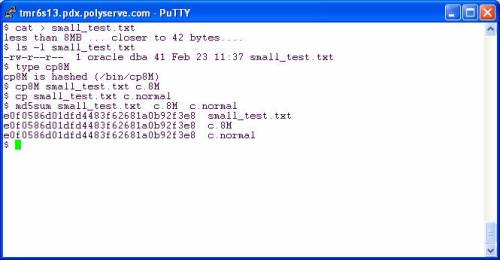
Eek! Oh the horror. Imagine the testing! Heaven’s sake! But, Kevin, how can you copy a small file with such large I/O requests? The following is a screen shot of two copy operations on a direct I/O mounted filesystem. I copy once with my cp command that will use a 8MB buffer and then again with the shipping cp(1) which uses a 4KB buffer.

fig4.jpg

Folks, in both cases the file is smaller than the buffer size. The custom cp8M will use an 8MB buffer but can safely (and quickly) copy a 41 byte file the same way the shipping cp(1) does with a 4KB buffer. The file is smaller than the buffer in both cases—no big deal.

So then you have to go through and make custom file tools right? No, you don’t. Let’s look at some other tools.

Living Happily With Direct I/O
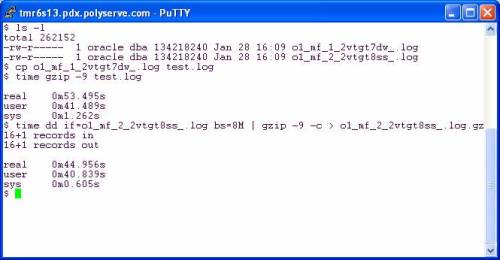
…and reaping the benefits of not completely smashing your physical memory with junk that should not be cached. In the following screen shot I copy a redo log to get a working copy. My current working directory is a direct I/O mounted PSFS and I’m on RHEL4 x86_64. After copying I used gzip straight out of the box as they say. I then followed that with a pipeline command of dd(1) reading the infile with 8MB reads and writing to the pipe (stdout) with 8MB writes. The gzip command is reading the pipe with 32KB reads and in both cases is writing the compressed output with 16KB writes.

fig5.jpg

It seems gzip was written by monkeys who were apparently not deranged. The effect of using 32KB input and 16KB output is apparent. There was only a 16% speedup when I slammed 8MB chucks into gzip on the pipeline example. Perhaps the sane monkeys that implemented gzip could talk to the deranged monkeys that implemented all those tools that do 4KB operations.

What if I pipeline so that gzip is reading and writing on pipes but dd is adapted on both sides to do large reads and writes? The following screen shot shows that using dd as the reader and writer does pick up another 5%:

fig6.jpg

So, all told, there is 20% speedup to be had going from canned gzip to using dd (with 8MB I/O) on the left and right hand of a pipeline command. To make that simpler one could easily write the following scripts:

#!/bin/bash

dd if=$1 bs=8M

and

#!/bin/bash

dd of=$1 bs=8M

Make these scripts executable and use as follows:

$ large_read.sh file1.dbf | gzip –c -9 | large_write.sh file1.dbf.gz

But why go to that trouble? This is open source and we are all so very excited that we can tweak the code. A simple change to any of these tools that operate with 4KB buffers is very easy as I pointed out above. To demonstrate the benefit of that little tiny tweak I did to coreutils cp(1), I offer the following screen shot. Using cp8M offers a 95% speedup over cp(1) by moving 42MB/sec on the direct I/O mounted filesystem:

fig7.jpg

More About cp8M
Honestly, I think it is a bit absurd that any modern platform would ship a tool like cp(1) that does really small I/Os. If any of you can test cp(1) on, say, AIX, HP-UX or Solaris you might find that it is smart enough to do large I/O requests if is sees the file is large. Then again, since OS page cache also comes with built-in read-ahead, the I/O request size doesn’t really matter since the OS is going to fire off a read-ahead anyway.

Anyway, for what it is worth, here is the README that we give to our customers when we give them cp8M:

$ more README

INTRODUCTION
Files stored on DBOPTIMIZED mounted filesystems do not get accessed with buffered I/O. Therefore, Linux tools that perform small I/O requests will suffer a performance degradation compared to buffered filesystems such as normal mounted PolyServe CFS , Ext3, etc. Operations such as copying a file with cp(1) will be very slow since cp(1) will read and write small amounts of data for every operation.

To alleviate this problem, PolyServe is providing this slightly modified version of the Open Source cp(1) program called cp8M. The seed source for this tool is from the coreutils-5.2.1 package. The modification to the source is limited to changing the I/O size that cp(1) issues from ST_BLOCKSIZE to 8 MB. The following code snippet is from the copy.c source file and depicts the entirety of source changes to cp(1):

copy.c:copy_reg()

/* buf_size = ST_BLKSIZE (sb);*/

buf_size = 8388608 ;

This program is statically linked and has been tested on the following filesystems on RHEL 3.0, SuSE SLES8 and SuSE SLES9:

* Ext3

* Regular mounted PolyServe CFS

* DBOPTIMIZED mounted PSFS

Both large and small files have been tested. The performance improvement to be expected from the tool is best characterized by the following terminal session output where a 1 GB file is copied using /bin/cp and then with cp8M. The source and destination locations were both DBOPTIMIZED.

# ls -l fin01.dbf

-rw-r–r– 1 root root 1073741824 Jul 14 12:37 fin01.dbf

# time /bin/cp fin01.dbf fin01.dbf.bu
real 8m41.054s

user 0m0.304s

sys 0m52.465s

# time /bin/cp8M fin01.dbf fin01.dbf.bu2

real 0m23.947s

user 0m0.003s

sys 0m6.883s

Oracle Direct I/O Brought to You By Deranged Monkeys

If you have an Linux system, check the “bugs” section of the man page for the open(2) system call and you’ll see the following quote from Linus Torvalds:

The thing that has always disturbed me about O_DIRECT is that the whole interface is just stupid, and was probably designed by a deranged monkey on some serious mind-controlling substances -Linus

I’m not joking, read that man page and you’ll see. Now, while I much prefer a mount option approach to direct I/O, I don’t think the O_DIRECT style of direct I/O was the brain child of a deranged monkey. I wonder if Linus is insinuating that the interface would be better if it was written by a sane monkey—or perhaps even a deranged monkey that is not on some serious mind-controlling substances?

There is nothing strange about O_DIRECT and most of the Unix derivations I am aware of are happy to offer it (Solaris being the notable exception offering directio(3C) instead). I’d love to know more about the context of that Linus quote. I’ve been around O_DIRECT since the very early 1990s. Sequent supported O_DIRECT opens on DYNIX/ptx file system files way back in 1991.

The Linux kernel development community still languishes over the fact that software like Oracle does not like to kernel-dive to access buffered data, preferring to do its own buffering instead.

A Mount-Option Approach
Why? Well, if you have programs that perform properly aligned I/O calls (e.g., cat(1), dd(1), cp(1), etc) but you don’t want them “polluting “ your system page cache, then you either need a mount-option approach to do Direct I/O or the tools need to be re-coded to open O_DIRECT. Back in 2001 I had the opportunity to make that choice for PolyServe and I haven’t regretted it once. Let me explain.

Let’s say, for instance, you generate and compress a few gigabytes of archived redo logs per day—or roughly ~40KB per second. It doesn’t sound like much, I know. But let’s look at page cache costs. When ARCH spools an offline redo log to the archive log destination the OS page cache will be used to buffer the I/O. When your compression tool (e.g. compress(P), gzip(1)) reads the file, page cache will once again be used. As the output of compress needs to be written page cache is used. Finally, when the archived redo is copied off the system (e.g., to tape), page cache will again be used. All this caching for data that is not used again—save for emergencies. But really, caching sequentially read archived files and compress output? Makes little sense.

The only way to not cache this sort of data is O_DIRECT, but I/Os issued against an O_DIRECT opened file must be multiples of the underlying disk block size (generally 512 bytes). The buffer in the calling process used for the I/O must also be a aligned on an address that is a multiple of the OS page size. It turns out that most OS tools perform proper alignment of their I/O buffers. So where is the rub? The I/O sizes! Even if you coded your compress tool to use O_DIRECT (deranged monkey syndrome), the odds that the output file will be a multiple of 512 bytes is nil. Let’s look at an example.

Direct I/O for Better Memory Utilization
In the following session I performed 6 steps to see the effect of direct I/O:

  1. Use df to determine space and exact filesystem of my current working directory (CWD)
  2. Check the Mount options. My CWD is a PolyServe PSFS mounted with the DBOptimized mount option which “renders” direct I/O akin to the Solaris –forcedirectio mount option.
  3. List my redo logs. Note, they are OMF files so the names are a bit strange.
  4. Check free memory on the system
  5. Copy a redo log
  6. Check free memory again to see how much memory was used by the OS page cache

fig1.jpg

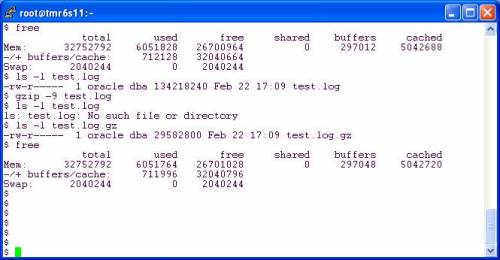
OK, hold it, in step 5 I copied a 128MB file and yet the free memory available only changed by 176KB (from step 4 to step 6). My copy of an online log closely resembles what ARCH does—it simply copies the inactive online redo log to the archive log destination. I like the ability to not consume 256MB of physical memory to copy a file that is no longer really part of the database! The cp(1) command performs I/O with requests that are 512byte multiples, so the PolyServe CFS mounted in the DBOptimized mode simply “renders” the I/O through the direct I/O code path. No, cp(1) does not open with O_DIRECT, yet I relieved the pressure on free memory by copying with Direct I/O via the mount option. That’s good.

File Compression with Direct I/O Mounted Filesystem
But what about compressing files in a direct I/O filesystem? Let’s take a look. In the next session I did the following:

  1. Check free memory on the system
  2. Used ls(1) to see my copy of the redo log file.
  3. Used gzip(1) with maximum compression on the copy of the redo log file
  4. Used ls(1) to see the file size of the compressed file.
  5. Check free memory on the system to see what OS page cache was used

fig2.jpg

OK, this is good. I take a 128MB redo log file and compress it down to 29,582,800 bytes—which is, of course, 57,778 512 byte chunks plus one 464 byte chunk. According to the differences in free memory from step 1 and step 5, only 64KB of system memory was “wasted” in the act of compressing that file. Why do I say wasted? Because cache is best used for sharing data such as in the SGA, however, here I was able to read in 128MB and write out 28.2MB and only used 64KB of page cache in the process. Memory costs money and efficiency matters. This is the reason I prefer a mount option approach to direct I/O.

Back to the example. How did I write an amount that included a stray 464 bytes with direct I/O? That is not a multiple of the underlying disk driver requirement which is 512 bytes.

Under The Covers
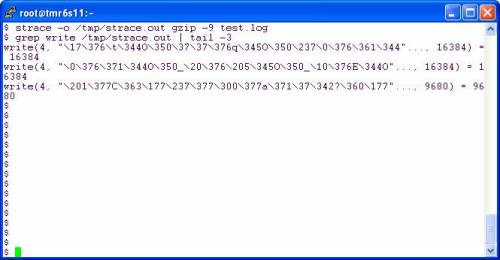
On Linux, gzip(1) uses 32KB reads and 16KB writes. The output file created by gzip(1) is 29,839,295 bytes which is 1,805 writes at 16KB and one last odd-ball write of 9,680 bytes—something that would be impossible to do with direct I/O were it not for the direct I/O mount option. Let’s look at strace. The last write was 9,680 bytes:

fig3.jpg

Direct I/O Without Compile-Time O_DIRECT
I can’t speak about other direct I/O mount implementations, but I can explain how PolyServe does this. All I/O bound for files in a DBOptimized mounted PSFS filesystem are quickly examined to see if the I/O meets the underlying device driver DMA requirements. In the kernel we use simple arithmetic to determine if the I/O size is a multiple of the underlying disk block size (satisfies DMA requirement) and whether the I/O buffer is aligned on a page boundry. If both conditions are true, the I/O is DMAed directly from the process address space to the disk. If not, we simply grab an OS page cache buffer, perform the I/O and then immediately invalidate that page so no other process can read dirty data (PolyServe is sort of big on cache coherency if you get my drift).

Best of Both Worlds
In the end, Linus might be right about O_DIRECT, but sitting here at PolyServe makes me say, “Who cares.” We supported direct I/O on Linux before Linux supported O_DIRECT (it was just a patch at that time). In fact, we did a 10-node Oracle9i RAC, 10 TB, 10,000 user OLTP Proof of Concept way back in 2002—before Linux O_DIRECT was mainstream. Here is a link to the paper if you are interested in that proof point.


Direct I/O Can Crash Dataguard. A Tricky ORA-01031.


BLOG CORRECTION: When explaining the use of the ORASYM environment variable to a reader, I noticed I typed it and assigned it to the wrong value. A double-decker bug! This entry corrects that bug. Please read the comments for context.

If improperly configured as per your platform, that is.

A Tricky ORA-01031 Error Case
I noticed something very odd today in the Linux x86_64 port of Oracle10gR2. If you set filesystemio_options=directIO and start up the instance (without connecting through the listener), subsequent connects as SYSDBA through the listener will open the orapw file with O_DIRECT. Huh? Yes, a normal, non-shared file opened O_DIRECT. I don’t know when that started, or what other platforms do this, but if the orapw file is located on a filesystem that does not support open(2) with O_DIRECT, you get an ORA-01031. This was no big deal really, other than the mystery, since I store my database on PolyServe with the direct I/O mount option. That is, the filesystemio_options=directIO is redundant for the database files and—as it turns out—creates a problem if the orapw file is on PSFS with regular mount options. I could simply omit the init.ora setting. But I’d like to cover this anyway.


It seems this was hit before by someone back in Oracle9iR2 days as per Metalink 3312751. So, as I was saying, I have a couple of simple solutions for my particular case where I hit this, but I thought there might be someone out there that would enjoy seeing the way I figured out it was the orapw file that was causing me trouble. But first, what did this do to Dataguard in my environment?


Mixing Dataguard, O_DIRECT and the orapw File
It may be that nobody on earth will ever hit this problem. I don’t know. But when it happened to me I had shut down my Dataguard primary, set filesystemio_options= directIO (for some test or another) and then went off and did other things. You know the memory is the first thing to go. “All of the sudden”, my Dataguard setup was not working and I could not remember what had changed (test gear). After starting my Dataguard primary back up (with filesystemio_options=directIO), I saw the following little treat in my alert log:

Thu Feb 22 10:12:46 2007
Errors in file /u01/app/oracle/admin/PROD/bdump/prod_arc0_6977.trc:
ORA-01017: invalid username/password; logon denied
ORA-27041: unable to open file
Linux-x86_64 Error: 22: Invalid argument
Additional information: 2
Thu Feb 22 10:12:46 2007
Error 1017 received logging on to the standby
————————————————————
Check that the primary and standby are using a password file
and remote_login_passwordfile is set to SHARED or EXCLUSIVE,
and that the SYS password is same in the password files.
returning error ORA-16191
It may be necessary to define the DB_ALLOWED_LOGON_VERSION
initialization parameter to the value “10”. Check the
manual for information on this initialization parameter.

OK, forget for a moment that Metalink note 259142.1 states that DB_ALLOWED_LOGON_VERSION is replaced by a setting in the sqlnet.ora file yet this Oracle10gR2 Dataguard primary is spitting out mention of that as possible remedy for the problem. I want to go over how I figured out what the problem actually was.


Oracle Binary Wrapper
Since the problem at hand was the inability to connect as SYSDBA through the listener, I would not be able to simply run sqlplus under strace (or truss). The listener is the parent of the dedicated server process in that situation. So, I had to implement a wrapper around the Oracle binary. To do this you simply mv $ORACLE_HOME/bin/oracle to something like $ORACLE_HOME/bin/oracle.bin and then create a script like this:


-bash-3.00$ cat $ORACLE_HOME/bin/oracle
#!/bin/bash
export ORASYM=/u01/app/oracle/product/10.2.0/db_1/bin/oracle.bin
if [ -f /tmp/trace ]
then
strace -f -o /tmp/trace.$$ /u01/app/oracle/product/10.2.0/db_1/bin/oracle.bin

else

exec /u01/app/oracle/product/10.2.0/db_1/bin/oracle.bin $*
fi


I didn’t create the /tmp/trace file until after I started the instance. This is how you can have background processes executing without single stepping (e.g., strace, truss) all Oracle processes. Instead you target a specific connection to the database by creating the /tmp/trace file immediately before connecting and then removing the file so that other connections are normal. I then ran sqlplus and generated the ORA-01031 error:


-bash-3.00$ sqlplus /nolog
SQL*Plus: Release 10.2.0.1.0 – Production on Thu Feb 22 12:44:28 2007
Copyright (c) 1982, 2005, Oracle. All rights reserved.
SQL> conn sys@PROD/test as sysdba
ERROR:
ORA-01031: insufficient privileges
SQL> exit


The shadow process PID was 20209 so I grep(1)ed for orapw from /tmp/trace.20209 and found the culprit:

NOTE: Right click-> view the image

orapw1.jpg


As the strace output revealed, the shadow process created through the listener uses O_DIRECT when opening the orapw file. Trivial pursuit!

Solution
The solution is very platform specific as I was saying, but it is not inconceivable to hit this on other platforms. In my case I simply don’t run with filesystemio_options= directIO because I store all my database files in PolyServe(HP) PSFS with the direct I/O mount option anyway. Works just fine, but I thought I’d elaborate on the point by relocating the orapw file to a mount that supports O_DIRECT and then use a symlink to $ORACLE_HOME/dbs followed by a successful connection as follows:


-bash-3.00$ cp /u01/app/oracle/product/10.2.0/db_1/dbs/orapwPROD \ /u01/app/oracle/oradata/PROD/orapwPROD
-bash-3.00$ rm /u01/app/oracle/product/10.2.0/db_1/dbs/orapwPROD
-bash-3.00$ ln -s /u01/app/oracle/oradata/PROD/orapwPROD \ /u01/app/oracle/product/10.2.0/db_1/dbs/orapwPROD
-bash-3.00$ df /u01/app/oracle/oradata/PROD
Filesystem 1K-blocks Used Available Use% Mounted on
/dev/psd/psd2p2 1225017312 3617672 1221399640 1% /u02
-bash-3.00$ mount | grep u02
/dev/psd/psd2p2 on /u02 type psfs (rw,dboptimize,shared,data=ordered)
-bash-3.00$ sqlplus /nolog

SQL*Plus: Release 10.2.0.1.0 – Production on Thu Feb 22 12:52:01 2007
Copyright (c) 1982, 2005, Oracle. All rights reserved.
SQL> conn sys@PROD/test as sysdba
Connected.
SQL> show parameter filesystem

NAME TYPE VALUE
———————————— ———– ——————————
filesystemio_options string directIO


Forward Look
I’ll be making a blog entry quite soon about how O_DIRECT can save memory for non-database activity like archived redo log compression.


Those Little Round Brown Spinning Things Will Fail

StorageMojo.com has a lively thread going about hard drive reliability and RAID/Replication mitigation techniques—some of which are completely incompatible with Oracle. RAID5 is not being treated very well in the thread and that is ok with us—remember: BAARF.


Database Systems Pioneer Starts Database Company.

Required reading for anyone who is really serious about database internals is what I always called the “big Red Book”. Readings in Database System by Michael Stonebraker sits prominently in my personal library. I recommend it to anyone interested in the fundamentals. Hold it, I just realized that this Amazon link for the book is Amazon.ca and the price is $256.40 Loonies and only US $57.00 on this Amazon.com site. Wow, I bet Stonebraker would rather sell his stuff in Canada! Or then again, he might be too busy.


According to this Network World article, Michael Stonebraker has been leading a startup called Vertica Systems. Vertica is going to bring a new database system to market. Vertica has Jerry Held and Ray Lane in the head-shed. I just blogged about some interesting perspectives Ray Lane has on the “traditional software” model in my blog entry entitled Scalable NFS Powered by Open Source Cluster Filesystems. I recommend you check it out to see if those views seem congruous given Ray’s involvement in Vertica. Or is this stealth-news that Vertica is some amalgam of Open Source and “Ad-Revenue funded Software.” Either way, I think bringing yet another database management system to market would be quite the challenge. CA spun off Ingres to go do battle with Oracle recently as well. Doing battle with Oracle is a good way to wind up floating face down in murky water somewhere.

I also noted that the latest round of funding raised by Vertica included money from New Enterprise Associates. Hmm, My company, PolyServe, was also seeded by NEA. Maybe we are all one big happy family. After all, the Network World article states:

It is designed to handle data warehousing, business intelligence, fraud detection and other applications, even in environments with hundreds of terabytes of data.

PolyServe customers build tremendously large clusters for unstructured and structured data alike. I know of one of our Oil and Gas customers that has more than one cluster handling over 250TB but I digress…

We’ll have to keep an eye on Vertica; it is Michael Stonebraker after all!


With Friends Like That Who Needs Enemies?

James Morle, my longtime friend, OakTable Network Co-founder, and Director of Scale Abilities has noticed I’m blogging about NUMA topics so he thought it was fitting to share a video of another apparent ex-Sequent employee who, like me, seems to have failed a NUMA 12-step program.

Thanks, James. I needed that.

Oracle on Opteron with Linux-The NUMA Angle (Part V). Introducing numactl(8) and SUMA. Is The Oracle x86_64 Linux Port NUMA Aware?

This blog entry is part five in a series. Please visit here for links to the previous installments.

Opteron-Based Servers are NUMA Systems
Or are they? It depends on how you boot them. For instance, I have 2 HP DL585 servers clustered with the PolyServe Database Utility for Oracle RAC. I booted one of the servers as a non-NUMA by tweaking the BIOS so that memory was interleaved on a 4KB basis. This is a memory model HP calls Sufficiently Uniform Memory Access (SUMA) as stated in this DL585 Technology Brief (pg. 6):

Node interleaving (SUMA) breaks memory into 4-KB addressable entities. Addressing starts with address 0 on node 0 and sequentially assigns through address 4095 to node 0, addresses 4096 through 8191 to node 1, addresses 8192 through 12287 to node 3, and addresses 12888

Booting in this fashion essentially turns an HP DL585 into a “flat-memory” SMP—or a SUMA in HP parlance. There seems to be conflicting monikers for using Opteron SMPs in this mode. IBM has a Redbook that covers the varying NUMA offerings in their System x portfolio. The abstract for this Redbook states:

The AMD Opteron implementation is called Sufficiently Uniform Memory Organization (SUMO) and is also a NUMA architecture. In the case of the Opteron, each processor has its own “local” memory with low latency. Every CPU can also access the memory of any other CPU in the system but at longer latency.

Whether it is SUMA or SUMO, the concept is cool, but a bit foreign to me given my NUMA background. The NUMA systems I worked on in the 90s consisted of distinct, separate small systems—each with their own memory and I/O cards, power supplies and so on. They were coupled into a single shared memory image with specialized hardware inserted into the system bus of each little system. These cards were linked together and the whole package was a cache coherent SMP (ccNUMA).

Is SUMA Recommended For Oracle?
Since the HP DL585 can be SUMA/SUMO, I thought I’d give it a test. But first I did a little research to see how most folks use these in the field. I know from the BIOS on my system that you actually get a warning and have to override it when setting up interleaved memory (SUMA). I also noticed that in one of HP’s Oracle Validated Configurations, the following statement is made:

Settings in the server BIOS adjusted to allow memory/node interleaving to work better with the ‘numa=off’ boot option

and:

Boot options
elevator=deadline numa=off


I found this to be strange, but I don’t yet fully understand why that recommendation is made. Why did they perform this validation with SUMA? When running a 4-socket Opteron system in SUMA mode, only 25% of all memory accesses will be to local memory. When I say all, I mean all—both user and kernel mode. The Linux 2.6 kernel is NUMA-aware so is seems like a waste to transform a NUMA system into a SUMA system? How can boiling down a NUMA system with interleaving (SUMA) possibly be optimal for Oracle? I will blog about this more as this series continues.

Is the x86_64 Linux Oracle Port NUMA Aware?
No, sorry, it is not. I might as well just come out and say it.

The NUMA API for Linux is very rudimentary compared to the boutique features in legacy NUMA systems like Sequent DYNIX/ptx and SGI IRIX, but it does support memory and process placement. I’ll blog later about this things it is missing that a NUMA aware Oracle port would require.

The Linux 2.6 kernel is NUMA aware, but what is there for applicaitons? The NUMA API which is implemented in the library called libnuma.so. But you don’t have to code to the API to effect NUMA awareness. The major 2.6 Linux kernel distributions (RHEL4 and SLES) ship with a command that uses the NUMA API in ways I’ll show later in this blog entry. The command is numactl(8) and it dynamically links to the NUMA API library (emphasis added by me):

$ uname -a
Linux tmr6s13 2.6.9-34.ELsmp #1 SMP Fri Feb 24 16:56:28 EST 2006 x86_64 x86_64 x86_64 GNU/Linux
$ type numactl
numactl is hashed (/usr/bin/numactl)
$ ldd /usr/bin/numactl
libnuma.so.1 => /usr/lib64/libnuma.so.1 (0x0000003ba3200000)
libc.so.6 => /lib64/tls/libc.so.6 (0x0000003ba2f00000)
/lib64/ld-linux-x86-64.so.2 (0x0000003ba2d00000)

Whereas the numactl(8) command links with libnuma.so, Oracle does not:

$ type oracle
oracle is /u01/app/oracle/product/10.2.0/db_1/bin/oracle
$ ldd /u01/app/oracle/product/10.2.0/db_1/bin/oracle
libskgxp10.so => /u01/app/oracle/product/10.2.0/db_1/lib/libskgxp10.so (0x0000002a95557000)
libhasgen10.so => /u01/app/oracle/product/10.2.0/db_1/lib/libhasgen10.so (0x0000002a9565a000)
libskgxn2.so => /u01/app/oracle/product/10.2.0/db_1/lib/libskgxn2.so (0x0000002a9584d000)
libocr10.so => /u01/app/oracle/product/10.2.0/db_1/lib/libocr10.so (0x0000002a9594f000)
libocrb10.so => /u01/app/oracle/product/10.2.0/db_1/lib/libocrb10.so (0x0000002a95ab4000)
libocrutl10.so => /u01/app/oracle/product/10.2.0/db_1/lib/libocrutl10.so (0x0000002a95bf0000)
libjox10.so => /u01/app/oracle/product/10.2.0/db_1/lib/libjox10.so (0x0000002a95d65000)
libclsra10.so => /u01/app/oracle/product/10.2.0/db_1/lib/libclsra10.so (0x0000002a96830000)
libdbcfg10.so => /u01/app/oracle/product/10.2.0/db_1/lib/libdbcfg10.so (0x0000002a96938000)
libnnz10.so => /u01/app/oracle/product/10.2.0/db_1/lib/libnnz10.so (0x0000002a96a55000)
libaio.so.1 => /usr/lib64/libaio.so.1 (0x0000002a96f15000)
libdl.so.2 => /lib64/libdl.so.2 (0x0000003ba3200000)
libm.so.6 => /lib64/tls/libm.so.6 (0x0000003ba3400000)
libpthread.so.0 => /lib64/tls/libpthread.so.0 (0x0000003ba3800000)
libnsl.so.1 => /lib64/libnsl.so.1 (0x0000003ba7300000)
libc.so.6 => /lib64/tls/libc.so.6 (0x0000003ba2f00000)
/lib64/ld-linux-x86-64.so.2 (0x0000003ba2d00000)

No Big Deal, Right?
This NUMA stuff must just be a farce then, right? Let’s dig in. First, I’ll use the SLB (http://oaktable.net/getFile/148). Later I’ll move on to what fellow OakTable Network member Anjo Kolk and I refer to as the Jonathan Lewis Oracle Computing Index. The JL Oracle Computing Index is yet another microbenchmark that is very easy to run and compare memory throughput from one server to another using an Oracle workload. I’ll use this next to blog about NUMA effects/affects on a running instance of Oracle. After that I’ll move on to more robust Oracle OLTP and DSS workloads. But first, more SLB.

The SLB on SUMA/SOMA
First, let’s use the numactl(8) command to see what this DL585 looks like. Is it NUMA or SUMA?

$ uname -a
Linux tmr6s13 2.6.9-34.ELsmp #1 SMP Fri Feb 24 16:56:28 EST 2006 x86_64 x86_64 x86_64 GNU/Linux
$ numactl –hardware
available: 1 nodes (0-0)
node 0 size: 32767 MB
node 0 free: 30640 MB

OK, this is a single node NUMA—or SUMA since it was booted with memory interleaving on. If it wasn’t for that boot option the command would report memory for all 4 “nodes” (nodes are sockets in the Opteron NUMA world). So, I set up a series of SLB tests as follows:

$ cat example1
echo “One thread”
./cpu_bind $$ 7
./create_sem
./memhammer 262144 6000 &
./trigger
wait

echo “Two Threads, same core”
./cpu_bind $$ 7
./create_sem
./memhammer 262144 6000 &
./cpu_bind $$ 6

echo “One thread”
./cpu_bind $$ 7
./create_sem
./memhammer 262144 6000 &
./trigger
wait

echo “Two threads, same socket”
./cpu_bind $$ 7
./create_sem
./memhammer 262144 6000 &
./cpu_bind $$ 6
./memhammer 262144 6000 &
./trigger
wait

echo “Two threads, different sockets”
./cpu_bind $$ 7
./create_sem
./memhammer 262144 6000 &
./cpu_bind $$ 5
./memhammer 262144 6000 &
./trigger
wait

echo “4 threads, 4 sockets”
./cpu_bind $$ 7
./create_sem
./memhammer 262144 6000 &
./cpu_bind $$ 5
./memhammer 262144 6000 &
./cpu_bind $$ 3
./memhammer 262144 6000 &
./cpu_bind $$ 1
./memhammer 262144 6000 &
./trigger
wait

echo “8 threads, 4 sockets”
./cpu_bind $$ 7
./create_sem
./memhammer 262144 6000 &
./cpu_bind $$ 5
./memhammer 262144 6000 &
./cpu_bind $$ 3
./memhammer 262144 6000 &
./cpu_bind $$ 1
./memhammer 262144 6000 &
./trigger
wait

And now the measurements:

$ sh ./example1
One thread
Total ops 1572864000 Avg nsec/op 71.5 gettimeofday usec 112433955 TPUT ops/sec 13989225.9
Two threads, same socket
Total ops 1572864000 Avg nsec/op 73.4 gettimeofday usec 115428009 TPUT ops/sec 13626363.4
Total ops 1572864000 Avg nsec/op 74.2 gettimeofday usec 116740373 TPUT ops/sec 13473179.5
Two threads, different sockets
Total ops 1572864000 Avg nsec/op 73.0 gettimeofday usec 114759102 TPUT ops/sec 13705788.7
Total ops 1572864000 Avg nsec/op 73.0 gettimeofday usec 114853095 TPUT ops/sec 13694572.2
4 threads, 4 sockets
Total ops 1572864000 Avg nsec/op 78.1 gettimeofday usec 122879394 TPUT ops/sec 12800063.1
Total ops 1572864000 Avg nsec/op 78.1 gettimeofday usec 122820373 TPUT ops/sec 12806214.2
Total ops 1572864000 Avg nsec/op 78.2 gettimeofday usec 123016921 TPUT ops/sec 12785753.3
Total ops 1572864000 Avg nsec/op 78.5 gettimeofday usec 123527864 TPUT ops/sec 12732868.1
8 threads, 4 sockets
Total ops 1572864000 Avg nsec/op 156.3 gettimeofday usec 245773200 TPUT ops/sec 6399656.3
Total ops 1572864000 Avg nsec/op 156.3 gettimeofday usec 245848989 TPUT ops/sec 6397683.4
Total ops 1572864000 Avg nsec/op 156.4 gettimeofday usec 245941009 TPUT ops/sec 6395289.7
Total ops 1572864000 Avg nsec/op 156.4 gettimeofday usec 246000176 TPUT ops/sec 6393751.5
Total ops 1572864000 Avg nsec/op 156.6 gettimeofday usec 246262366 TPUT ops/sec 6386944.2
Total ops 1572864000 Avg nsec/op 156.5 gettimeofday usec 246221624 TPUT ops/sec 6388001.1
Total ops 1572864000 Avg nsec/op 156.7 gettimeofday usec 246402465 TPUT ops/sec 6383312.8
Total ops 1572864000 Avg nsec/op 156.8 gettimeofday usec 246594031 TPUT ops/sec 6378353.9

SUMA baselines at 71.5ns average write operation and tops out at about 156ns with 8 concurrent threads of SLB execution (one per core). Let’s see what SLB on NUMA does.

SLB on NUMA
First, let’s get an idea what the memory layout is like:

$ uname -a
Linux tmr6s14 2.6.9-34.ELsmp #1 SMP Fri Feb 24 16:56:28 EST 2006 x86_64 x86_64 x86_64 GNU/Linux
$ numactl –hardware
available: 4 nodes (0-3)
node 0 size: 8191 MB
node 0 free: 5526 MB
node 1 size: 8191 MB
node 1 free: 6973 MB
node 2 size: 8191 MB
node 2 free: 7841 MB
node 3 size: 8191 MB
node 3 free: 7707 MB

OK, this means that there is approximately 5.5GB, 6.9GB, 7.8GB and 7.7GB of free memory on “nodes” 0, 1, 2 and 3 respectively. Why is the first node (node 0) lop-sided? I’ll tell you in the next blog entry. Let’s run some SLB. First, I’ll use numactl(8) to invoke memhammer with the directive that forces allocation of memory on a node-local basis. The first test is one memhammer process per socket:

$ cat ./membind_example.4
./create_sem
numactl –membind 3 –cpubind 3 ./memhammer 262144 6000 &
numactl –membind 2 –cpubind 2 ./memhammer 262144 6000 &
numactl –membind 1 –cpubind 1 ./memhammer 262144 6000 &
numactl –membind 0 –cpubind 0 ./memhammer 262144 6000 &
./trigger
wait

$ bash ./membind_example.4
Total ops 1572864000 Avg nsec/op 67.5 gettimeofday usec 106113673 TPUT ops/sec 14822444.2
Total ops 1572864000 Avg nsec/op 67.6 gettimeofday usec 106332351 TPUT ops/sec 14791961.1
Total ops 1572864000 Avg nsec/op 68.4 gettimeofday usec 107661537 TPUT ops/sec 14609340.0
Total ops 1572864000 Avg nsec/op 69.7 gettimeofday usec 109591100 TPUT ops/sec 14352114.4

This test is the same as the one above called “4 threads, 4 sockets” performed on the SOMA configuration where the latencies were 78ns. Switching from SOMA to NUMA and executing with NUMA placement brought the latencies down 13% to an average of 68ns. Interesting. Moreover, this test with 4 concurrent memhammer processes actually demonstrates better latencies than the single process average on SUMA which was 72ns. That comparison alone is quite interesting because it makes the point quite clear that SUMA in a 4-socket system is a 75% remote memory configuration—even for a single process like memhammer.

The next test was 2 memhammer processes per socket:

$ more membind_example.8
./create_sem
numactl –membind 3 –cpubind 3 ./memhammer 262144 6000 &
numactl –membind 2 –cpubind 2 ./memhammer 262144 6000 &
numactl –membind 1 –cpubind 1 ./memhammer 262144 6000 &
numactl –membind 0 –cpubind 0 ./memhammer 262144 6000 &
./trigger
wait

$ sh ./membind_example.8
Total ops 1572864000 Avg nsec/op 95.8 gettimeofday usec 150674658 TPUT ops/sec 10438809.2
Total ops 1572864000 Avg nsec/op 96.5 gettimeofday usec 151843720 TPUT ops/sec 10358439.6
Total ops 1572864000 Avg nsec/op 96.9 gettimeofday usec 152368004 TPUT ops/sec 10322797.2
Total ops 1572864000 Avg nsec/op 96.9 gettimeofday usec 152433799 TPUT ops/sec 10318341.5
Total ops 1572864000 Avg nsec/op 96.9 gettimeofday usec 152436721 TPUT ops/sec 10318143.7
Total ops 1572864000 Avg nsec/op 97.0 gettimeofday usec 152635902 TPUT ops/sec 10304679.2
Total ops 1572864000 Avg nsec/op 97.2 gettimeofday usec 152819686 TPUT ops/sec 10292286.6
Total ops 1572864000 Avg nsec/op 97.6 gettimeofday usec 153494359 TPUT ops/sec 10247047.6

What’s that? Writing memory on the SUMA configuration in the 8 concurrent memhammer case demonstrated latencies on order of 156ns but dropped 38% to 97ns by switching to NUMA and using the Linux 2.6 NUMA API. No, of course an Oracle workload is not all random writes, but a system has to be able to handle the difficult aspects of a workload in order to offer good throughput. I won’t ask the rhetorical question of why Oracle is not NUMA aware in the x86_64 Linux ports until my next blog entry where the measurements will not be based on the SLB, but a real Oracle instance instead.

Déjà vu
Hold it. Didn’t the Dell PS1900 with a Clovertown Xeon quad-core E5320’s exhibit ~500ns latencies with only 4 concurrent threads of SLB execution (1 per core)? That was what was shown in this blog entry. Interesting.

I hope it is becoming clear why NUMA awareness is interesting. NUMA systems offer a great deal of potential incremental bandwidth when local memory is preferred over remote memory.

Next up—comparisons of SUMA versus NUMA with the Jonathan Lewis Computing Index and why all is not lost just because the 10gR2 x86_64 Linux port is not NUMA aware.

Ouch! Migrating an Oracle7 Database from OpenVMS to Oracle10g on Linux.

I’ve been following the thread over at Yet Another Oracle DBA Blog about the effort to migrate a very complex Oracle7 database on OpenVMS (old Digital gear)  to Oracle10g on Linux. I hope Herod will give some details about the hardware used for the Linux system. It looks like they are about 6 days into the data migration aspect of the project. Here is a snippet of the system being migrated from:

Oracle database version 7, with an astounding 3,319 tables in a single schema with only one primary key constraint created on one table. No database referential integrity at all. 891 procedures, 4319 triggers, 771 functions (no packages).

That sounds like a mess! This would be quite a project for anyone to take on. Give the site a visit and see what you think:

http://yaodba.blogspot.com/2007/01/new-project-time-for-new-job.html

http://yaodba.blogspot.com/2007/01/conversion-of-07.html

http://yaodba.blogspot.com/2007/01/conversion-of-07-still-processing.html


DISCLAIMER

I work for Amazon Web Services. The opinions I share in this blog are my own. I'm *not* communicating as a spokesperson for Amazon. In other words, I work at Amazon, but this is my own opinion.

Enter your email address to follow this blog and receive notifications of new posts by email.

Join 819 other subscribers
Oracle ACE Program Status

Click It

website metrics

Fond Memories

Copyright

All content is © Kevin Closson and "Kevin Closson's Blog: Platforms, Databases, and Storage", 2006-2015. Unauthorized use and/or duplication of this material without express and written permission from this blog’s author and/or owner is strictly prohibited. Excerpts and links may be used, provided that full and clear credit is given to Kevin Closson and Kevin Closson's Blog: Platforms, Databases, and Storage with appropriate and specific direction to the original content.