Archive for the 'oracle' Category


Manly Men Only Deploy Oracle with Fibre Channel – Part VI. Introducing Oracle11g Direct NFS!

Since December 2006, I’ve been testing Oracle11g NAS capabilities with Oracle’s revolutionary Direct NFS feature. This is a fantastic feature. Let me explain. As I’ve laboriously pointed out in the Manly Man Series, NFS makes life much simpler in the commodity computing paradigm. Oracle11g takes the value proposition further with Direct NFS. I co-authored Oracle’s paper on the topic:

Here is a link to the paper.

Here is a link to the joint Oracle/HP news advisory.

What Isn’t Clearly Spelled Out. Windows Too?
Windows has no NFS in spite of stuff like SFU and Hummingbird. That doesn’t stop Oracle. With Oracle11g, you can mount directories from the NAS device as CIFS shares and Oracle will access them with high availability and performance via Direct NFS. No, not CIFS, Direct NFS. The mounts only need to be visible as CIFS shares during instance startup.

Who Cares?
Anyone that likes simplicity and cost savings.

The Worlds Largest Installation of Oracle Databases
…is Oracle’s On Demand hosting datacenter in Austin, Tx. Folks, that is a NAS shop. They aren’t stupid!

Quote Me

The Oracle11g Direct NFS feature is another classic example Oracle implementing features that offer choices in the Enterprise data center. Storage technologies, such as Tiered and Clustered storage (e.g., NetApp OnTAP GX, HP Clustered Gateway), give customers choices—yet Oracle is the only commercial database vendor that has done the heavy lifting to make their product work extremely well with NFS. With Direct NFS we get a single, unified connectivity model for both storage and networking and save the cost associated with Fibre Channel. With built-in multi-path I/O for both performance and availability, we have no worries about I/O bottlenecks. Moreover, Oracle Direct NFS supports running Oracle on Windows servers accessing databases stored in NAS devices—even though Windows has no native support for NFS! Finally, simple, inexpensive storage connectivity and provisioning for all platforms that matter in the Grid Computing era!

Manly Men Only Deploy Oracle with Fibre Channel – Part V. What About Oracle9i on RHAS 2.1? Yippie!

Due to my Manly Man Fibre Channel Series Part I , Part II , Part III and Part IV, my email box is getting loaded with a lot of questions about various Oracle over NFS combinations. The questions run the gamut from how to best tune Oracle9i on Red Hat AS 2.1 to Oracle10g on Red Hat RHEL 3 (all on NAS/NFS of course). And then it dawned on me. When I say I’m a fan of Oracle over NFS, that is just entirely too generic.

It Ain’t Linux Unless It Is a 2.6 Kernel
Honestly folks, Red Hat 3.0-or worse yet, RHAS 2.1? Sheer madness. I’m more than convinced that there are a lot of solid RHEL 3.0 systems out there running Oracle. To those folks I’d say, “If it isn’t broken, don’t fix it.” But RHAS 2.1? That wasn’t even an operating system and to be hyper-critically honest, the “franken-kernel” that was RHEL 3.0 wasn’t really that much better, what with that hugemem 4×4 split garbage and all. SuSE SLES8 was vastly more stable than RHEL 3.0. But I digress. Look, if you are running on a pre-2.6 Kernel Linux distribution you’ve simply got to do yourself a favor and plan an upgrade! Now, back to NAS.

What Oracle on NFS?
I’ll be brief, I wouldn’t even think about using Oracle9i on NAS. I know there are a ton of databases out there doing it, but that is just me. The Oracle Server code specific to NFS (Operating System Dependent code) has gone through some serious evolution/maturation. I’ve watched the changes specifically handling NFS mature from 9i through 10g and now into 11g. Simply put, I didn’t like what I say in Oracle9i-specific to NFS that is. Oracle9i is a perfectly fine release-albeit the port to 64bit Linux was pretty scary. I guess I wasn’t that brief. So I’ll continue.

So, Oracle9i on NAS is a no-go (in my book), what about Oracle10g? There again, I’ll be brief. In my opinion, Oracle10gR1 on NAS was about as elegant as a fish flopping around on a hot sidewalk-not a pretty picture. Yes, I have my reasons why for all this stuff, but this blog entry is purely an assertion of my opinion.

Thus far, I discussed 9i and 10gR1 Linux ports. I cannot speak authoritatively about the Solaris ports of either vis a vis fitness for NFS. If I was a betting man and had two dimes to rub together I would wager them that even the Solaris releases of 9i and 10g were probably pretty shaky on NAS. That leads us to 10gR2.

Solid
Oracle10gR2 on NAS is solid-at least for Linux clients. I have seen Metalink stories about Legacy Unix ports that have RMAN problems with NFS as a near-line backup target. Again, I cannot speak for all these sundry platforms. They are good platforms, but I don’t deal with them day to day.

11g
Don’t jump the gun…tomorrow AM…

Examples
In this May 5, 2007 post on toasters, a list participant posted the following:

We are about to start testing Oracle 9i (single instance) with NetApp NAS (6070) filers. We currently have Oracle running on Solaris 9 with SAN storage attached and VERITAS.

I wouldn’t touch that project with a 10 foot pole. If that database is stable, I wouldn’t switch out the storage architecture-especially on that old of an Oracle release.

I’ve also had a thread going with Chen Shapira who has blogged about Oracle troubles on NAS. Her point throughout that blog entry, and the comments to follow, was that they’ve suffered uptime impact that never really solidly indicts to the storage, but there seems to be a lot of fingers pointed that way. Having read of the types of instability his systems have suffered, I suspected old stuff. It came out in the comment section that they are on RHEL 3.0 64-bit. Now, like I’ve said, RHEL 3.0 is carrying a lot of Oracle databases out there I know, but I wonder how many on NAS? When I say Oracle on NFS, I’m mostly saying Linux Oracle10gR2 releases on Linux 2.6 Kernels—and beyond.

I made a blog entry on this topic back in October of last year as well.

Old Operating System Releases
I take criticism (by true believers mostly) when I point out that running Oracle on a Legacy Unix release that is, say, four years old is not a reason for concern. I wish I could say the same thing about the current state of the art in the Linux world. Dating back to my first high-end Linux project (The Tens–A 10 Node, 10TB, 10,000 User Oracle9i Linux Cluster Project in 2002), I’ve been routinely reminded that Linux stands for:

(L)inux (i)s (n)ot (u)ni(x)

Now, that said, you’ll find much less dissatisfaction with Oracle in general on 2.6 Linux Kernel based systems, but in my opinion, that goes extra for NAS deployments

Oracle Faces Fierce Competition in the SMB Space!

In my post about Oracle in the Small and Medium Business space I pointed out that while Oracle can drive large SMPs to TPC results in the 4 Million TpmC range, their recent push to SMB is really “where it’s at.” I made that blog entry fresh off the heels of a press release about SMB back in May 2007. This blog entry is a follow-up to a June 27 press release where Oracle announced ORACLE 1-CLICK ORDERING and the establishment of an SMB Technology Program Office within Oracle headed by Judson Althoff. I wish Judson and the rest of the folks at Oracle focusing on SMB the absolute best! I’d really like to see Oracle get more traction in the SMB space.

Not My Typical Blog Entry
Yes, it is. I just haven’t gotten to the meat yet. Just days after Oracle’s release about the SMB Program Office, this piece in eWEEK.com popped up. I got a chuckle out of this piece because it is basically Microsoft saying that Oracle is too big and powerful to come down to the SMB scale. In the words of Michael Park, corporate vice president of U.S. SMB at Microsoft:

So they are taking their big concrete and trying to whittle down to a smaller scale.

Hmm, that’s Microsoft. The company that entered the “Enterprise Database Market” by licensing Sybase and running on x86 and IA64 machines with only one Opertaing System to support. I’m a pretty simply guy, so I’ll stick to that analogy. I wonder what is more difficult, whittling something down, or un-whittling something together?

I know I left my PC-XT with DOS 3.0 Around Here Somewhere…
These weren’t just stones being thrown by Microsoft though-they had help from the heavy hitters. The eWEEK.com article quotes Taylor MacDonald of Sage Software as saying:

Recasting enterprise products isn’t the way to win over small businesses

Sage who? The article points out that Sage Software is still hitting the market with such stalwarts as Peachtree for accounting! That’s just fine because I think I can get you a total solution for that. Retrocomputer.com has this to offer:

Peachtree Complete III the business accounting system – comes on 5.25 inch floppies and 11 manuals. All 10 floppies are here and the disks are in very good shape and have been in the box in a closet for a long time, so they have been protected. The dustcover is thin cardboard and has some wear, but the manuals and disks are in real good shape. This is from 1990 and runs on any XT or AT with 640k of Ram. If you really wanted to, you could actually install this on a machine and run your business with it. You would have to add the tax codes manually, but only once. At one time, this was the accounting package of choice. Anyway, it’s a little heavy, but I can ship it media mail for big shipping savings. $12.00 Shipping Weight 9 lbs.

And if you need to write checks, you can get Bank Account Manager to go with it.

Oracle’s Competition
There you have it. You heard it here first. Oracle’s newest competitor is Peachtree. You better get one of these.

Perspective
The eWEEK.com article further quoted Microsoft’s Park:

To be successful in SMB you have to have great products aimed at the customers in the space, and you have to have great partners to drive solutions to these customers,” he said. “When you are talking about mid-market, these guys have the same business requirements as enterprise but they don’t have hundreds of IT staff and thousands of dollars to spend. They have to be much more practical in their decision making.

Thousands of dollars? Yep, better get that PC-XT and a copy of Peachtree.

Manly Men Only Deploy Oracle with Fibre Channel – Part IV. SANs are Simple, RAC is Difficult!

Several months back I made a blog entry about the RAC poll put together by Jared Still. The poll can be found here. Thus far there have been about 150 participants through the poll—best I can tell. Some of the things I find interesting about the results are:

1. Availability was cited 46% of the time as the motivating factor for deploying RAC whereas scalability counted for 37%.

2. Some 46% of the participants state that RAC has met between 75% and 100% of their expectations.

3. More participants (52%) say they’d stay with RAC given the choice to revert to non-RAC.

4. 52% of the deployments are Linux (42% Red Hat, 6% Oracle Enterprise Linux, 4% SuSE) and 34% are using the major Legacy Unix offerings (Solaris 17%, AIX 11%, HP-UX 6%).

5. 84% of the deployments are using block storage (e.g., FCP, iSCSI) with 42% of all respondents using ASM on block storage. Nearly one quarter of the respondents say they use a CFS. Only 13% use file storage (NAS via NFS).

Surveys often make for tough cipherin’. It sure would be interesting to see which of the 52% that use Linux also state they’d stay with RAC given the choice to revert or re-deploy with a non-RAC setup. Could they all have said they’d stick with RAC? Point 1 above is also interesting because Oracle markets RAC as a prime ingredient for availability as per MAA.

Of course point 5 is very interesting to me.

RAC is Simple…on Simple Storage
We are talking about RAC here, so the 84% from point 5 above get to endure the Storage Buffet. On the other hand, the 24% of the block storage deployments that layered a CFS over the raw partitions didn’t have it as bad, but the rest of them had to piece together the storage aspects of their RAC setup. That is, they had to figure out what to do with the clusterware files, database, Oracle Home and so forth. The problem with CFS is that there is no one CFS that covers all platforms. That war was fought and lost. NFS on the other hand is ubiquitous and works nicely for RAC. On that note, an email came in to my inbox last Friday on this very topic. The author of that email said:

[…] we did quite a lot of tests in the summer last year and figured out that indeed using Oracle/NFS can make a very good combination (many at [COMPANY XYZ] were spectical, I had no opinion as I had never used it, I wanted to see the fact). So I have convinced our management to go the NFS way (performance ok for the workload under question, way simpler management).

[…] The production setup (46 nodes, some very active, some almost idle accessing 6 NAS “heads”) does its job with satisfying performance […]

What do I see in this email? NFS works well enough for this company that they have deployed 46 nodes—but that’s not all. I pay particular attention to the 3 most important words in that quote: “way simpler management.”

Storage Makes or Breaks Many RAC Deployments
I watched intently as Charles Schultz detailed his first forray into RAC. First, I’ll point out that Charles and I had an email side-bar conversation on this topic. He is aware that I intended to weave his RAC experience into a blog entry of my own. So what’s there to blog about? Well, I’ll just come right out and say it—RAC is usually only difficult when difficult storage is used. How can I say that? Let’s consider Charles’ situation.

First, Charles is an Oracle Certified Master who has no small amount of exposure to large Oracle environments. Charles points out on his blog that the environment they were trying to deploy RAC into has some 150 or more databases consuming some 10TB of storage! That means Charles is no slouch. And being the professional he is, Charles points out that he took specialized RAC training to prepare for the task of deploying Oracle in their environment. So why did Charles struggle with setting up a 2-node RAC cluster to the point of making a post to the oracle-l email list for assistance? The answer is simply that the storage wasn’t simple.

It turned out that Charles’ “RAC difficulty” wasn’t even RAC. I assert that the highest majority of what is termed “RAC difficulty” isn’t RAC at all, but the platform or storage instead. By platform I mean Linux RPM dependency and by storage I mean SAN madness. Charles’ difficulties boiled down to Linux FCP multipathing issues. Specifically, multipathing was causing ASM to see multiple entries for each LUN. I made the following comment on Charles’ blog:

Hmm, RHEL4 and two nodes. Things should not be that difficult. I think what you have is more on your hands than RAC. I’ve seen OCFS2, and ASM [in Charles’ blog thread]. That means you also have simple raw disks for OCR/CSS and since this is Dell, is my guess right that you have EMC storage with PowerPath?

Lot’s on your plate. You know me, I’d say NAS…

Ok, I’m sorry for SPAMing your site, Charles, but your situation is precisely what I talk about. You are a Certified Master who has also been to specific RAC training and you are experiencing this much difficulty on a 2 node cluster using a modern Linux distro. Further, most of your problems seem to be storage related. I think that all speaks volumes.

Charles replied with:

[…] I agree whole-heartedly with your statements; my boss made the same observations after we had already sunk over 40 FTE of 2 highly skilled DBAs plunking around with the installation.

If I read that correctly, Charles and a colleague spent a week trying to work this stuff out and Charles is certainly not alone in these types of situations that generally get chalked up as “RAC problems.” There was a lengthy thread on oracle-l about very similar circumstances not that long ago.

Back To The Poll
It has been my experience that most RAC difficulties are storage related—specifically the storage presentation. As point 5 in the poll above shows, some 84% of the respondents had to deal with raw partitions at one time or another. Indeed, even with CFS, you have to get the raw partitions visible and like-named on each node of the cluster before you can create a filesystem. If I hear of one more RAC deployment falling prey to storage difficulties, I’ll…

gross.jpg

Ah, forget that. I use the following mount options on Linux RAC NFS clients:

rw,bg,hard,nointr,tcp,vers=3,timeo=300,rsize=32768,wsize=32768,actimeo=0

and I generally widen up a few kernel tunables when using Oracle over NFS:

net.core.rmem_default = 524288
net.core.wmem_default = 524288
net.core.rmem_max = 16777216
net.core.wmem_max = 16777216
net.ipv4.ipfrag_high_thresh=524288
net.ipv4.ipfrag_low_thresh=393216
net.ipv4.tcp_rmem=4096 524288 16777216
net.ipv4.tcp_wmem=4096 524288 16777216
net.ipv4.tcp_timestamps=0
net.ipv4.tcp_sack=0
net.ipv4.tcp_window_scaling=1
net.core.optmem_max=524287
net.core.netdev_max_backlog=2500
sunrpc.tcp_slot_table_entries=128
sunrpc.udp_slot_table_entries=128
net.ipv4.tcp_mem=16384 16384 16384

Once the filesystem(s) is/are mounted, I have 100% of my storage requirements for RAC taken care of. Most importantly, however, is to not forget Direct I/O when using NFS, so I set the following init.ora parameter filesystemio_options as follows:

filesystemio_options=setall

Life is an unending series of choices. Choosing between simple or difficult storage connectivity and provisioning is one of them. If you overhear someone lamenting about how difficult “RAC” is, ask them how they like their block storage (FCP, iSCSI).

Working on Oracle Technology Brings on a Powerful Hunger.

Too much lab work for blogging these last few days, but I thought I’d put out a blog entry with a photo. I love Oracle and platform technology, but I also fancy myself a bit of a chef.

The following is a photo of a dish I made some time back. It is a Wildfleisch Ragout a La Berghof with Chanterelle mushrooms and red cabbage. The plate is garnished with pear halves dressed with pflaumenmus and dill weed. The only thing missing from the picture is the Spaten Pils, but rest assured, it was on the table. Yes, it was all quite tasty.

742054354_7efe905f42.jpg

The photo that follows is one of me heading off to “the market” to pick up the Wildfleisch-it was a bit of a hike (elevation 6089′ or 1855m), and I only get over there once a year.

122836313_3fcc98c27c.jpg

Manly Men Only Deploy Oracle with Fibre Channel – Part III. Did I Hear EMC Say NAS?

And here I thought I came up with it all on my own—the connectivity and presentation model value propositions of NAS that is. I was checking out network cache appliances by Gear6 when I found a reference to a post on Chuck Hollis’ blog over at EMC. Chuck was talking about the benefits of NAS in a VMware context, but I’d like to quote some of the bits I liked the most:

• You get to manage a file system, rather than a collection of LUNs

• You get some modicum of access control through the file system mechanisms

• You get access to advanced NAS features, like thin provisioning, snaps, replication, etc.

And, as a special added bonus, you get to use low-cost ethernet to connect your servers to your storage. Very nice, especially if you’re looking at blades or high-density racks.

Of course I like that last bit with an eye on the commodity computing paradigm with Oracle.

It Takes Time to Read Long Blog Entries!

I’m sure my last entry was laborious to read. This link will take you to a video record of some poor souls who found themselves waiting in a plane (pushed from the gate) for over 7 hours. All told it took them 10 hours to travel from JFW to DFW. That would be plenty of time to read long blog entries!

I think 7 hours takes the cake. The longest time I spent suffering that nasty trick was 3 hours. I’ve heard that the airline records/reports that as an on time departure. The plane is departed when it leaves the gate.

Manly Men Only Deploy Oracle with Fibre Channel – Part II. What’s So Simple and Inexpensive About NFS for Oracle?

The things I routinely hear from DBAs leads me to believe that they often don’t understand storage. Likewise, the things I hear from Storage Administrators convinces me they don’t always know what DBAs and system administrators have to do with those chunks of disk they dole out for Oracle. This is a long blog entry aimed at closing that gap with a particular slant to Oracle over NFS. Hey, it is my blog after all.

I also want to clear up some confusion about points I made in a recent blog entry. The confusion was rampant as my email box will attest so I clearly need to fix this.

I was catching up on some blog reading the other day when I ran across this post on Nuno Souto’s blog dated March 18, 2006. The blog entry was about how Noon’s datacenter had just taken on some new SAN gear. The gist of the blog entry is that they did a pretty major migration from one set of SAN gear to the other with very limited impact—largely due to apparent 6-Ps style forethought. Noons speaks highly of the SAN technology they have.

Anyone that participates in the oracle-l email list knows Noons and his important contributions to the list. In short, he knows his stuff—really well. So why am I blogging about this? It dawned on me that my recent post about Manly Men Only Deploy Oracle with Fibre Channel Storage jumped over a lot of ground work. I assure you all that neither Noons nor the tens of thousands of Oracle shops using Oracle on FCP are Manly Men as I depicted in my blog entry. I’m not trying to suggest that people are fools for using Fibre Channel SANs. Indeed, after waiting patiently from about 1997 to about 2001 for the stuff to actually work warrants at least some commitment to the technology. OK, ok, I’m being snarky again. But wait, I do have a point to make.

Deploying Oracle on NAS is Simpler and Cheaper, Isn’t It?
In my blog entry about “Manly Man”, I stated matter-of-factly that it is less expensive to deploy Oracle on NAS using NFS than on SANs. Guess what, I’m right, it is. But I didn’t sufficiently qualify what I was talking about. I produced that blog entry presuming readers would have the collective information of my prior blog posts about Oracle over NFS in mind. That was a weak presumption. No, when someone like Noons says his life is easier with SAN he means it. Bear in mind his post was comparing SAN to DAS, but no matter. Yes, Fibre Channel SAN was a life saver for too many sites to count in the late 90s. For instance, sites that bought into the “server consolidation” play of the late 1990s. In those days, people turned off their little mid-range Unix servers with DAS and crammed the workloads into a large SMP. The problem was that eventually the large SMP couldn’t physically attach any more DAS. It turns out that Fibre was needed first and foremost to get large numbers of disks connected to the huge SMPs of the era. That is an entirely different problem to solve than getting large numbers of servers connected to storage.

Put Your Feet in the Concrete
Most people presume that Oracle over NFS must be exponentially slower than Fibre Channel SAN. They presume this because at face value the wires are faster (e.g., 4Gb FCP versus 1Gb Ethernet). True, 4Gb is more bandwidth than 1Gb, but you can have more than one NFS path to storage and the latencies are a wash. I wanted to provide some numbers so I thought I’d use Network Appliance’s data that suggested a particular test of 8-way Solaris servers running Oracle OLTP over NFS comes within 21% of what is possible on a SAN. Using someone else’s results was mistake number 1. Folks, 21% degredation for NFS compared to SAN is not a number cast in stone. I just wanted to show that it is not a day and night difference and I wanted to use Network Appliance numbers for validity. I would not be happy with 21% either and that is good, because the numbers I typically see are not even in that range to start with. I see more like 10% and that is with 10g. 11g closes the gap nicely.

I’ll be producing data for those results soon enough, but let’s get back to the point. 21% of 8 CPUs worth of Oracle licenses would put quite a cost-savings burden on NAS in order to yield a net gain. That is, unless you accept the fact that we are comparing Oracle on NAS versus Oracle on SAN in which case the Oracle licensing gets cancelled out. And, again, let’s not hang every thought on that 21% of 8 CPUs performance difference because it is by no means a constant.

Snarky Email
After my Manly Man post, a fellow member of the OakTable Network emailed me the viewpoint of their very well-studied Storage Administrator. He calculated the cost of SAN connectivity for a very, very small SAN (using inexpensive 8-port FC switches) and factored in Oracle Enterprise Edition licensing to produce a cost per throughput using the data from that Network Appliance paper—the one with the 21% deficit. That is, he used the numbers at hand (21% degradation), Oracle Enterprise Edition licensing cost and his definition of a SAN (low connectivity requirements) and did the math correctly. Given those inputs, the case for NAS was pretty weak. To my discredit, I lashed back with the following:

…of course he is right that Oracle licensing is the lion’s share of the cost. Resting on those laurels might enable him to end up the last living SAN admin.

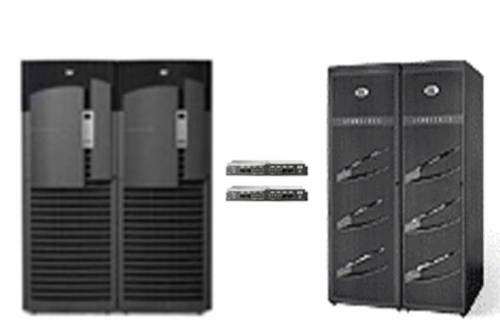
Folks, I know that 21% of 8 is 1.7 and that 1.7 Enterprise Edition Licenses can buy a lot of dual-port FCP HBAs and even a midrange Fibre Channel switch, but that is not the point I failed to make. The point I failed to make was that I’m not talking about solving the supposed difficulties of provisioning storage to those one or two remaining refrigerator-sized Legacy Unix boxes you might have. There is no there, there. It is not difficult at all to run a few 4Gb FCP wires to separate 8 or 16 port FC switches and then back to the storage array. Even Manly Man can do that. That is not a problem that needs solved because that is neither difficult nor is it expensive (at least the SAN aspect isn’t). As the adage goes, a picture speaks a thousand words. The following is a visual of a problem that doesn’t need to be solved—a simple SAN connected to a single server. Ironically, what it depicts is potentially millions of dollars worth of server and storage connected with merely thousands of dollars worth of Fibre Channel connectivity gear. In case the photo isn’t vivid enough, I’ll point out that on the left is a huge SMP (e.g., HP Superdome) and on the right is an EMC DMX. In the middle is a redundant set of 8-port switches—cheap, and simple. Even providing private and public Ethernet connectivity in such a deployment is a breeze by the way.

simplesan.jpg

I Ain’t Never Doing That Grid Thing.
Simply put, if the only Oracle you have deployed—now and forever—sits in a couple of refrigerator-sized legacy SMP boxes, I’m going to sound like a loon on this topic. I’m talking about provisioning storage to commodity servers—grid computing. Grid may not be where you are today, but it is in fact where you will be someday. Consider the fact that most datacenters are taking their huge machines and chopping them up into little machines with hardware/software virtualization anyway so we might as well just get to the punch and deploy commodity servers. When we do, we feel the pain of Fibre Channel SAN connectivity and storage provisioning. Because connecting large numbers of servers to storage was not exactly a design center for Fibre Channel SAN technology. Just the opposite is true; SANs were originally meant to connect a few servers to a huge number of disks—more than was possible with DAS.

Commodity Computing (Grid) == Huge SAN
Large numbers of servers connected to a SAN makes the SAN very complex. Not necessarily more disks, but the presentation and connectivity aspects get very difficult to deal with.

If you are unlucky enough to be up to your knees in the storage provisioning, connectivity and cost nightmare associated with even a moderate number of commodity servers in a SAN environment you know what I’m talking about. In these types of environments, people are deploying and managing director-class Fibre Channel switches where each port can cost up to $5,000 and they are deploying more than one switch for redundancy sake. That is, each commodity server needs a 2 port FC HBA and 2 paths to two different switches. Between the HBAs and the FC switch ports, the cost is as much as $10,000-$12,000 just to connect a “pizza box” to the SAN. That’s the connectivity story and the provisioning story is not much prettier.

Once the cabling is done, the Storage Administrator has to zone the switches and provision storage (e.g., create LUNs, LUN masking, etc). For RAC, that would be a minimum of 3 masked LUNs for each database. Then the System Administrator has to make sure Oracle has access to those LUNs. That is a lot of management overhead. NAS on the other hand uses very inexpensive NICs and switches. Ah, now there is an interesting point. Using NAS means each server only has one type of network connectivity instead of two (e.g., FC and Ethernet). Storage provisioning is also simpler—the database server administrator simply mounts the NFS filesystem and the DBA can go straight to work with RAC or non-RAC Oracle databases. How simple. And yes, the Oracle licensing cost is a constant, so in this paradigm, the only way to recuperate cost is in the storage connectivity side. The savings are worth consideration, and the simplicity is very difficult to argue.

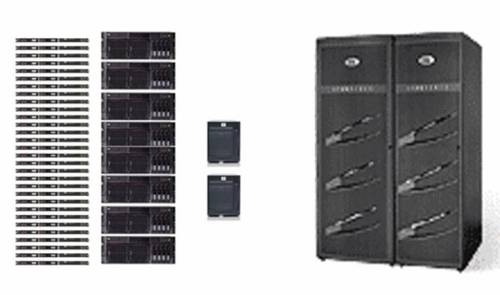
It’s time for another picture. The picture below depicts a small commodity server deployment—38 servers that need storage.

complexsan.jpg

Let’s consider the total connectivity problem starting with the constant—Ethernet. Yes, every one of these 38 servers needs both Ethernet and Fibre Channel connectivity. For simplicity, let’s say only 8 of these servers are using RAC. The 8 that host RAC will need a minimum of 4 Gigabit Ethernet NICs/cables—2 for the public interfaces and two for a bonded, private network for Oracle Cache Fusion (GCS, GES) for a total of 32. The remaining 30 could conceivably do fine with 2 public networks each for a subtotal of 60. All told, we have 92 Ethernet paths to deal with before we look at storage networking.

On the storage side, we’ll need redundant paths for all 38 server to multiple switches so we start with 38 dual-port HBAs and 76 front-side Fibre Channel switch ports. Each switch will need a minimum of 2 paths back to storage, but honestly, would anyone try to feed 38 modern commodity servers with 2 4Gb paths worth of storage bandwidth? Likely not. On the other hand, it is unlikely the 30 smaller servers will each need dedicated 4Gb I/O bandwidth to storage so we’ll play zone trickery on the switch and group sets of 2 from the 30 yielding a requirement for 15 back-side I/O paths from each switch for a subtotal of 30 back-side paths. Following in suit, the remaining 8 RAC servers will require 4 back-side paths from each of the two switches for a subtotal of 8 back-side paths. To sum it up, we have 76 front-side and 38 back-side paths for a total of 114 storage paths. Yes, I know this can be a lot simpler by limiting the number of switch-to-storage paths. That’s a game called Which Servers Should We Starve for I/O and it isn’t fun to play. These arrangements are never attempted with small switches. That’s why the picture depicts large, expensive director-class switches.

Here’s our mess. We have 92 Ethernet paths and 114 storage paths. How would NAS make this simpler? Well, Ethernet is the constant here so we simply add more inexpensive Ethernet infrastructure. We still need redundant switches and I/O paths, but Ethernet is cheap and simple and we are down to a single network topology instead of two. Just add some simple NICs and simple Ethernet switches and go. And oh, by the way, the two network-topologies-model (e.g., GbE_+ FCP) generally means two different “owners” since the SAN would generally be owned by the Storage Group and the Ethernet would be owned by the Networking Group. With NAS, all connectivity from the Ethernet switches forward can be owned by the Networking Group freeing the Storage Group to focus on storage—as opposed to storage networking.

And, yes, Oracle11g has features that make the connectivity requirement on the Ethernet side simpler but 10g environments can benefit from this architecture too.

Not a Sales Pitch
Thus far, this blog entry has been the what. This would make a pretty hollow blog entry if I didn’t at least mention the how. The odds are very slim that your datacenter would be able to do a 100% NAS storage deployment. So Network Appliance handles this by offering multiple protocol storage from their Filers. The devil shall not remain with the details.

Total NAS? Nope. Multi-Protocol Storage.
I’ll be brief. You are going to need both FCP and NAS, I know that. If you have SQL Server (ugh) you certainly aren’t going to connect those servers to NAS. There are other reasons FCP isn’t going to go away soon enough. I accept the fact that both protocols are required in real life. So let’s take a look a multi-protocol storage and how it fits into this thread.

Network Appliance Multi-Protocol Support
Network Appliance is an NFS device. If you want to use it for FCP or iSCSI SAN, large files in the Filer’s filesystem (WAFL) are served with either FCP or iSCSI protocol and connectivity. Fine. It works. I don’t like it that much, but it works. In this paradigm, you’d choose to run the simplest connectivity type you deem fit. You could run some FCP to a few huge Legacy SMPs, FCP to some servers running SQL Server (ugh), and most importantly Ethernet for NFS to whatever you choose—including Oracle on commodity servers. Multi-protocol storage in this fashion means total vendor lock-in, but it would allow you to choose between the protocols and it works.

SAN Gateway Multi-Protocol Support
Don’t get rid of your SAN until there is something reasonable to replace it with. How does that statement fit this thread? Well, as I point out in this paper, SAN-NAS gateway devices are worth consideration. Products in this space are the HP Enterprise File Services Clustered Gateway and EMC Celerra. With these devices you leverage your existing SAN by connecting the “NAS Heads” to the SAN using very low-end, simple Fibre Channel SAN connectivity (e.g., small switches, few cables). From there, you can provision NFS mounts to untold numbers of NFS clients—a few, dozens or hundreds. The mental picture here should be a very small amount of the complex, expensive connectivity (Fibre Channel) and a very large amount of the inexpensive, simple connectivity (Ethernet). What a pleasant mental picture that is. So what’s the multi-protocol angle? Well, since there is a down-wind SAN behind the NAS gateway, you can still directly cable your remaining Legacy Unix boxes with FCP. You get native FCP storage (unlike NetApp with the blocks-from-file approach) for the systems that need it and NAS for the ones that don’t.

I’m a Oracle DBA, What’s in It for Me?
Excellent question and the answer is simply simplicity! I’m not just talking simplicity, I’m talking simple, simple, simple. I’m not just talking about simplicity in the database tier either. As I’ve pointed out upteen times, NFS will support you from top to bottom—not just the database tier, but all your unstructured data such as software installations as well. Steve Chan chimes in on the simplicity of shared software installs in the E-Biz world too. After the NFS filesystem is mounted, you can do everything from ORACLE_HOME, APPL_TOP, clusterware files (e.g., the OCR and CSS disks), databases, RMAN, imp/exp, SQL*Loader/External Tables, ETL, compiled PL/SQL, UTL_FILE, BFILE, trace/logging, scripts, and on and on. Without NFS, what sort of mix-match of raw, filesystem, raw+ASM combination would be required? A complex one—and the really ironic part is you’d probably still end up with some NFS mounts in addition to all that raw disk and non-CFS filesystem space as well!

Whew. That was a long blog entry.

Mount Options for Oracle over NFS. It’s All About the Port.

BLOG UPDATE: This post has developed an interesting comment thread worth noting.

I currently have a nearly chaotic set of differing configurations to deal with that run the gamut of x86_64 servers attached to 2/4 Gb FCP SANs and others to NAS via GbE. So sometimes I miss the mark. I just tried to fire up one of my databases on a DL585 running RHEL4 attached to the Enterprise File Services Clustered Gateway NAS device. In the midst of the chaos I mistakenly mounted the filesystem containing the Oracle Database 10g test database using the wrong mount options, so:

$ tail alert*log
ALTER DATABASE MOUNT
Mon Jun 18 15:04:28 2007
WARNING:NFS file system /mnt mounted with incorrect options
WARNING:Expected NFS mount options: rsize>=32768,wsize>=32768,hard
Mon Jun 18 15:04:28 2007
ORA-00202: control file: ‘/u01/app/oracle/product/10.2.0/db_1/rw/DATA/cntlbench_1’
ORA-27054: NFS file system where the file is created or resides is not mounted with correct options
Additional information: 3
Mon Jun 18 15:04:28 2007

I clearly did not mount the filesystems correctly. After remounting with the following options, everything was OK:

rw,bg,hard,nointr,tcp,vers=3,timeo=300,rsize=32768,wsize=32768,actimeo=0

But then these mount options are port-specific and as they say in true Clintonian form, “It’s the Port Stupid.”

It’s All About the Port
The only complaint I have about Oracle over NFS is at the port level. I intend to start blogging about the idiosyncrasies between, say, certain Legacy Unix and Linux ports of Oracle with regard to NAS mount options. I think RMAN has the most issues and, again, these are always port level. For instance, certain ports inspect the mount options of the actual mounted filesystem and others will look at the mnttab. And then, in some cases, certain ports do it one way for the instance and then another for functionality such as RMAN. Sometimes when the database or tools don’t like the mount options they return an error message spelling out what is missing and other times just a generic complaint that the mount options are incorrect—and that too varies by port and version of Oracle as well. Recently I found that the HP-UX port of Oracle10g needs the llock mount option which is apparently not documented very well.

In all cases, issues regarding mount options are the responsibility of the Oracle port team for the release. That is where this functionality is built. The layers above the I/O layer (Operating System Dependent code) have no idea whether there is DAS, SAN or NAS down stream. That abstraction is one of the main reasons Oracle is the best database out there. That porting heritage goes back to Oracle version 4. Anyway, I digress…

Complicated.
Yes, these mount option topics are more complicated than they should be, but this situation is not permanent. As we get closer to July 11, I’ll be blogging more about what that means. Regardless, I stand fast in my view that provisioning storage for Oracle via NFS is simpler, simpler, simpler than SANs and that goes for both RAC or non-RAC databases. Just mount the filesystem and go…

In the meantime, if you have a particular port of Oracle10g that isn’t getting along with your NAS, remember our motto, “It’s the port[…]” so log an SR and Oracle will get you on your way.

10 Years to Replace 64 CPU Systems with a Single Socket.

I’ve been wondering how much longer I’d have to wait for this to happen…

Back in 1998 I was a part of the team at Sequent Computer Systems that delivered the first non-clustered TPC-C result of 100,000 Tpm-C. Well, OK, I exaggerated, it was 93,901 but the prior Oracle record was held by HP with the V2200 (a Convex system actually) at 40,794 TpmC. Non-Clustered TPC-C results do not get doubled within a year’s time so it was quite the accomplishment at the time. Even more so given the detractors and skeptics at the time that couldn’t imagine a bunch of those “little Intel processors” churning out a record TPC-C result. Well, we did. It was a huge, expensive system with 64 processors, 64GB RAM, and hundreds upon hundreds of disk drives. The system cost for that big system was $131.67 per TpmC.

That was then, this is now. On June 8, Hewlett-Packard and Oracle joined to produce a 100,926 TpmC result with a single processor—a Xeon 5355 “Cloverdale”. While it has 4 cores, it is technically a single processor. So, they beat our 1998 number with 1/64th the number of CPUs and only 24GB memory as opposed to the 64GB we used. Interesting as well is that they used 100 disks in MSA-1000 enclosures. And the cost? Only $.78 per TpmC!

Mistaken Identity?
The benchmark was executed with Oracle Enterprise Linux, Standard Edition One and no ASM. I can’t find anything in the full disclosure report suggesting the datafiles were on raw partitions, but I’d be very surprised to find they used Ext3. Besides, there was no value assigned to filesystemio_options that would have enabled Direct I/O and I would be dollars to doughnuts that there was no filesystem caching overhead on a TPC-C run.

On the humorous side of things, you might get a chuckle to find that on page 10 of the Full Disclosure Report, the auditors missed the subtle distinction between Oracle Enterprise Linux and Red Hat Linux 4 as the following quote will attest:

Overview
This report documents the methodology and results of the TPC Benchmark C test conducted on the hp ProLiant ML350 G5. The operating system used for the benchmark was Red Hat Enterprise Linux 4. The DBMS used was Oracle Database 10g Standard Edition One.

This was a phenomenal result actually. I was quite glad to see it. I plan to share a couple other interesting things I noticed in the FDR as well in another blog entry.

Change. Rapid, Very Rapid, Change.

If you are a xenophobe or an ostrich with your head in the sand I encourage you not to watch this video.

A New Blog to Follow.

The young’n has caught the blogging itch. Fellow OakTable Network member Tanel Poder has started blogging at:

http://blog.tanelpoder.com/

I’m looking forward to good stuff there.

Note, the “young’n” bit is an inside joke. Tanel is brilliant and his blog should be a good read.

Manly Men Only Deploy Oracle with Fibre Channel – Part 1. Oracle Over NFS is Weird.

Beware, lot’s of tongue in cheek in this one. If you’re not the least bit interested in storage protocols, saving money or a helpful formula for safely configuring I/O bandwidth for Oracle, don’t read this.

I was reading Pawel Barut’s Log Buffer #48 when the following phrase caught my attention:

For many of Oracle DBAs it might be weird idea: Kevin Closson is proposing to install Oracle over NFS. He states that it’s cheaper, simpler and will be even better with upcoming Oracle 11g.

Yes, I have links to several of my blog entries about Oracle over NFS on my CFS, NFS, ASM page, but that is not what I want to blog about. I’m blogging specifically about Powet’s assertion that “it might be a weird idea”—referring to using NAS via NFS for Oracle database deployments.

Weird
I think the most common misconception people have is regarding the performance of such a configuration. True, NFS has a lot of overhead that would surely tax the Oracle server way too much—that is if Oracle didn’t take steps to alleviate the overhead. The primary overhead is in NFS client-side caching. Forget about it. Direct I/O and asynchronous I/O are available to the Oracle server for NFS files with just about every NFS client out there.

Manly Men™ Choose Fibre Channel
I hear it all the time when I’m out in the field or on the phone with prospects. First I see the wheels turning while math is being done in the head. Then, one of those cartoon thought bubbles pops up with the following:

Hold it, that Closson guy must not be a Manly Man™. Did he just say NFS over Gigabit Ethernet? Ugh, I am Manly Man and I must have 4Gb Fibre Channel or my Oracle database will surely starve for I/O!

Yep, I’ve been caught! Gasp, 4Gb has more bandwidth than 1Gb. I have never recommended running a single path to storage though.

Bonding Network Interfaces
Yes, it can be tricky to work out 802.3ad Link Aggregation, but it is more than possible to have double or triple bonded paths to the storage. And yes, scalability of bonded NICs varies, but there is a simplicity and cost savings (e.g., no FCP HBAs or expensive FC switches) with NFS that cannot be overlooked. And, come in closely and don’t tell a soul, you won’t have to think about bonding NICs for Oracle over NFS forever, wink, wink, nudge, nudge.

But, alas, Manly Man doesn’t need simplicity! Ok, ok, I’m just funning around.

No More Wild Guesses
A very safe rule of thumb to keep your Oracle database servers from starving for I/O is:
100Mb I/O per GHz CPU

So, for example, if you wanted to make sure an HP c-Class server blade with 2-socket 2.66 GHz “Cloverdale” Xeon processors had sufficient I/O for Oracle, the math would look like this:

12 * 2.66 * 4 * 2 == 255 MB/s

Since the Xeon 5355 is a quad-core processor and the 480c c-Class blade supports two of them there are 21.28 GHz for the formula. And, 100 Mb is about 12 MB. So if Manly Man configures, say, two 4Gb FC paths (for redundancy) to the same c-Class blade he is allocating about 1000 MB/s bandwidth. Simply put, that is expensive overkill. Why? Well, for starters, the blade would be 100% saturated at the bus level if it did anything with 1000 MB/s so it certainly couldn’t satisfy Oracle performing physical I/O and actually touching the blocks (e.g., filtering, sorting, grouping, etc). But what if Manly Man configured the two 4Gb FCP paths for failover with only 1 path active path (approximately 500 MB/s bandwidth)? That is still overkill.

Now don’t get me wrong. I am well aware that 2 “Cloverdale” Xeons running Parallel Query can scoop up 500MB/s from disk without saturating the server. It turns out that simple light weight scans (e.g., select count(*) ) are about the only Oracle functionality that breaks the rule of 100Mb I/O per GHz CPU. I’ve even proven that countless times such as in this dual processor, single core Opteron 2.8 Ghz proof point. In that test I had IBM LS20 blades configured with dual processor, single-core Opterons clocked at 2.8 GHz. So if I plug that into the formula I’d use 5.6 for the GHz figure which supposedly yields 67 MB/s as the throughput at which those processors should have been saturated. However, on page 16 of this paper I show those two little single-core Opterons scanning disk at the rate of approximately 380MB/s. How is that? The formula must be wrong!

No, it’s not wrong. When Oracle is doing a light weight scan it is doing very, very little with the blocks of data being returned from disk. On the other hand, if you read further in that paper, you’ll see on page 17 that a measly 21MB/s of data loading saturated both processors on a single node-due to the amount of data manipulation required by SQL*Loader. OLTP goes further. Generally, when Oracle is doing OLTP, as few as 3,000 IOps from each processor core will result in total saturation. There is a lot of CPU intensive stuff wrapped around those 3,000 IOps. Yes, it varies, but look at your OLTP workload and take note of the processor utilization when/if the cores are performing on the order of 3,000 IOps each. Yes, I know, most real-world Oracle databases don’t even do 3,000 IOps for an entire server which takes us right back to the point: 100Mb I/O per GHz CPU is a good, safe reference point.

What Does the 800 Pound Gorilla Have To Say?
When it comes to NFS, Network Appliance is the 800lb gorilla. They have worked very hard to get to where they are. See, Network Appliance likely doesn’t care if Manly Man would rather deploy FCP for Oracle instead of NFS since their products do both protocols-and iSCSI too. All told, they may stand to make more money if Manly Man does in fact go with FCP since they may have the opportunity to sell expensive switches too. But, no, Network Appliance dispels the notion that 4Gb (or even 2Gb) FCP for Oracle is a must.

In this NetApp paper about FCP vs iSCSI and NFS, measurements are offered that show equal performance with DSS-style workloads (Figure 4) and only about 21% deficit when comparing OLTP on FCP to NFS. How’s that? The paper points out that the FCP test was fitted with 2Gb Fibre Channel HBAs and the NFS case had two GbE paths to storage yet Manly Man only achieved 21% more OLTP throughput. If NFS was so inherently unfit for Oracle, this test case with bandwidth parity would have surely made the point clear. But that wasn’t the case.

If you look at Figure 2 in that paper, you’ll see that the NFS case (with jumbo frames) spent 31.5% of cycles in kernel mode compared to 22.4% in the FCP case. How interesting. The NFS case lost 28% more CPU to kernel mode overhead and delivered 21% less OLTP throughput. Manly Man must surely see that addressing that 28% extra kernel mode overhead associated with NFS will bring OLTP throughput right in line with FCP and:

– NFS is simpler to configure

– NFS can be used for RAC and non-RAC

– NFS is cheaper since GbE is cheaper (per throughout) than FCP

Now isn’t that weird?

The 28%.

I can’t tell you how and when the 28% additional kernel-mode overhead gets addressed, but, um, it does. So, Manly Man, time to invent the wheel.

SAN Admins: Please Give Me As Much Capacity From As Few Spindles As Possible!

I was catching up on my mojo reading when I caught a little snippet I’d like to blog about. Oh, by the way, have I mentioned recently that StorageMojo is one of my favorite blogs?

In Robin Harris’ latest installment about ZFS action at Apple, he let out a glimpse of one of his other apparent morbid curiosities—flash. Just joking, I don’t think ZFS on Mac or flash technology are morbid, it just sounded catchy. Anyway, he says:

I’ve been delving deep into flash disks. Can you say “weird”? My take now is that flash drives are to disk drives what quantum mechanics is to Newtonian physics. I’m planning to have something out next week.

I look forward to what he has to say. I too have a great interest in flash.

Now, folks, just because we are Oracle-types and Jim Grey was/is a Microsoft researcher, you cannot overlook what sorts of things Jim was/is interesting in. Jim’s work has had a huge impact on technology over the years and it turns out that Jim took/takes an interest in flash technology with servers in mind. Just the abstract of that paper makes it a natural must-read for Oracle performance minded individuals. Why? Because it states (with emphasis added by me):

Executive summary: Future flash-based disks could provide breakthroughs in IOps, power, reliability, and volumetric capacity when compared to conventional disks.


Yes, IOps! Nothing else really matter where Oracle database is concerned. How can I say that? Folks, round-brown spinning things do sequential I/O just fine—naturally. What they don’t do is random I/O. To make it worse, most SAN array controllers (you know, that late 1990’s technology) pile on overhead that further choke off random I/O performance. Combine all that with the standard IT blunder of allocating space for Oracle on a pure capacity basis and you get the classic OakTable Network response:

Attention DBAs, it’s time for some déjà vu. I’ll state with belligerent repetition, redundantly, over and over, monotonously reiterating this one very important recurrent bit of advice: Do everything you can to get spindles from your storage group—not just capacity.


Flash
Yes that’s right, it wont be long (in relative terms) until you see flash memory storage fit for Oracle databases. The aspect of this likely future trend that I can’t predict, however, is what impact such technology would have on the entrenched SAN array providers. Will it make it more difficult to keep the margins at the levels they demand, or will flash be the final straw that commoditizes enterprise storage? Then again, and Jim Grey points out in that paper, flash density isn’t even being driven by the PC—and most certainly not enterprise storage—ecosystem. The density is being driven by consumer and mobile applications. Hey, I want my MTV. Um, like all of it, crammed into my credit-card sized mpeg player too.

When?
When it gets cheaper and higher capacity of course. Well, its not exactly that simple. I went spelunking for that Samsung 1.8” 32GB SSD and found two providers with street price of roughly USD $700.00 for 32GB here and here. In fact, upon further investigation, Ritek may soon offer a 32GB device at some $8 per GB. But let’s stick with current product for the moment. At $22 per GB, we’re not exactly talking SATA which runs more on the order of $.35 per GB. But then we are talking enterprise applications here, so a better comparison would be to Fibre drives which go for about $3-$4 per GB.

Now that is interesting since Jim Grey pointed out that in-spite of some industry predictions setting the stage for NAND to double every year, NAND had in fact gained 16 fold in 4 years–off by year. If that pace continues, could we really expect 512GB 1.8″ SSD devices in the next 4 years? And would the price stay relatively constant yielding a cost of something like $1.35 per GB? Remember, even the current state of the art (e.g., the Samsung 1.8″ 32GB SSD) delivers on the order of 130,000 random single-sector IOps–that’s approximately 7usec latency for a random I/O. At least that is what Samsung’s literature claims. Jim’s paper, on the other hand reports grim current art performance when measured with DskSpd.exe:

The story for random IOs is more complex – and disappointing. For the typical 4-deep 8KB random request, read performance is a spectacular 2,800 requests/second but write performance is a disappointing 27 requests/second.

The technology is young and technically superior, but there is work to do in getting the most out of NSSD as the paper reports. Jim suspects that short term quick fixes could be made to bring the random I/O performance for 8KB transfers on today’s NSSD technology up to about 1,700 IOps split evenly between read and write. Consider, however, that real world applications seldom exhibit a read:write ratio of 50:50. Jim generalized on the TPC-C workload as a case in point. It seems with “some re-engineering” (Jim’s words) even today’s SSD would be a great replacement for hard drives for typical Oracle OLTP workloads since you’ll see more 70:30 read:write ratios in the real world. And what about sequential writes? Well, there again, even today’s technology can handle some 35MB/s of sequential writes so direct path writes (e.g., sort spills) and redo log writes would be well taken care of. But alas, the $$/GB is still off. Time will fix that problem and when it does, NSSD will be a great fit for databases.

Don’t think for a moment Oracle Corporation is going to pass up on enabling customers to exploit that sort of performance–with or without the major SAN vendors.

But flash burns out, right? Well, yes and no. The thing that matters is how long the device lasts-the sum of its parts. MTBF numbers are crude, but Samsung sticks a 1,000,000hr MTBF on this little jewel-how cool.
Well, I’ve got the cart well ahead of the horse here for sure because it is still too expensive, but put it on the back burner, because we aren’t using Betamax now and I expect we’ll be using fewer round-brown spinning things in the span of our careers.

Oracle Over NFS. I Need More Monitoring Tools? A Bonded NIC Roller Coaster.

As you can tell by my NFS-related blog entries, I am an advocate of Oracle over NFS. Forget those expensive FC switches and HBAs in every Oracle Database server. That is just a waste. Oracle11g will make that point even more clearly soon enough. I’ll start sharing how and why as soon as I am permitted. In the meantime…

Oracle over NFS requires bonded NICs for redundant data paths and performance. That is an unfortunate requirement that Oracle10g is saddled with. And, no, I’m not going to blog about such terms as IEEE 802.3ad, PAgP, LACP, balance-tlb, balance-alb or even balance-rr. The days are numbered for those terms-at least in the Oracle database world. I’m not going to hint any futher about that though.

Monitoring Oracle over NFS
If you are using Oracle over NFS, there are a few network monitoring tools out there. I don’t like any of them. Let’s see, there’s akk@da and Andrisoft WanGuard. But don’t forget Anue and Aurora, Aware, BasicState, CommandCenter NOC, David, Dummmynet, GFI LANguard, Gomez, GroundWork, Hyperic HQ, IMMonitor, Jiploo, Monolith, moods, Network Weathermap, OidView, Pandetix, Pingdom, Pingwy, skipole-monitor, SMARTHawk, Smarts, WAPT, WFilter, XRate1, arping, Axence NetVision, BBMonitor, Cacti, CSchmidt collection, Cymphonix Network Composer, Darkstat, Etherape, EZ-NOC, Eye-on Bandwidth, Gigamon University, IPTraf, Jnettop, LITHIUM, mrtg-ping-probe, NetMRG, NetworkActiv Scanner, NimTech, NPAD, Nsauditor, Nuttcp, OpenSMART, Pandora FMS, PIAFCTM, Plab, PolyMon, PSentry, Rider, RSP, Pktstat, SecureMyCompany, SftpDrive, SNM, SpeedTest, SpiceWorks, Sysmon, TruePath, Unbrowse, Unsniff, WatchMouse, Webalizer, Web Server Stress Tool, Zenoss, Advanced HostMonitor, Alvias, Airwave, AppMonitor, BitTorrent, bulk, BWCTL, Caligare Flow Inspector, Cittio, ClearSight, Distinct Network Monitor, EM7, EZMgt, GigaMon, Host Grapher II, HPN-SSH, Javvin Packet Analyzer, Just-ping, LinkRank, MoSSHe, mturoute, N-able OnDemand, Netcool, netdisco, Netflow Monitor, NetQoS, Pathneck, OWAMP, PingER, RANCID, Scamper, SCAMPI, Simple Infrastructure Capacity Monitor, Spirent, SiteMonitor, STC, SwitchMonitor, SysUpTime, TansuTCP, thrulay, Torrus, Tstat, VSS Monitoring, WebWatchBot, WildPackets, WWW Resources for Communications & Networking Technologies, ZoneRanger, ABwE, ActivXpets, AdventNet Web NMS, Analyse It, Argus, Big Sister, CyberGauge, eGInnovations, Internet Detective, Intellipool Network Monitor, JFF Network Management System, LANsurveyor, LANWatch, LoriotPro, MonitorIT, Nagios, NetIntercept, NetMon, NetStatus, Network Diagnostic Tool, Network Performance Advisor, NimBUS, NPS, Network Probe, NetworksA-OK, NetStat Live, Open NerveCenter, OPENXTRA, Packeteer, PacketStorm, Packetyzer, PathChirp, Integrien, Sniff’em, Spong, StableNet PME, TBIT, Tcptraceroute, Tping, Trafd, Trafshow, TrapBlaster, Traceroute-nanog, Ultra Network Sniffer, Vivere Networks, ANL Web100 Network Configuration Tester, Anritsu, aslookup, AlertCenter, Alertra, AlertSite, Analyse-it, bbcp, BestFit, Bro, Chariot, CommView, Crypto-PAn, elkMonitor, DotCom, Easy Service Monitor, Etherpeek, Fidelia, Finisar, Fpinger, GDChart, HipLinkXS, ipMonitor, LANExplorer, LinkFerret, LogisoftAR, MGEN, Netarx, NetCrunch, NetDetector, NetGeo, NEPM, NetReality, NIST Net, NLANR AAD, NMIS, OpenNMS PageREnterprise, PastMon, Pathprobe, remstats, RIPmon, RFT, ROMmon, RUDE, Silverback, SmokePing, Snuffle, SysOrb, Telchemy, TCPTune, TCPurify, UDPmon, WebAttack, Zabbix, AdventNet SNMP API, Alchemy Network Monitor, Anasil analyzer, Argent, Autobuf, Bing, Clink, DSLReports, Firehose, GeoBoy, PacketBoy, Internet Control Portal, Internet Periscope, ISDNwatch, Metrica/NPR, Mon, NetPredict, NetTest, Nettimer, Net-One-1, Pathrate, RouteView, sFlow, Shunra, Third Watch, Traceping, Trellian, HighTower, WCAT, What’s Up Gold, WS_FTP, Zinger, Analyzer, bbftp, Big Brother, Bronc, Cricket, EdgeScape, Ethereal (now renamed Wireshark), gen_send/gen_recv, GSIFTP, Gtrace, Holistix, InMon, NcFTP, Natas, NetAlly, NetScout, Network Simulator, Ntop, PingGraph, PingPlotter, Pipechar, RRD, Sniffer, Snoop, StatScope, Synack, View2000, VisualPulse, WinPcap, WU-FTPD, WWW performance monitoring, Xplot, Cheops, Ganymede, hping2, Iperf, JetMon, MeasureNet, MatLab, MTR, NeoTrace, Netflow, NetLogger, Network health, NextPoint, Nmap, Pchar, Qcheck, SAA, SafeTP, Sniffit, SNMP from UCSD, Sting, ResponseNetworks, Tcpshow, Tcptrace WinTDS, INS Net Perf Mgmt survey, tcpspray, Mapnet, Keynote, prtraceroute clflowd flstats, fping, tcpdpriv, NetMedic Pathchar, CAIDA Measurement Tool Taxonomy, bprobe & cprobe, mrtg, NetNow, NetraMet, Network Probe Daemon, InterMapper, Lachesis, Optimal Networks and last but not least, Digex.

Simplicity Please
The networking aspect of Oracle over NFS is the simplest type of networking imaginable. The database server issues I/O to NFS filesystems being exported over simple, age old Class C private networks (192.168.N.N). We have Oracle statspack to monitor what Oracle is asking of the filesystem. However, if the NFS traffic is being sent over a bonded NIC, monitoring the flow of data is important as well. That is also a simple feat on Linux since /proc tracks all that on a per-NIC basis.

I hacked out a very simple little script to monitor eth2 and eth3 on my system. It isn’t anything special, but it shows some interesting behavior with bonded NICS. The following screen shot shows the simple script executing. A few seconds after starting the script, I executed an Oracle full table scan with Parallel Query in another window. Notice how /proc data shows that the throughput has peaks and valleys on a per-second basis. The values being reported are Megabytes so it is apparent that the bursts of I/O are achieving full bandwidth of the GbE network storage paths, but what’s up with the pulsating action? Is that Oracle, or the network? I can’t tell you just yet. Here is the screen shot nonetheless:

ntput.jpg

For what it is worth, here is a listing of that silly little script. Its accuracy compensates for its lack of elegance. Cut and paste this on a Linux server and tailor eth[23] to whatever you happen to have.

$ cat ntput.sh
#!/bin/bash
function get_data() {
cat /proc/net/dev | egrep “${token1}|${token2}” \
| sed ‘s/^.*://g’ | awk ‘{ print $1 }’ | xargs echo
}

token1=eth2
token2=eth3
INTVL=1

while true
do

set – `get_data`
b_if1=$1
b_if2=$2

sleep $INTVL

set – `get_data`
a_if1=$1
a_if2=$2

echo $a_if1 $b_if1 | awk -v intvl=$INTVL ‘{
printf(“%7.3f\t”, (($1 – $2) / 1048576) / intvl) }’
echo $a_if2 $b_if2 | awk -v intvl=$INTVL ‘{
printf(“%7.3f\n”, (($1 – $2) / 1048576) / intvl) }’

done


DISCLAIMER

I work for Amazon Web Services. The opinions I share in this blog are my own. I'm *not* communicating as a spokesperson for Amazon. In other words, I work at Amazon, but this is my own opinion.

Enter your email address to follow this blog and receive notifications of new posts by email.

Join 741 other subscribers
Oracle ACE Program Status

Click It

website metrics

Fond Memories

Copyright

All content is © Kevin Closson and "Kevin Closson's Blog: Platforms, Databases, and Storage", 2006-2015. Unauthorized use and/or duplication of this material without express and written permission from this blog’s author and/or owner is strictly prohibited. Excerpts and links may be used, provided that full and clear credit is given to Kevin Closson and Kevin Closson's Blog: Platforms, Databases, and Storage with appropriate and specific direction to the original content.