Archive Page 28

Oracle11g: Where’s My Alert Log?

Just a short blog entry about Oracle 11g. One of the first things that caught me by surprise with 11g, when I first started in the beta program, was that the default location for the alert log has moved. It is still placed under the traditional OFA structure, but not /u01/app/oracle/admin. There is a new directory called diag that resides in /u01/app/oracle as seen on one of my systems:


 $ pwd
 /u01/app/oracle/diag/rdbms/bench/bench1
 $ ls -l
 total 144
 drwxr-xr-x 2 oracle dba 4096 Jul 9 21:32 alert
 drwxr-xr-x 3 oracle dba 4096 Jul 8 11:11 cdump
 drwxr-xr-x 2 oracle dba 4096 Jul 9 04:02 hm
 drwxr-xr-x 9 oracle dba 4096 Jul 8 11:11 incident
 drwxr-xr-x 2 oracle dba 4096 Jul 9 04:02 incpkg
 drwxr-xr-x 2 oracle dba 4096 Jun 29 22:00 ir
 drwxr-xr-x 2 oracle dba 4096 Jul 10 08:59 lck
 drwxr-xr-x 2 oracle dba 4096 Jul 10 08:59 metadata
 drwxr-xr-x 2 oracle dba 4096 Jul 8 11:11 stage
 drwxr-xr-x 2 oracle dba 4096 Jul 8 11:11 sweep
 drwxr-xr-x 3 oracle dba 57344 Jul 10 09:02 trace
 $ cd trace
 $ pwd
 /u01/app/oracle/diag/rdbms/bench/bench1/trace
 $ ls -l alert*
 -rw-r----- 1 oracle dba 1098745 Jul 10 09:00 alert_bench1.log

In this case, my database is called bench and the first instance is bench1. To quickly locate alert logs associated with many different ORACLE_HOMEs simple execute the adrci command and then execute “show alert”

Manly Men Only Deploy Oracle with Fibre Channel – Part VII. A Very Helpful Step-by-Step RAC Install Guide for NFS

Tim Hall has stepped up to the plate to document a step-by-step recipe for setting up Oracle10g RAC on NFS mounts. In Tim’s blog entry, he points out that for testing and training purposes it is true that you can simply export some Ext3 filesystem from a Linux server and use it for all things Oracle. Tim only had 2 systems, so what he did was use one of the servers as the NFS server. The NFS server exported a filesystem and both the servers mounted the filesystem. In this model, you have 2 NFS clients and one is acting as both an NFS client and an NFS server.

This is the link to Tim’s excellent step-by-step guide.

How Simple

If you’ve ever had a difficult time getting RAC going, I think you’d be more than happy with how simple it is with NFS and using Tim’s guide and a couple of low-end test servers would prove that out.

Recently I blogged about the fact that most RAC difficulties are in fact storage difficulties. That is not the case with NFS/NAS.

Thanks Tim!

Manly Men Only Deploy Oracle with Fibre Channel – Part VI. Introducing Oracle11g Direct NFS!

Since December 2006, I’ve been testing Oracle11g NAS capabilities with Oracle’s revolutionary Direct NFS feature. This is a fantastic feature. Let me explain. As I’ve laboriously pointed out in the Manly Man Series, NFS makes life much simpler in the commodity computing paradigm. Oracle11g takes the value proposition further with Direct NFS. I co-authored Oracle’s paper on the topic:

Here is a link to the paper.

Here is a link to the joint Oracle/HP news advisory.

What Isn’t Clearly Spelled Out. Windows Too?
Windows has no NFS in spite of stuff like SFU and Hummingbird. That doesn’t stop Oracle. With Oracle11g, you can mount directories from the NAS device as CIFS shares and Oracle will access them with high availability and performance via Direct NFS. No, not CIFS, Direct NFS. The mounts only need to be visible as CIFS shares during instance startup.

Who Cares?
Anyone that likes simplicity and cost savings.

The Worlds Largest Installation of Oracle Databases
…is Oracle’s On Demand hosting datacenter in Austin, Tx. Folks, that is a NAS shop. They aren’t stupid!

Quote Me

The Oracle11g Direct NFS feature is another classic example Oracle implementing features that offer choices in the Enterprise data center. Storage technologies, such as Tiered and Clustered storage (e.g., NetApp OnTAP GX, HP Clustered Gateway), give customers choices—yet Oracle is the only commercial database vendor that has done the heavy lifting to make their product work extremely well with NFS. With Direct NFS we get a single, unified connectivity model for both storage and networking and save the cost associated with Fibre Channel. With built-in multi-path I/O for both performance and availability, we have no worries about I/O bottlenecks. Moreover, Oracle Direct NFS supports running Oracle on Windows servers accessing databases stored in NAS devices—even though Windows has no native support for NFS! Finally, simple, inexpensive storage connectivity and provisioning for all platforms that matter in the Grid Computing era!

Oracle11g Now Exists! Are the Files Secure or Fast?

Yes, July 11 2007 is here and so is Oracle11g. I wonder what that stuff was that I’ve been testing since December 2006? Anyway, this CNNMoney.com article covers the launch this morning. It’s standard fare news coverage, but I picked something out and I thought I’d see if I could blog it first. The article states:

Oracle Fast Files

The next-generation capability for storing large objects (LOBs) such as images, large text objects, or advanced data types – including XML, medical imaging, and three-dimensional objects – within the database. Oracle Fast Files offers database applications performance fully comparable to file systems. By storing a wider range of enterprise information and retrieving it quickly and easily, enterprises can know more about their business and adapt more rapidly.

Odd. I’ve known that feature as SecureFiles for months now. Looks like a name change.

Is it True?
I don’t know whether LOBs in 11g Fast Files or Secure Files is faster than accessing them from calls to a filesystem. I’ve tested a lot of Oracle11g and that isn’t one of the features I’ve looked at. I did blog on this feature rather pessimistically way back in November 2006 in this blog entry—before I had my hands on Oracle11g.

My Take?
I hope the Secure/Fast Files feature is indeed faster and better than calls out to a filesystem. The more comprehensive Oracle becomes the better! Regular readers of my blog know the topic of unstructured data is a regular rant of mine.

Here is a link to a late-breaking Oracle paper on SecureFiles.

Manly Men Only Deploy Oracle with Fibre Channel – Part V. What About Oracle9i on RHAS 2.1? Yippie!

Due to my Manly Man Fibre Channel Series Part I , Part II , Part III and Part IV, my email box is getting loaded with a lot of questions about various Oracle over NFS combinations. The questions run the gamut from how to best tune Oracle9i on Red Hat AS 2.1 to Oracle10g on Red Hat RHEL 3 (all on NAS/NFS of course). And then it dawned on me. When I say I’m a fan of Oracle over NFS, that is just entirely too generic.

It Ain’t Linux Unless It Is a 2.6 Kernel
Honestly folks, Red Hat 3.0-or worse yet, RHAS 2.1? Sheer madness. I’m more than convinced that there are a lot of solid RHEL 3.0 systems out there running Oracle. To those folks I’d say, “If it isn’t broken, don’t fix it.” But RHAS 2.1? That wasn’t even an operating system and to be hyper-critically honest, the “franken-kernel” that was RHEL 3.0 wasn’t really that much better, what with that hugemem 4×4 split garbage and all. SuSE SLES8 was vastly more stable than RHEL 3.0. But I digress. Look, if you are running on a pre-2.6 Kernel Linux distribution you’ve simply got to do yourself a favor and plan an upgrade! Now, back to NAS.

What Oracle on NFS?
I’ll be brief, I wouldn’t even think about using Oracle9i on NAS. I know there are a ton of databases out there doing it, but that is just me. The Oracle Server code specific to NFS (Operating System Dependent code) has gone through some serious evolution/maturation. I’ve watched the changes specifically handling NFS mature from 9i through 10g and now into 11g. Simply put, I didn’t like what I say in Oracle9i-specific to NFS that is. Oracle9i is a perfectly fine release-albeit the port to 64bit Linux was pretty scary. I guess I wasn’t that brief. So I’ll continue.

So, Oracle9i on NAS is a no-go (in my book), what about Oracle10g? There again, I’ll be brief. In my opinion, Oracle10gR1 on NAS was about as elegant as a fish flopping around on a hot sidewalk-not a pretty picture. Yes, I have my reasons why for all this stuff, but this blog entry is purely an assertion of my opinion.

Thus far, I discussed 9i and 10gR1 Linux ports. I cannot speak authoritatively about the Solaris ports of either vis a vis fitness for NFS. If I was a betting man and had two dimes to rub together I would wager them that even the Solaris releases of 9i and 10g were probably pretty shaky on NAS. That leads us to 10gR2.

Solid
Oracle10gR2 on NAS is solid-at least for Linux clients. I have seen Metalink stories about Legacy Unix ports that have RMAN problems with NFS as a near-line backup target. Again, I cannot speak for all these sundry platforms. They are good platforms, but I don’t deal with them day to day.

11g
Don’t jump the gun…tomorrow AM…

Examples
In this May 5, 2007 post on toasters, a list participant posted the following:

We are about to start testing Oracle 9i (single instance) with NetApp NAS (6070) filers. We currently have Oracle running on Solaris 9 with SAN storage attached and VERITAS.

I wouldn’t touch that project with a 10 foot pole. If that database is stable, I wouldn’t switch out the storage architecture-especially on that old of an Oracle release.

I’ve also had a thread going with Chen Shapira who has blogged about Oracle troubles on NAS. Her point throughout that blog entry, and the comments to follow, was that they’ve suffered uptime impact that never really solidly indicts to the storage, but there seems to be a lot of fingers pointed that way. Having read of the types of instability his systems have suffered, I suspected old stuff. It came out in the comment section that they are on RHEL 3.0 64-bit. Now, like I’ve said, RHEL 3.0 is carrying a lot of Oracle databases out there I know, but I wonder how many on NAS? When I say Oracle on NFS, I’m mostly saying Linux Oracle10gR2 releases on Linux 2.6 Kernels—and beyond.

I made a blog entry on this topic back in October of last year as well.

Old Operating System Releases
I take criticism (by true believers mostly) when I point out that running Oracle on a Legacy Unix release that is, say, four years old is not a reason for concern. I wish I could say the same thing about the current state of the art in the Linux world. Dating back to my first high-end Linux project (The Tens–A 10 Node, 10TB, 10,000 User Oracle9i Linux Cluster Project in 2002), I’ve been routinely reminded that Linux stands for:

(L)inux (i)s (n)ot (u)ni(x)

Now, that said, you’ll find much less dissatisfaction with Oracle in general on 2.6 Linux Kernel based systems, but in my opinion, that goes extra for NAS deployments

Oracle Faces Fierce Competition in the SMB Space!

In my post about Oracle in the Small and Medium Business space I pointed out that while Oracle can drive large SMPs to TPC results in the 4 Million TpmC range, their recent push to SMB is really “where it’s at.” I made that blog entry fresh off the heels of a press release about SMB back in May 2007. This blog entry is a follow-up to a June 27 press release where Oracle announced ORACLE 1-CLICK ORDERING and the establishment of an SMB Technology Program Office within Oracle headed by Judson Althoff. I wish Judson and the rest of the folks at Oracle focusing on SMB the absolute best! I’d really like to see Oracle get more traction in the SMB space.

Not My Typical Blog Entry
Yes, it is. I just haven’t gotten to the meat yet. Just days after Oracle’s release about the SMB Program Office, this piece in eWEEK.com popped up. I got a chuckle out of this piece because it is basically Microsoft saying that Oracle is too big and powerful to come down to the SMB scale. In the words of Michael Park, corporate vice president of U.S. SMB at Microsoft:

So they are taking their big concrete and trying to whittle down to a smaller scale.

Hmm, that’s Microsoft. The company that entered the “Enterprise Database Market” by licensing Sybase and running on x86 and IA64 machines with only one Opertaing System to support. I’m a pretty simply guy, so I’ll stick to that analogy. I wonder what is more difficult, whittling something down, or un-whittling something together?

I know I left my PC-XT with DOS 3.0 Around Here Somewhere…
These weren’t just stones being thrown by Microsoft though-they had help from the heavy hitters. The eWEEK.com article quotes Taylor MacDonald of Sage Software as saying:

Recasting enterprise products isn’t the way to win over small businesses

Sage who? The article points out that Sage Software is still hitting the market with such stalwarts as Peachtree for accounting! That’s just fine because I think I can get you a total solution for that. Retrocomputer.com has this to offer:

Peachtree Complete III the business accounting system – comes on 5.25 inch floppies and 11 manuals. All 10 floppies are here and the disks are in very good shape and have been in the box in a closet for a long time, so they have been protected. The dustcover is thin cardboard and has some wear, but the manuals and disks are in real good shape. This is from 1990 and runs on any XT or AT with 640k of Ram. If you really wanted to, you could actually install this on a machine and run your business with it. You would have to add the tax codes manually, but only once. At one time, this was the accounting package of choice. Anyway, it’s a little heavy, but I can ship it media mail for big shipping savings. $12.00 Shipping Weight 9 lbs.

And if you need to write checks, you can get Bank Account Manager to go with it.

Oracle’s Competition
There you have it. You heard it here first. Oracle’s newest competitor is Peachtree. You better get one of these.

Perspective
The eWEEK.com article further quoted Microsoft’s Park:

To be successful in SMB you have to have great products aimed at the customers in the space, and you have to have great partners to drive solutions to these customers,” he said. “When you are talking about mid-market, these guys have the same business requirements as enterprise but they don’t have hundreds of IT staff and thousands of dollars to spend. They have to be much more practical in their decision making.

Thousands of dollars? Yep, better get that PC-XT and a copy of Peachtree.

YAP – Yet Another RAC Poll

I was talking with someone the other day about Oracle Parallel Server (OPS) and Real Application Clusters. I got to thinking about what percentage of RAC deployments have been done by folks that had prior OPS experience. I wondered if the number was really small?

I remember during the summer of 2000 I was working on the Oracle Disk Manager library at Veritas using a pre-release version of Oracle called Oracle 8.2. That was the code that became the Oracle9i product. The clustered database in Oracle 8.2 was still being called Oracle Parallel Server since that was before the name Real Application Clusters hit the street. Oh well, that is just a little walk down memory lane.

YAP
No, not Anjo Kolk’s YAPP, but Yet Another Poll. Yes, if you can bear it, please visit my poll called “RAC Archeology.” And, yes it is yet another poll about RAC, but I’d like to dial in on a couple of aspects of storage as you can tell by the wording of the questions. Maybe the same 150 folks that participated in Jared Still’s poll (as I discussed in Manly Man Part IV) will be kind enough to stop by this one.

Folks, if you use RAC, please take a second to participate in the RAC Archeology poll. Thanks.

Manly Men Only Deploy Oracle with Fibre Channel – Part IV. SANs are Simple, RAC is Difficult!

Several months back I made a blog entry about the RAC poll put together by Jared Still. The poll can be found here. Thus far there have been about 150 participants through the poll—best I can tell. Some of the things I find interesting about the results are:

1. Availability was cited 46% of the time as the motivating factor for deploying RAC whereas scalability counted for 37%.

2. Some 46% of the participants state that RAC has met between 75% and 100% of their expectations.

3. More participants (52%) say they’d stay with RAC given the choice to revert to non-RAC.

4. 52% of the deployments are Linux (42% Red Hat, 6% Oracle Enterprise Linux, 4% SuSE) and 34% are using the major Legacy Unix offerings (Solaris 17%, AIX 11%, HP-UX 6%).

5. 84% of the deployments are using block storage (e.g., FCP, iSCSI) with 42% of all respondents using ASM on block storage. Nearly one quarter of the respondents say they use a CFS. Only 13% use file storage (NAS via NFS).

Surveys often make for tough cipherin’. It sure would be interesting to see which of the 52% that use Linux also state they’d stay with RAC given the choice to revert or re-deploy with a non-RAC setup. Could they all have said they’d stick with RAC? Point 1 above is also interesting because Oracle markets RAC as a prime ingredient for availability as per MAA.

Of course point 5 is very interesting to me.

RAC is Simple…on Simple Storage
We are talking about RAC here, so the 84% from point 5 above get to endure the Storage Buffet. On the other hand, the 24% of the block storage deployments that layered a CFS over the raw partitions didn’t have it as bad, but the rest of them had to piece together the storage aspects of their RAC setup. That is, they had to figure out what to do with the clusterware files, database, Oracle Home and so forth. The problem with CFS is that there is no one CFS that covers all platforms. That war was fought and lost. NFS on the other hand is ubiquitous and works nicely for RAC. On that note, an email came in to my inbox last Friday on this very topic. The author of that email said:

[…] we did quite a lot of tests in the summer last year and figured out that indeed using Oracle/NFS can make a very good combination (many at [COMPANY XYZ] were spectical, I had no opinion as I had never used it, I wanted to see the fact). So I have convinced our management to go the NFS way (performance ok for the workload under question, way simpler management).

[…] The production setup (46 nodes, some very active, some almost idle accessing 6 NAS “heads”) does its job with satisfying performance […]

What do I see in this email? NFS works well enough for this company that they have deployed 46 nodes—but that’s not all. I pay particular attention to the 3 most important words in that quote: “way simpler management.”

Storage Makes or Breaks Many RAC Deployments
I watched intently as Charles Schultz detailed his first forray into RAC. First, I’ll point out that Charles and I had an email side-bar conversation on this topic. He is aware that I intended to weave his RAC experience into a blog entry of my own. So what’s there to blog about? Well, I’ll just come right out and say it—RAC is usually only difficult when difficult storage is used. How can I say that? Let’s consider Charles’ situation.

First, Charles is an Oracle Certified Master who has no small amount of exposure to large Oracle environments. Charles points out on his blog that the environment they were trying to deploy RAC into has some 150 or more databases consuming some 10TB of storage! That means Charles is no slouch. And being the professional he is, Charles points out that he took specialized RAC training to prepare for the task of deploying Oracle in their environment. So why did Charles struggle with setting up a 2-node RAC cluster to the point of making a post to the oracle-l email list for assistance? The answer is simply that the storage wasn’t simple.

It turned out that Charles’ “RAC difficulty” wasn’t even RAC. I assert that the highest majority of what is termed “RAC difficulty” isn’t RAC at all, but the platform or storage instead. By platform I mean Linux RPM dependency and by storage I mean SAN madness. Charles’ difficulties boiled down to Linux FCP multipathing issues. Specifically, multipathing was causing ASM to see multiple entries for each LUN. I made the following comment on Charles’ blog:

Hmm, RHEL4 and two nodes. Things should not be that difficult. I think what you have is more on your hands than RAC. I’ve seen OCFS2, and ASM [in Charles’ blog thread]. That means you also have simple raw disks for OCR/CSS and since this is Dell, is my guess right that you have EMC storage with PowerPath?

Lot’s on your plate. You know me, I’d say NAS…

Ok, I’m sorry for SPAMing your site, Charles, but your situation is precisely what I talk about. You are a Certified Master who has also been to specific RAC training and you are experiencing this much difficulty on a 2 node cluster using a modern Linux distro. Further, most of your problems seem to be storage related. I think that all speaks volumes.

Charles replied with:

[…] I agree whole-heartedly with your statements; my boss made the same observations after we had already sunk over 40 FTE of 2 highly skilled DBAs plunking around with the installation.

If I read that correctly, Charles and a colleague spent a week trying to work this stuff out and Charles is certainly not alone in these types of situations that generally get chalked up as “RAC problems.” There was a lengthy thread on oracle-l about very similar circumstances not that long ago.

Back To The Poll
It has been my experience that most RAC difficulties are storage related—specifically the storage presentation. As point 5 in the poll above shows, some 84% of the respondents had to deal with raw partitions at one time or another. Indeed, even with CFS, you have to get the raw partitions visible and like-named on each node of the cluster before you can create a filesystem. If I hear of one more RAC deployment falling prey to storage difficulties, I’ll…

gross.jpg

Ah, forget that. I use the following mount options on Linux RAC NFS clients:

rw,bg,hard,nointr,tcp,vers=3,timeo=300,rsize=32768,wsize=32768,actimeo=0

and I generally widen up a few kernel tunables when using Oracle over NFS:

net.core.rmem_default = 524288
net.core.wmem_default = 524288
net.core.rmem_max = 16777216
net.core.wmem_max = 16777216
net.ipv4.ipfrag_high_thresh=524288
net.ipv4.ipfrag_low_thresh=393216
net.ipv4.tcp_rmem=4096 524288 16777216
net.ipv4.tcp_wmem=4096 524288 16777216
net.ipv4.tcp_timestamps=0
net.ipv4.tcp_sack=0
net.ipv4.tcp_window_scaling=1
net.core.optmem_max=524287
net.core.netdev_max_backlog=2500
sunrpc.tcp_slot_table_entries=128
sunrpc.udp_slot_table_entries=128
net.ipv4.tcp_mem=16384 16384 16384

Once the filesystem(s) is/are mounted, I have 100% of my storage requirements for RAC taken care of. Most importantly, however, is to not forget Direct I/O when using NFS, so I set the following init.ora parameter filesystemio_options as follows:

filesystemio_options=setall

Life is an unending series of choices. Choosing between simple or difficult storage connectivity and provisioning is one of them. If you overhear someone lamenting about how difficult “RAC” is, ask them how they like their block storage (FCP, iSCSI).

Working on Oracle Technology Brings on a Powerful Hunger.

Too much lab work for blogging these last few days, but I thought I’d put out a blog entry with a photo. I love Oracle and platform technology, but I also fancy myself a bit of a chef.

The following is a photo of a dish I made some time back. It is a Wildfleisch Ragout a La Berghof with Chanterelle mushrooms and red cabbage. The plate is garnished with pear halves dressed with pflaumenmus and dill weed. The only thing missing from the picture is the Spaten Pils, but rest assured, it was on the table. Yes, it was all quite tasty.

742054354_7efe905f42.jpg

The photo that follows is one of me heading off to “the market” to pick up the Wildfleisch-it was a bit of a hike (elevation 6089′ or 1855m), and I only get over there once a year.

122836313_3fcc98c27c.jpg

Manly Men Only Deploy Oracle with Fibre Channel – Part III. Did I Hear EMC Say NAS?

And here I thought I came up with it all on my own—the connectivity and presentation model value propositions of NAS that is. I was checking out network cache appliances by Gear6 when I found a reference to a post on Chuck Hollis’ blog over at EMC. Chuck was talking about the benefits of NAS in a VMware context, but I’d like to quote some of the bits I liked the most:

• You get to manage a file system, rather than a collection of LUNs

• You get some modicum of access control through the file system mechanisms

• You get access to advanced NAS features, like thin provisioning, snaps, replication, etc.

And, as a special added bonus, you get to use low-cost ethernet to connect your servers to your storage. Very nice, especially if you’re looking at blades or high-density racks.

Of course I like that last bit with an eye on the commodity computing paradigm with Oracle.

Audited TPC-C Proves SQL Server is Better Than Oracle

Some time back I had a blog thread going about Oracle on AMD’s upcoming quad-core “Barcelona” processor. The thread (found here ) took AMD’s published, promotional material that set expectations for TPC-C throughput. At first there were projections from AMD that Barcelona would deliver 70% better throughput than Opteron 2200 systems. Later, as I blogged in this blog entry, AMD suggested we should expect as much as a 40% improvement over the Intel Xeon 5355 “Cloverdale” processor. The whole series of Barcelona-related posts was based on my analysis of Oracle licensing cost vis a vis Barcelona since Oracle licenses per core. In that series I used TPC-C results to make my points and at one juncture I used a TPC-C result from an Intel Xeon 5355 with SQL Server in one of my calculations. Folks got up in arms about that.

It seems people aren’t aware that all three major database players get about the same TPC-C per core on commodity hardware because the TPC-C workload has been optimized to the maximum. It’s a hardware benchmark folks.

This blog entry is to draw attention to the error of my ways.

My analysis of the potential for Oracle performance on Barcelona was covered in detail in that series of posts, but the TPC-C result I used in some of my calculations–thus raising the ire of some readers–was this 2-socket Xeon 5355 result with SQL Server. Certain readers thought it was absurd to collude differing database vendors’ TPC-C numbers into my calculations in spite of how many times I’ve blogged about the fact that TPC-C is a hardware benchmark, not a software benchmark. Oh well, you can’t win them all.

Confession is Good for The Soul
But what does this have to do with the Barcelona thread. Well, the Barcelona thread is just how we got here. So now I admit the error of my ways. During my series on Barcelona, I used this TPC-C result showing that Xeon 5355 can do 30,092 TpmC per core—with SQL Server. I factored that TPC-C number into Oracle cost per core comparison to AMD’s prediction on what Barcelona might do. After all, AMD is predicting they’ll beat out Xeon 5355 by 40% so I needed a Xeon 5355 number. Egad! Using a TPC-C number, without regard for database product, to compare hardware platforms! Shame on me. It turns out I was wrong. How wrong?

A Lower TPC-C Result Proves Oracle is Better
Yes, it’s true. A lower result can be a better result. It turns out that Oracle did eventually publish a TPC-C result on Xeon 5355-based gear. The result came in at 100,924 TpmC or 25,231 TpmC per core—19% lower than the SQL Server result of 30,092 TpmC/core. SQL Server simply must be a better database!

Not even close. Yes, the SQL Server number is 19% better on a per-core basis, but the cost to produce that result was $1.85 per TpmC whereas Oracle’s result was only 42% of that cost or $.78 per TpmC and it’s easy to see why. The SQL Server result was obtained with 64GB main memory whereas Oracle’s result used only 24GB. But that isn’t all. The SQL Server result came from a configuration that included, get this, 552 disk drives compared to the Oracle result that only required 104 drives.

The Tale of the Tape
You heard it here first! SQL Server is a better database than Oracle. All you have to do is throw in 5.3 fold more disk drives and an additional 2.6 fold main memory, shake vigorously and out plops a 19% performance improvement. Not bad for 2.4 fold additional cost!

Summary
SQL Server is not better than Oracle. By the way, AMD Barcelona most likely won’t deliver 40% more throughput measured in TpmC than Intel Xeon 5355.

It Takes Time to Read Long Blog Entries!

I’m sure my last entry was laborious to read. This link will take you to a video record of some poor souls who found themselves waiting in a plane (pushed from the gate) for over 7 hours. All told it took them 10 hours to travel from JFW to DFW. That would be plenty of time to read long blog entries!

I think 7 hours takes the cake. The longest time I spent suffering that nasty trick was 3 hours. I’ve heard that the airline records/reports that as an on time departure. The plane is departed when it leaves the gate.

Manly Men Only Deploy Oracle with Fibre Channel – Part II. What’s So Simple and Inexpensive About NFS for Oracle?

The things I routinely hear from DBAs leads me to believe that they often don’t understand storage. Likewise, the things I hear from Storage Administrators convinces me they don’t always know what DBAs and system administrators have to do with those chunks of disk they dole out for Oracle. This is a long blog entry aimed at closing that gap with a particular slant to Oracle over NFS. Hey, it is my blog after all.

I also want to clear up some confusion about points I made in a recent blog entry. The confusion was rampant as my email box will attest so I clearly need to fix this.

I was catching up on some blog reading the other day when I ran across this post on Nuno Souto’s blog dated March 18, 2006. The blog entry was about how Noon’s datacenter had just taken on some new SAN gear. The gist of the blog entry is that they did a pretty major migration from one set of SAN gear to the other with very limited impact—largely due to apparent 6-Ps style forethought. Noons speaks highly of the SAN technology they have.

Anyone that participates in the oracle-l email list knows Noons and his important contributions to the list. In short, he knows his stuff—really well. So why am I blogging about this? It dawned on me that my recent post about Manly Men Only Deploy Oracle with Fibre Channel Storage jumped over a lot of ground work. I assure you all that neither Noons nor the tens of thousands of Oracle shops using Oracle on FCP are Manly Men as I depicted in my blog entry. I’m not trying to suggest that people are fools for using Fibre Channel SANs. Indeed, after waiting patiently from about 1997 to about 2001 for the stuff to actually work warrants at least some commitment to the technology. OK, ok, I’m being snarky again. But wait, I do have a point to make.

Deploying Oracle on NAS is Simpler and Cheaper, Isn’t It?
In my blog entry about “Manly Man”, I stated matter-of-factly that it is less expensive to deploy Oracle on NAS using NFS than on SANs. Guess what, I’m right, it is. But I didn’t sufficiently qualify what I was talking about. I produced that blog entry presuming readers would have the collective information of my prior blog posts about Oracle over NFS in mind. That was a weak presumption. No, when someone like Noons says his life is easier with SAN he means it. Bear in mind his post was comparing SAN to DAS, but no matter. Yes, Fibre Channel SAN was a life saver for too many sites to count in the late 90s. For instance, sites that bought into the “server consolidation” play of the late 1990s. In those days, people turned off their little mid-range Unix servers with DAS and crammed the workloads into a large SMP. The problem was that eventually the large SMP couldn’t physically attach any more DAS. It turns out that Fibre was needed first and foremost to get large numbers of disks connected to the huge SMPs of the era. That is an entirely different problem to solve than getting large numbers of servers connected to storage.

Put Your Feet in the Concrete
Most people presume that Oracle over NFS must be exponentially slower than Fibre Channel SAN. They presume this because at face value the wires are faster (e.g., 4Gb FCP versus 1Gb Ethernet). True, 4Gb is more bandwidth than 1Gb, but you can have more than one NFS path to storage and the latencies are a wash. I wanted to provide some numbers so I thought I’d use Network Appliance’s data that suggested a particular test of 8-way Solaris servers running Oracle OLTP over NFS comes within 21% of what is possible on a SAN. Using someone else’s results was mistake number 1. Folks, 21% degredation for NFS compared to SAN is not a number cast in stone. I just wanted to show that it is not a day and night difference and I wanted to use Network Appliance numbers for validity. I would not be happy with 21% either and that is good, because the numbers I typically see are not even in that range to start with. I see more like 10% and that is with 10g. 11g closes the gap nicely.

I’ll be producing data for those results soon enough, but let’s get back to the point. 21% of 8 CPUs worth of Oracle licenses would put quite a cost-savings burden on NAS in order to yield a net gain. That is, unless you accept the fact that we are comparing Oracle on NAS versus Oracle on SAN in which case the Oracle licensing gets cancelled out. And, again, let’s not hang every thought on that 21% of 8 CPUs performance difference because it is by no means a constant.

Snarky Email
After my Manly Man post, a fellow member of the OakTable Network emailed me the viewpoint of their very well-studied Storage Administrator. He calculated the cost of SAN connectivity for a very, very small SAN (using inexpensive 8-port FC switches) and factored in Oracle Enterprise Edition licensing to produce a cost per throughput using the data from that Network Appliance paper—the one with the 21% deficit. That is, he used the numbers at hand (21% degradation), Oracle Enterprise Edition licensing cost and his definition of a SAN (low connectivity requirements) and did the math correctly. Given those inputs, the case for NAS was pretty weak. To my discredit, I lashed back with the following:

…of course he is right that Oracle licensing is the lion’s share of the cost. Resting on those laurels might enable him to end up the last living SAN admin.

Folks, I know that 21% of 8 is 1.7 and that 1.7 Enterprise Edition Licenses can buy a lot of dual-port FCP HBAs and even a midrange Fibre Channel switch, but that is not the point I failed to make. The point I failed to make was that I’m not talking about solving the supposed difficulties of provisioning storage to those one or two remaining refrigerator-sized Legacy Unix boxes you might have. There is no there, there. It is not difficult at all to run a few 4Gb FCP wires to separate 8 or 16 port FC switches and then back to the storage array. Even Manly Man can do that. That is not a problem that needs solved because that is neither difficult nor is it expensive (at least the SAN aspect isn’t). As the adage goes, a picture speaks a thousand words. The following is a visual of a problem that doesn’t need to be solved—a simple SAN connected to a single server. Ironically, what it depicts is potentially millions of dollars worth of server and storage connected with merely thousands of dollars worth of Fibre Channel connectivity gear. In case the photo isn’t vivid enough, I’ll point out that on the left is a huge SMP (e.g., HP Superdome) and on the right is an EMC DMX. In the middle is a redundant set of 8-port switches—cheap, and simple. Even providing private and public Ethernet connectivity in such a deployment is a breeze by the way.
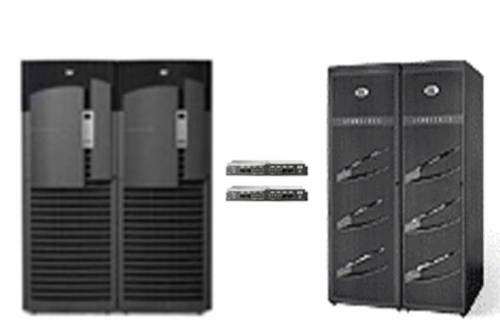
simplesan.jpg

I Ain’t Never Doing That Grid Thing.
Simply put, if the only Oracle you have deployed—now and forever—sits in a couple of refrigerator-sized legacy SMP boxes, I’m going to sound like a loon on this topic. I’m talking about provisioning storage to commodity servers—grid computing. Grid may not be where you are today, but it is in fact where you will be someday. Consider the fact that most datacenters are taking their huge machines and chopping them up into little machines with hardware/software virtualization anyway so we might as well just get to the punch and deploy commodity servers. When we do, we feel the pain of Fibre Channel SAN connectivity and storage provisioning. Because connecting large numbers of servers to storage was not exactly a design center for Fibre Channel SAN technology. Just the opposite is true; SANs were originally meant to connect a few servers to a huge number of disks—more than was possible with DAS.

Commodity Computing (Grid) == Huge SAN
Large numbers of servers connected to a SAN makes the SAN very complex. Not necessarily more disks, but the presentation and connectivity aspects get very difficult to deal with.

If you are unlucky enough to be up to your knees in the storage provisioning, connectivity and cost nightmare associated with even a moderate number of commodity servers in a SAN environment you know what I’m talking about. In these types of environments, people are deploying and managing director-class Fibre Channel switches where each port can cost up to $5,000 and they are deploying more than one switch for redundancy sake. That is, each commodity server needs a 2 port FC HBA and 2 paths to two different switches. Between the HBAs and the FC switch ports, the cost is as much as $10,000-$12,000 just to connect a “pizza box” to the SAN. That’s the connectivity story and the provisioning story is not much prettier.

Once the cabling is done, the Storage Administrator has to zone the switches and provision storage (e.g., create LUNs, LUN masking, etc). For RAC, that would be a minimum of 3 masked LUNs for each database. Then the System Administrator has to make sure Oracle has access to those LUNs. That is a lot of management overhead. NAS on the other hand uses very inexpensive NICs and switches. Ah, now there is an interesting point. Using NAS means each server only has one type of network connectivity instead of two (e.g., FC and Ethernet). Storage provisioning is also simpler—the database server administrator simply mounts the NFS filesystem and the DBA can go straight to work with RAC or non-RAC Oracle databases. How simple. And yes, the Oracle licensing cost is a constant, so in this paradigm, the only way to recuperate cost is in the storage connectivity side. The savings are worth consideration, and the simplicity is very difficult to argue.

It’s time for another picture. The picture below depicts a small commodity server deployment—38 servers that need storage.
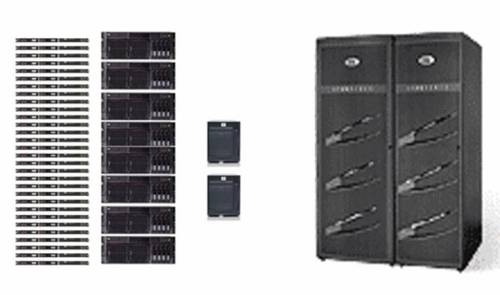
complexsan.jpg

Let’s consider the total connectivity problem starting with the constant—Ethernet. Yes, every one of these 38 servers needs both Ethernet and Fibre Channel connectivity. For simplicity, let’s say only 8 of these servers are using RAC. The 8 that host RAC will need a minimum of 4 Gigabit Ethernet NICs/cables—2 for the public interfaces and two for a bonded, private network for Oracle Cache Fusion (GCS, GES) for a total of 32. The remaining 30 could conceivably do fine with 2 public networks each for a subtotal of 60. All told, we have 92 Ethernet paths to deal with before we look at storage networking.

On the storage side, we’ll need redundant paths for all 38 server to multiple switches so we start with 38 dual-port HBAs and 76 front-side Fibre Channel switch ports. Each switch will need a minimum of 2 paths back to storage, but honestly, would anyone try to feed 38 modern commodity servers with 2 4Gb paths worth of storage bandwidth? Likely not. On the other hand, it is unlikely the 30 smaller servers will each need dedicated 4Gb I/O bandwidth to storage so we’ll play zone trickery on the switch and group sets of 2 from the 30 yielding a requirement for 15 back-side I/O paths from each switch for a subtotal of 30 back-side paths. Following in suit, the remaining 8 RAC servers will require 4 back-side paths from each of the two switches for a subtotal of 8 back-side paths. To sum it up, we have 76 front-side and 38 back-side paths for a total of 114 storage paths. Yes, I know this can be a lot simpler by limiting the number of switch-to-storage paths. That’s a game called Which Servers Should We Starve for I/O and it isn’t fun to play. These arrangements are never attempted with small switches. That’s why the picture depicts large, expensive director-class switches.

Here’s our mess. We have 92 Ethernet paths and 114 storage paths. How would NAS make this simpler? Well, Ethernet is the constant here so we simply add more inexpensive Ethernet infrastructure. We still need redundant switches and I/O paths, but Ethernet is cheap and simple and we are down to a single network topology instead of two. Just add some simple NICs and simple Ethernet switches and go. And oh, by the way, the two network-topologies-model (e.g., GbE_+ FCP) generally means two different “owners” since the SAN would generally be owned by the Storage Group and the Ethernet would be owned by the Networking Group. With NAS, all connectivity from the Ethernet switches forward can be owned by the Networking Group freeing the Storage Group to focus on storage—as opposed to storage networking.

And, yes, Oracle11g has features that make the connectivity requirement on the Ethernet side simpler but 10g environments can benefit from this architecture too.

Not a Sales Pitch
Thus far, this blog entry has been the what. This would make a pretty hollow blog entry if I didn’t at least mention the how. The odds are very slim that your datacenter would be able to do a 100% NAS storage deployment. So Network Appliance handles this by offering multiple protocol storage from their Filers. The devil shall not remain with the details.

Total NAS? Nope. Multi-Protocol Storage.
I’ll be brief. You are going to need both FCP and NAS, I know that. If you have SQL Server (ugh) you certainly aren’t going to connect those servers to NAS. There are other reasons FCP isn’t going to go away soon enough. I accept the fact that both protocols are required in real life. So let’s take a look a multi-protocol storage and how it fits into this thread.

Network Appliance Multi-Protocol Support
Network Appliance is an NFS device. If you want to use it for FCP or iSCSI SAN, large files in the Filer’s filesystem (WAFL) are served with either FCP or iSCSI protocol and connectivity. Fine. It works. I don’t like it that much, but it works. In this paradigm, you’d choose to run the simplest connectivity type you deem fit. You could run some FCP to a few huge Legacy SMPs, FCP to some servers running SQL Server (ugh), and most importantly Ethernet for NFS to whatever you choose—including Oracle on commodity servers. Multi-protocol storage in this fashion means total vendor lock-in, but it would allow you to choose between the protocols and it works.

SAN Gateway Multi-Protocol Support
Don’t get rid of your SAN until there is something reasonable to replace it with. How does that statement fit this thread? Well, as I point out in this paper, SAN-NAS gateway devices are worth consideration. Products in this space are the HP Enterprise File Services Clustered Gateway and EMC Celerra. With these devices you leverage your existing SAN by connecting the “NAS Heads” to the SAN using very low-end, simple Fibre Channel SAN connectivity (e.g., small switches, few cables). From there, you can provision NFS mounts to untold numbers of NFS clients—a few, dozens or hundreds. The mental picture here should be a very small amount of the complex, expensive connectivity (Fibre Channel) and a very large amount of the inexpensive, simple connectivity (Ethernet). What a pleasant mental picture that is. So what’s the multi-protocol angle? Well, since there is a down-wind SAN behind the NAS gateway, you can still directly cable your remaining Legacy Unix boxes with FCP. You get native FCP storage (unlike NetApp with the blocks-from-file approach) for the systems that need it and NAS for the ones that don’t.

I’m a Oracle DBA, What’s in It for Me?
Excellent question and the answer is simply simplicity! I’m not just talking simplicity, I’m talking simple, simple, simple. I’m not just talking about simplicity in the database tier either. As I’ve pointed out upteen times, NFS will support you from top to bottom—not just the database tier, but all your unstructured data such as software installations as well. Steve Chan chimes in on the simplicity of shared software installs in the E-Biz world too. After the NFS filesystem is mounted, you can do everything from ORACLE_HOME, APPL_TOP, clusterware files (e.g., the OCR and CSS disks), databases, RMAN, imp/exp, SQL*Loader/External Tables, ETL, compiled PL/SQL, UTL_FILE, BFILE, trace/logging, scripts, and on and on. Without NFS, what sort of mix-match of raw, filesystem, raw+ASM combination would be required? A complex one—and the really ironic part is you’d probably still end up with some NFS mounts in addition to all that raw disk and non-CFS filesystem space as well!

Whew. That was a long blog entry.

Mount Options for Oracle over NFS. It’s All About the Port.

BLOG UPDATE: This post has developed an interesting comment thread worth noting.

I currently have a nearly chaotic set of differing configurations to deal with that run the gamut of x86_64 servers attached to 2/4 Gb FCP SANs and others to NAS via GbE. So sometimes I miss the mark. I just tried to fire up one of my databases on a DL585 running RHEL4 attached to the Enterprise File Services Clustered Gateway NAS device. In the midst of the chaos I mistakenly mounted the filesystem containing the Oracle Database 10g test database using the wrong mount options, so:

$ tail alert*log
ALTER DATABASE MOUNT
Mon Jun 18 15:04:28 2007
WARNING:NFS file system /mnt mounted with incorrect options
WARNING:Expected NFS mount options: rsize>=32768,wsize>=32768,hard
Mon Jun 18 15:04:28 2007
ORA-00202: control file: ‘/u01/app/oracle/product/10.2.0/db_1/rw/DATA/cntlbench_1’
ORA-27054: NFS file system where the file is created or resides is not mounted with correct options
Additional information: 3
Mon Jun 18 15:04:28 2007

I clearly did not mount the filesystems correctly. After remounting with the following options, everything was OK:

rw,bg,hard,nointr,tcp,vers=3,timeo=300,rsize=32768,wsize=32768,actimeo=0

But then these mount options are port-specific and as they say in true Clintonian form, “It’s the Port Stupid.”

It’s All About the Port
The only complaint I have about Oracle over NFS is at the port level. I intend to start blogging about the idiosyncrasies between, say, certain Legacy Unix and Linux ports of Oracle with regard to NAS mount options. I think RMAN has the most issues and, again, these are always port level. For instance, certain ports inspect the mount options of the actual mounted filesystem and others will look at the mnttab. And then, in some cases, certain ports do it one way for the instance and then another for functionality such as RMAN. Sometimes when the database or tools don’t like the mount options they return an error message spelling out what is missing and other times just a generic complaint that the mount options are incorrect—and that too varies by port and version of Oracle as well. Recently I found that the HP-UX port of Oracle10g needs the llock mount option which is apparently not documented very well.

In all cases, issues regarding mount options are the responsibility of the Oracle port team for the release. That is where this functionality is built. The layers above the I/O layer (Operating System Dependent code) have no idea whether there is DAS, SAN or NAS down stream. That abstraction is one of the main reasons Oracle is the best database out there. That porting heritage goes back to Oracle version 4. Anyway, I digress…

Complicated.
Yes, these mount option topics are more complicated than they should be, but this situation is not permanent. As we get closer to July 11, I’ll be blogging more about what that means. Regardless, I stand fast in my view that provisioning storage for Oracle via NFS is simpler, simpler, simpler than SANs and that goes for both RAC or non-RAC databases. Just mount the filesystem and go…

In the meantime, if you have a particular port of Oracle10g that isn’t getting along with your NAS, remember our motto, “It’s the port[…]” so log an SR and Oracle will get you on your way.

10 Years to Replace 64 CPU Systems with a Single Socket.

I’ve been wondering how much longer I’d have to wait for this to happen…

Back in 1998 I was a part of the team at Sequent Computer Systems that delivered the first non-clustered TPC-C result of 100,000 Tpm-C. Well, OK, I exaggerated, it was 93,901 but the prior Oracle record was held by HP with the V2200 (a Convex system actually) at 40,794 TpmC. Non-Clustered TPC-C results do not get doubled within a year’s time so it was quite the accomplishment at the time. Even more so given the detractors and skeptics at the time that couldn’t imagine a bunch of those “little Intel processors” churning out a record TPC-C result. Well, we did. It was a huge, expensive system with 64 processors, 64GB RAM, and hundreds upon hundreds of disk drives. The system cost for that big system was $131.67 per TpmC.

That was then, this is now. On June 8, Hewlett-Packard and Oracle joined to produce a 100,926 TpmC result with a single processor—a Xeon 5355 “Cloverdale”. While it has 4 cores, it is technically a single processor. So, they beat our 1998 number with 1/64th the number of CPUs and only 24GB memory as opposed to the 64GB we used. Interesting as well is that they used 100 disks in MSA-1000 enclosures. And the cost? Only $.78 per TpmC!

Mistaken Identity?
The benchmark was executed with Oracle Enterprise Linux, Standard Edition One and no ASM. I can’t find anything in the full disclosure report suggesting the datafiles were on raw partitions, but I’d be very surprised to find they used Ext3. Besides, there was no value assigned to filesystemio_options that would have enabled Direct I/O and I would be dollars to doughnuts that there was no filesystem caching overhead on a TPC-C run.

On the humorous side of things, you might get a chuckle to find that on page 10 of the Full Disclosure Report, the auditors missed the subtle distinction between Oracle Enterprise Linux and Red Hat Linux 4 as the following quote will attest:

Overview
This report documents the methodology and results of the TPC Benchmark C test conducted on the hp ProLiant ML350 G5. The operating system used for the benchmark was Red Hat Enterprise Linux 4. The DBMS used was Oracle Database 10g Standard Edition One.

This was a phenomenal result actually. I was quite glad to see it. I plan to share a couple other interesting things I noticed in the FDR as well in another blog entry.


DISCLAIMER

I work for Amazon Web Services. The opinions I share in this blog are my own. I'm *not* communicating as a spokesperson for Amazon. In other words, I work at Amazon, but this is my own opinion.

Enter your email address to follow this blog and receive notifications of new posts by email.

Join 819 other subscribers
Oracle ACE Program Status

Click It

website metrics

Fond Memories

Copyright

All content is © Kevin Closson and "Kevin Closson's Blog: Platforms, Databases, and Storage", 2006-2015. Unauthorized use and/or duplication of this material without express and written permission from this blog’s author and/or owner is strictly prohibited. Excerpts and links may be used, provided that full and clear credit is given to Kevin Closson and Kevin Closson's Blog: Platforms, Databases, and Storage with appropriate and specific direction to the original content.