Archive Page 6

SLOB Deployment – A Picture Tutorial.

SLOB can be obtained at this link: Click here.

This post is just a simple set of screenshots I recently took during a fresh SLOB deployment. There have been a tremendous number of SLOB downloads lately so I thought this might be a helpful addition to go along with the documentation. The examples I show herein are based on a 12.1.0.2 Oracle Database but these principles apply equally to 12.1.0.1 and all Oracle Database 11g releases as well.

Synopsis

  1. Create a tablespace for SLOB.
  2. Run setup.sh
  3. Verify user schemas
  4. Execute runit.sh. An Example Of Wait Kit Failure and Remedy
  5. Execute runit.sh Successfully
  6. Using SLOB With SQL*Net
    1. Test SQL*Net Configuration
    2. Execute runit.sh With SQL*Net
  7. More About Testing Non-Linux Platforms


Create a Tablespace for SLOB

If you already have a tablespace to load SLOB schemas into please see the next step in the sequence.

SLOB-deploy-1

Run setup.sh

Provided database connectivity works with ‘/ as sysdba’ this step is quite simple. All you have to do is tell setup.sh which tablespace to use and how many SLOB users (schemas) load. The slob.conf file tells setup.sh how much data to load. This example is 16 SLOB schemas each with 10,000 8K blocks of data. One thing to be careful of is the slob.conf->LOAD_PARALLEL_DEGREE parameter. The name is not exactly perfect since this actually controls concurrent degree of SLOB schema creation/loading. Underneath the concurrency may be parallelism (Oracle Parallel Query) so consider setting this to a rather low value so as to not flood the system until you’ve practiced with setup.sh for a while.


SLOB-deploy-2

Verify Users’ Schemas

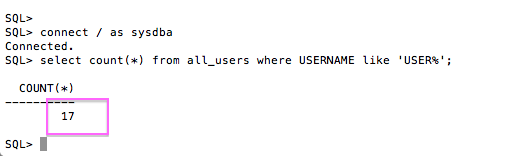
After taking a quick look at cr_tab_and_load.out, as per setup.sh instruction, feel free to count the number of schemas. Remember, there is a “zero” user so setup.sh with 16 will have 17 SLOB schema users.

SLOB-deploy-3

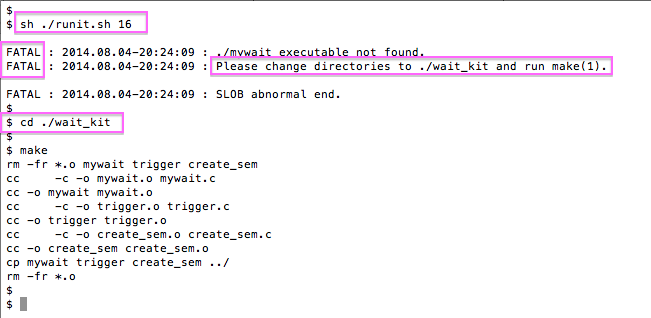
Execute runit.sh. An Example Of Wait Kit Failure and Remedy

This is an example of what happens if one misses the detail to create the semaphore wait kit as per the documentation. Not to worry, simply do what the output of runit.sh directs you to do. Note, while runit.sh supports just a single argument as shown here, SLOB 2.3 and beyond have additional options to support Multiple Schema Model. Please see the documentation for more information on recently added options to runit.sh.

SLOB-deploy-5

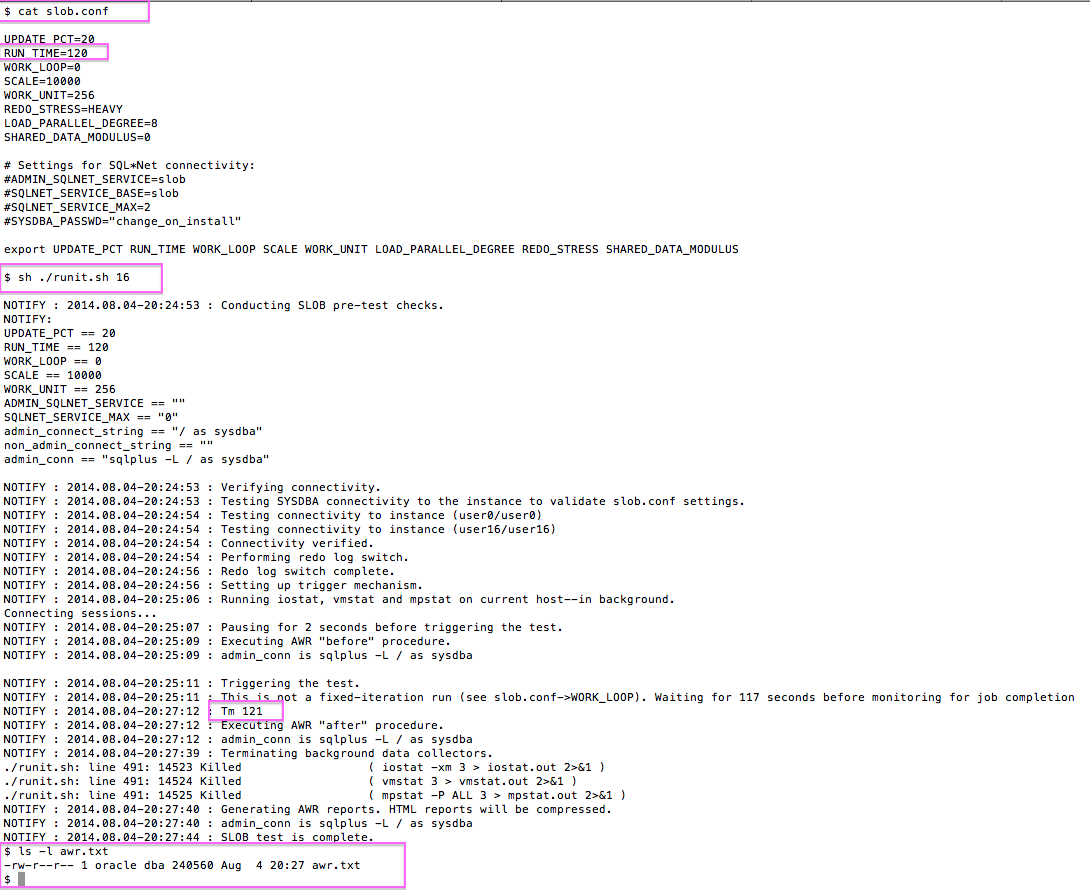
Execute runit.sh Successfully

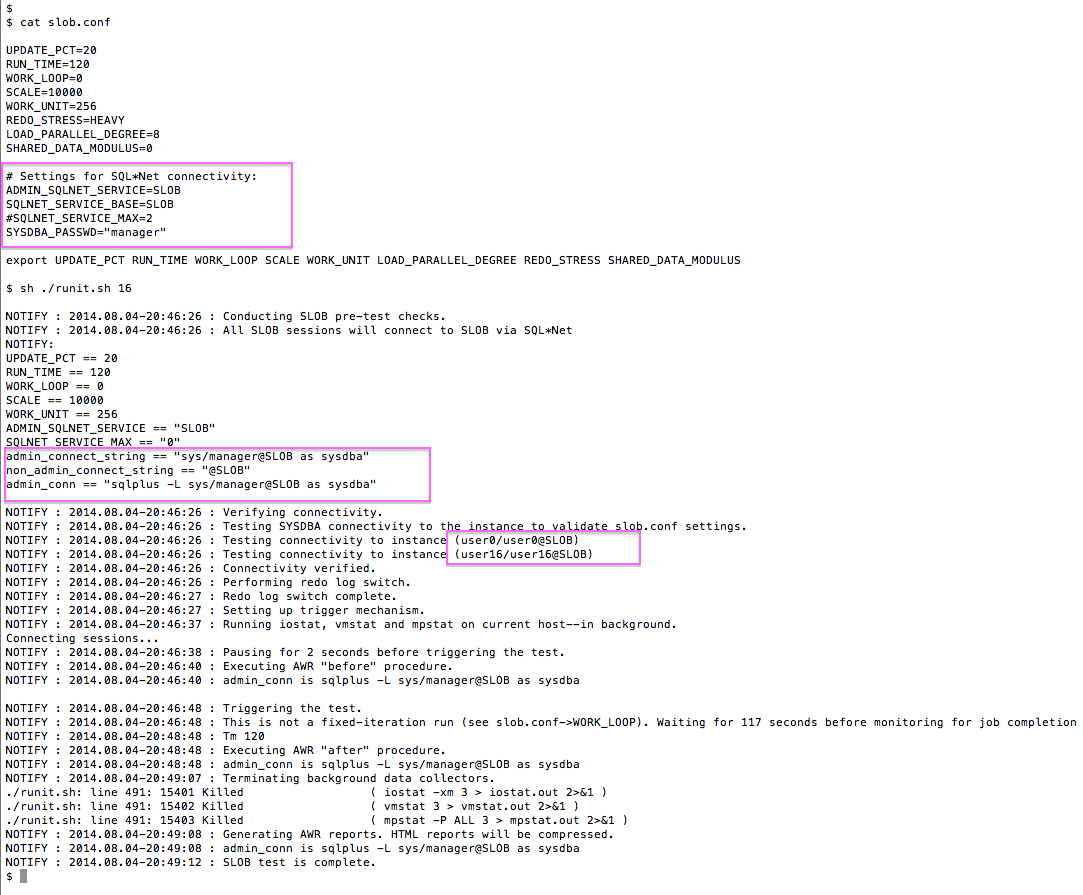
The following is an example of a healthy runit.sh test.

SLOB-deploy-6

Using SLOB with SQL Net

Strictly speaking this is all optional if all you intend to do is test SLOB on your current host. However, if SLOB has been configured in a Windows, AIX, or Solaris box this is how one tests SLOB. Testing these non-Linux platforms merely requires a small Linux box (e.g., a laptop or a VM running on the system you intend to test!) and SQL*Net.

Test SQL*Net Configuration

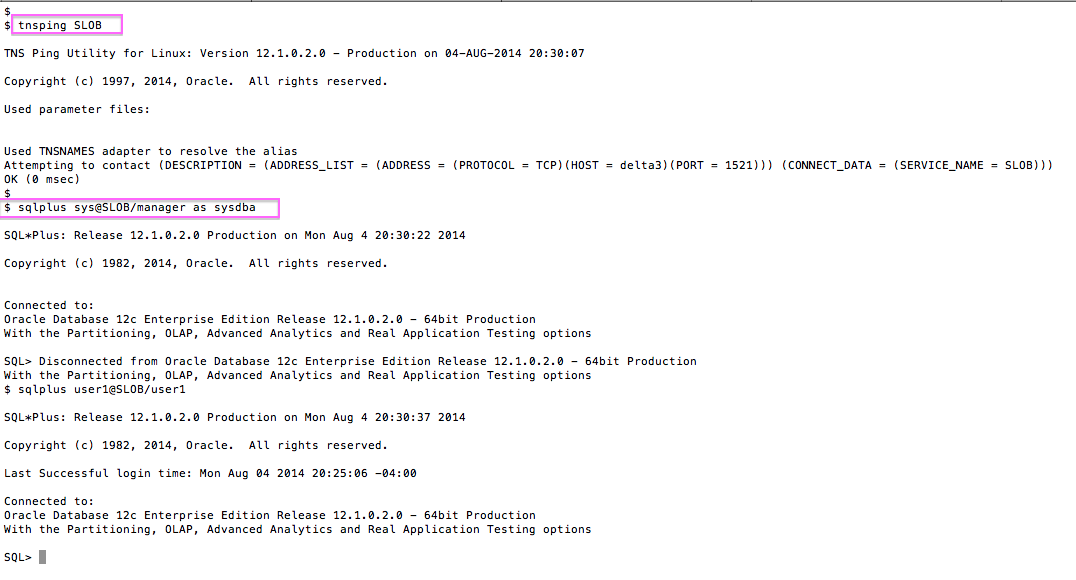
We don’t care where the SLOB database service is. If you can reach it successfully with tnsping you are mostly there.

SLOB-deploy-7

Execute runit.sh With SQL*Net

The following is an example of a successful runit.sh test over SQL*Net.

SLOB-deploy-8

More About Testing Non-Linux Platforms

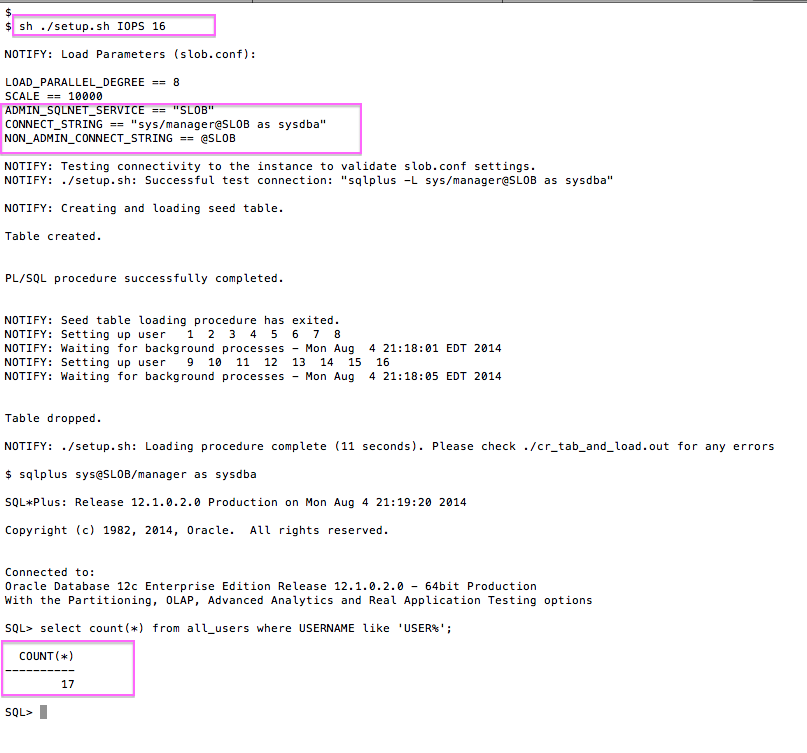
Please note, loading SLOB over SQL*Net has the same configuration requirements as what I’ve shown for data loading (i.e., running setup.sh). Consider the following screenshot which shows an example of loading SLOB via SQL*Net.

SLOB-deploy-9

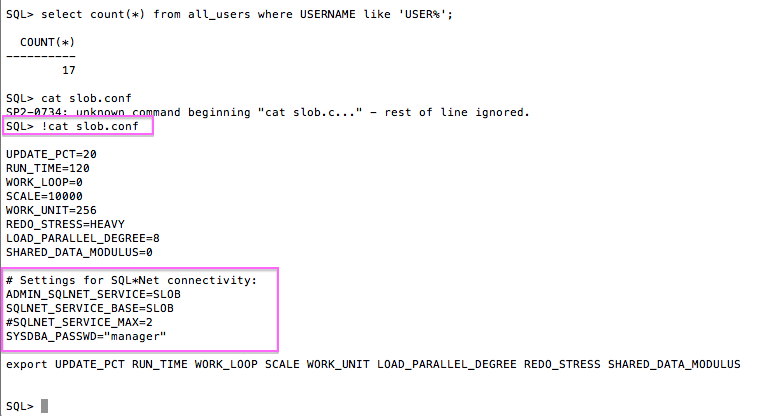
Finally, please see the next screenshot which shows the slob.conf file the corresponds to the proof of loading SLOB via SQL*Net.

SLOB-deploy-10


Summary

This short post shows the simple steps needed to deploy SLOB in both the simple Linux host-only scenario as well as via SQL*Net. Once a SLOB user gains the skills needed to load and use SLOB via SQL*Net there are no barriers to testing SLOB databases running on any platform to include Windows, AIX and Solaris.


Impugn My Character Over Technical Points–But You Should Probably Be Correct When You Do So. Oracle 12c In-Memory Feature Snare? You Be The Judge ‘Cause Here’s The Proof. Part IV.

Press Coverage at The Register: Click here.

Executive Summary

This blog post offers proof that you can trigger In-Memory Column Store feature usage with the default INMEMORY_* parameter settings. These parameters are documented as the approach to ensure In-Memory functionality is not used inadvertently–or at least they are documented as the “enabling” parameters.

Update: Oracle Acknowledges Software Defect

During the development of this study, Oracle’s Product Manager in charge of the In-Memory feature has cited Bug #19308780 as it relates to my findings. I need to point out, however, that it wasn’t until this blog installment that the defective functionality was acknowledged as a bug. Further, the bug being cited is not visible to customers so there is no closure. How can one have closure without knowing what, specifically, is acknowledged as defective?

Index of Related Posts

This is part 4 in a series: Part I, Part II, Part III, Part IV, Part V.

Other Blog Updates

Please note, blog updates are listed at the end of the article.

What Really Matters?

This is a post about enabling versus using the Oracle Database 12c Release 12.1.0.2 In-Memory Column Store feature which is a part of the separately licensed Database In-Memory Option of 12c. While reading this please be mindful that in this situation all that really matters is what actions on your part effect the internal tables that track feature usage.

Make Software, Not Enemies–And Certainly Not War

There is a huge kerfuffle regarding the separately licensed In-Memory Column Store feature in Oracle Database 12c Release 12.1.0.2–specifically how the feature is enabled and what triggers  usage of the feature.

I pointed out a) the fact that the feature is enabled by default and b) the feature is easily accidentally used. I did that in Part I and Part II in my series on the matter.  In Part III I shared how the issue has lead to industry journalists quoting–and then removing–said quotes. I’ve endured an ungodly amount of shameful backlash even from some friends on the Oaktable Network list as they asserted I was making a mountain out of a mole hill  (that was a euphemistic way of saying they all but accused me of misleading my readers). Emotion and high-technology are like watery oil.

About the only thing that hasn’t happened is for anyone to apologize for being totally wrong in their blind-faith rooted feelings about this issue. What did he say? Please read on.

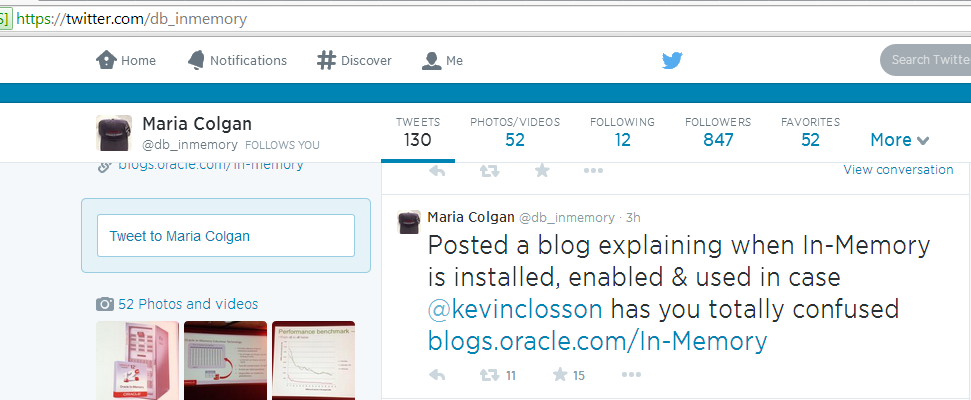
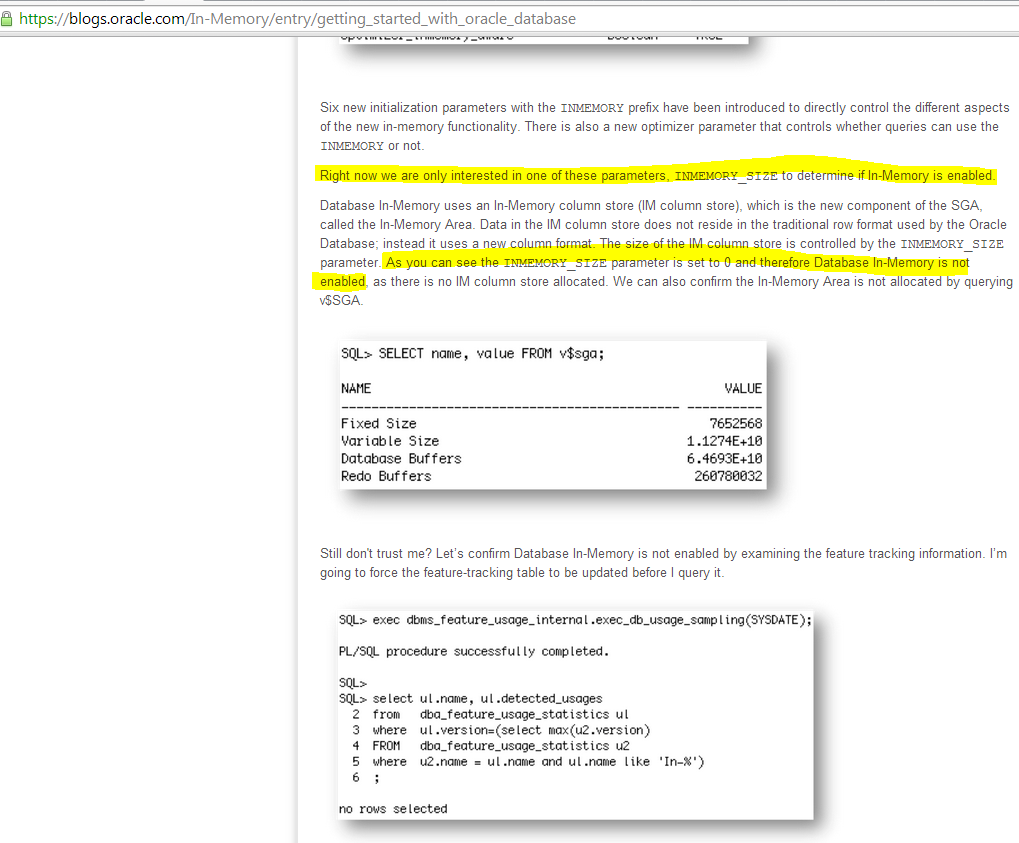
From the start I pointed out that the INMEMORY_QUERY feature is enabled by default–and that it is conceivable that someone could use it accidentally. The back lash from that was along the lines of how many parameters and what user actions (e.g., database reboot)  are needed for that to be a reality.  Maria Colgan–who is Oracle’ s PM for the In-Memory Column Store feature–tweeted that I’m confusing people when announcing her blog post on the fact that In-Memory Column Store usage is controlled not by INMEMORY_QUERY but instead INMEMORY_SIZE. Allow me to add special emphasis to this point. In a blog post on oracle.com, Oracle’s PM for this Oracle database  feature explicitly states that INMEMORY_SIZE must be changed from the default to use the feature.

If I were to show you everyone else was wrong and I was right, would you think less of me? Please, don’t let it make you feel less of them. We’re just people trying to wade through the confusion.

The Truth On The Matter

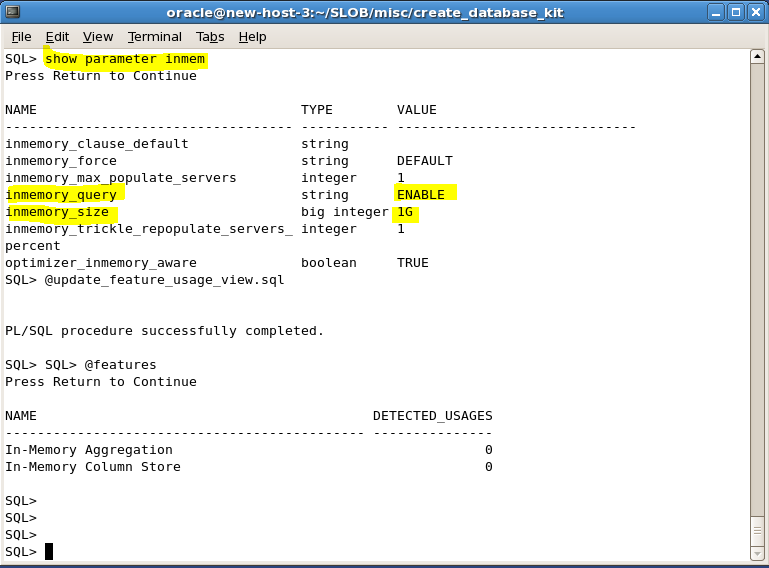
Here is the truth and I’ll prove it in a screen shot to follow:

  1. INMEMORY_QUERY is enabled by default. If it is set you can trigger feature usage–full stop.
  2. INMEMORY_SIZE is zero by default.  Remember this is the supposedly ueber-powerful setting that precludes usage of the feature and not, in fact, the more top-level-sounding INMEMORY_QUERY parameter.

In the following screenshot I’ll show that INMEMORY_QUERY is at the default setting of ENABLE  and INMEMORY_SIZE is at the default setting of zero. I prove first there is no prior feature usage. I then issue a CREATE TABLE statement specifying INMEMORY.  Remember, the feature-blocking INMEMORY_SIZE parameter is zero.  If  “they” are right I shouldn’t be able to trigger In-Memory Column Store feature usage, right? Observe–or better yet, try this in your own lab:

proof-mu

So ENABLED Means ENABLED? Really? Imagine That.

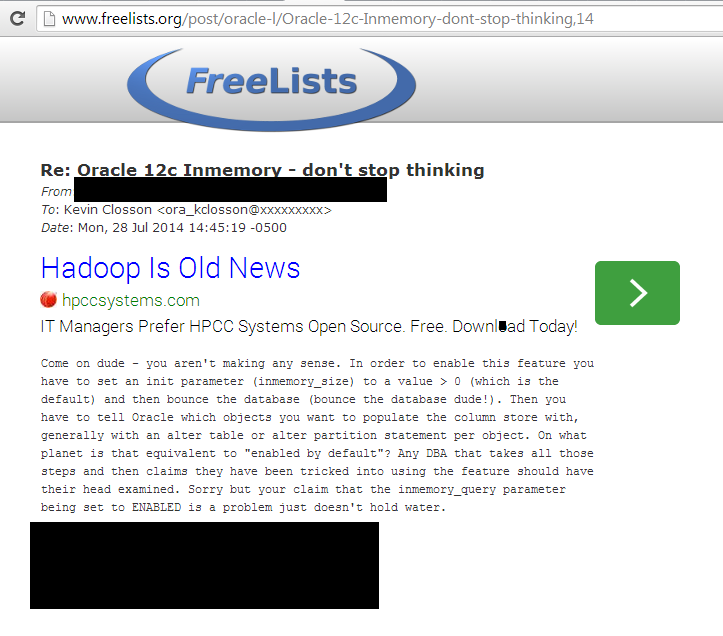
So I proved my point which is any instance with the default initialization parameters can trigger feature usage. I also proved that the words in the following three screenshots are factually incorrect:

MariaCallingMeOut

Screenshot of blog post on Oracle.com:

maria-on-inmemory_size_assertion

Screenshot of email to Oracle-L Email list:

oaktable-redact

Summary

I didn’t want to make a mountain out of this mole hill. It’s just a bug. I don’t expect apologies. That would be too human–almost as human as being completely wrong while wrongly clinging to one’s wrongness because others are equally, well, wrong on the matter.


BLOG UPDATE 2014.07.31: Click here to view an article on The Register regarding Oracle Database In-Memory feature usage.

BLOG UPDATE 2014.07.30: Oracle’s Maria Colgan has a comment thread on her blog on the In-Memory Column Store feature. In the thread a reader reports precisely the same bug behavior you will see in my proof below. Maria’s comment is that feature usage is tracked in spite of the supposed disabling feature INMEMORY_SIZE set to the default value. While this agrees with what I  already knew about this feature it is in my opinion not sufficient to speak of a bug of such consequence without citing the bug number. Furthermore, such a bug must be visible to users with support contracts. Click here for a  screenshot of the Oracle blog. In case Oracle changes their mind on such an apparently sensitive topic I uploaded the blog to the Wayback Machine here

BLOG UPDATE 2014.07.29: Oracle’s Maria Colgan issued a tweet stating “What u found in you 3rd blog is a bug […] Bug 19308780.”  Click here for a screenshot of the tweet. Also, click here for a Wayback Machine (web.archive.org) copy of the tweet.


Sundry References

 Print out of Maria’s post on Oracle.com and link to same: Getting started with Oracle Database In-Memory Part I

Franck Pachot 2014.07.23 findings reported here:  Tweet , screenshot of tweet.


Oracle Database 12c In-Memory Feature – Part III. Enabled, Used or Confused? Don’t Be.

Index of Related Posts

This is part 3 in a series: Part I, Part II, Part III, Part IV, Part V.

Update: Oracle Acknowledges Software Defect

During the development of this study, Oracle’s Product Manager in charge of the In-Memory feature has cited Bug #19308780 as it relates to my findings. I need to point out, however, that it wasn’t until this blog installment that the defective functionality was acknowledged as a bug. Further, the bug being cited is not visible to customers so there is no closure. How can one have closure without knowing what, specifically, is acknowledged as defective? Also read more at The Register: Click here.

Other Blog Updates

Please note, there are blog updates at the end of this post.


Enabled By Default. Not Usable By Default.

It was my intention to only write 2 installments on my short series about Oracle Database 12c In-Memory Column Store feature usage. My hopes were quickly dashed when the following developments occurred:

1. A quote from an Oracle spokesman cited on informationweek.com was pulled because (I assume) it corroborated my assertion that the feature is enabled by default. It is, enabled by default.

Citations: Tweet about the quote, link to the July 26, 2014 version of the Informationweek.com article showing the Oracle spokesman quote: Informationweek.com 26 July 2014.

The July 26, 2014 version of the Informationweek.com article quoted an Oracle spokesman as having said the following:

Yes, Oracle Database In-Memory is an option and it is on by default, as have been all new options since Oracle Database 11g

2. An email from an Oracle Product Manager appeared on the oracle-l email list and stated the following:

So, it is explicitly NOT TRUE that Database In-Memory is enabled by default – and it’s (IMHO) irresponsible (at best) to suggest otherwise

Citation: link to the oracle-l list server copy of the email, screenshot of the email.


Features or Options, Enabled or Used

I stated in Part I that I think the In-Memory Column Store feature is a part of a hugely-important release.  But, since the topic is so utterly confusing I have to make some points.

It turns out that neither of the Oracle folks I mention above are correct. Please allow me to explain. Yes, the Oracle spokesman spoke the truth originally to Informationweek.com as reported by Doug Henschen. The truth that was spoken is, yes indeed, the In-Memory Column Store feature/option  is enabled by default. Now don’t be confused. There is a difference between enabled and usable and  in-use.

In Part II of the series I showed an example of the things that need to be done to put the feature into use–and remember, you’re not charged for it until it is used. I believe that post made it quite clear that there is a difference between enabled and in-use. What does the Oracle documentation say about In-Memory Column Store feature/option default settings? It says it is enabled by default. Full stop. Citation: Top-level initialization parameter enabled by default. I’ve put a screenshot of that documentation here for education sake:

enable-by-default


This citation of the documentation means the Oracle spokesman was correct.  The feature is enabled by default.

The problem is with the mixing of the words enabled and “use” in the documentation.

Please consider the following screenshot of a session where the top-level INMEMORY_QUERY parameter is set to the default (ENABLE) as well as the INMEMORY_SIZE parameter to grant some RAM to the In-Memory Column Store feature. In the screenshot you’ll see that I didn’t trigger usage of the feature just by enabling it. I did, however, show that you don’t have to “use” the feature to trigger “usage” so please visit Part II on that matter.

img1-mu

So here we sit with wars over words.

Oracle’s Maria Colgan just posted a helpful blog (or, practically a Documentation addendum) going over the initialization parameters needed to fully, really-truly enable the feature–or more correctly how to go beyond enabled to usable.  I’ve shown that Oracle’s spokesman was correct in stating the feature is enabled by default (INMEMORY_QUERY enabled by default). Maria and others showed that you have to set 2 parameters to really, truly, gosh-darnit use the feature that is clearly ENABLE(d) by default. I showed you that enabling the feature doesn’t mean you use the feature (as per the DBA_FEATURE_USAGE_STATICS view). I also showed you in Part II how one can easily, accidentally use the feature.  And using the feature is chargeable and that’s why I assert INMEMORY_QUERY should ship with the default value of DISABLE. It is less confusing and it maps well to prior art such as the handling of Real Application Clusters.

Trying To Get To A Summary

So how does one summarize all of this?  I see it as quite simple. Oracle could have shipped Oracle Database 12c 12.1.0.2 with the sole,  top-level enabling parameter disabled (e.g., INMEMORY_QUERY=DISABLE). Doing so would be crystal clear because it nearly maps to a trite sentence–the feature is DISABLE(d). Instead we have other involved parameters that are not top level adding to the confusion. And confusion indeed since the Oracle documentation insinuates INMEMORY_SIZE is treated differently when Automatic Memory Management is in play:

amm-issue

Prior Art

And what is that prior art on the matter? Well, consider Oracle’s (presumably) most profitable separately-licensed feature of all time–Real Application Clusters. How does Oracle treat this desirable feature? It treats it with a crystal-clear top-level, nuance-free disabled state:

cluster_database_default

So, in summary, the In-Memory feature is not disabled by default. It happens to be that the capacity-sizing parameter INMEMORY_SIZE is set to zero so the feature is unusable. However, setting both INMEMORY_QUERY and INMEMORY_SIZE does not constitute usage of the feature.

Confused? I’m not.


BLOG UPDATE 2014.07.29: Oracle’s Maria Colgan issued a tweet stating “What u found in you 3rd blog is a bug […] Bug 19308780.” Click here for a screenshot of the tweet.


Oracle Database 12c Release 12.1.0.2 – My First Observations. Licensed Features Usage Concerns – Part II.

Index of Related Posts

This is part 2 in a series: Part I, Part II, Part III, Part IV, Part V.

Update: Oracle Acknowledges Software Defect

During the development of this study, Oracle’s Product Manager in charge of the In-Memory feature has cited Bug #19308780 as it relates to my findings. I need to point out, however, that it wasn’t until this blog installment that the defective functionality was acknowledged as a bug. Further, the bug being cited is not visible to customers so there is no closure. How can one have closure without knowing what, specifically, is acknowledged as defective? Also read more at The Register: Click here.

Preface

In this post you’ll see that I provide an scenario of accidental paid-feature “use.”  The key elements of the scenario are: 1) I enabled the feature (by “accident”) but 2) I didn’t actually use the feature because I neither created nor altered any tables.

In Part I of this series I aimed to bring to people’s attention what I see as a significant variation from the norm when it comes to Oracle licensed-option usage triggers and how to prevent them from being triggered. Oracle Database Enterprise Edition supports several separately licensed options such as Real Application Clusters, Partitioning, and so on.  A feature like Real Application Clusters is very expensive but if  “accidental usage” of this feature is a worry on an administrator’s mind there is a simple remedy: unlink it. If the bits aren’t in the executable you’re safe. Is that a convoluted procedure? No. An administrator simply executes make -d ins_rdbms.mk rac_off and then relinks the Oracle executable. Done.

What about other separately licensed options like Partitioning?  As I learned from Paul Bullen, once can use the Oracle-supplied chopt command to remove any chance of using Partitioning if, in fact, one does not want to use Partitioning. I thought chopt might be the solution to the issue of possible, accidental usage of the In-Memory Column Store feature/option. However, I found that chopt, as of this point, does not offer the ability to neutralize the feature as per the following screenshot.

img5

Trivial Pursuit of the Ignoramus or Mountainous Mole Hill?

There is yet no way I know of to prevent accidental use of the In-Memory Column Store feature/option. Am I just making a mountain out of a mole hill? I’ll let you be the judge. And if you side with folks that do feel this is a mountainous-mole hill you’d be in really good company.

Lest folks think that we Oaktable Network Members are a blind, mutual admiration society, allow me to share the rather sizzling feedback I got for raising awareness to this aspect of Oracle Database 12c:

oaktable-email-calls-bs

Geez!

No, I didn’t just want to dismiss this feedback. Instead  I pushed the belt-sander off of my face and read the words a couple of times. The author of this email asserted I’m conveying misinformation ( aka “BS”) and to fortify that position it was pointed out that one must:

  1. Set a database (instance initialization) parameter.
  2. Bounce the instance.
  3. Alter any object to use the feature. I’ll interpret that as a DDL action (e.g., ALTER TABLE, CREATE TABLE).

Even before I read this email I knew these assertions were false. We all make mistakes–this I know!  I should point out that unlike every release of Oracle from 5.1.17 to 11gR2 I was not invited to participate in the Beta for this feature. I think a lot of Oaktable Network members were in the program–perhaps even the author of the above email snippet–but I don’t know that for certain. Had I encountered this during a Beta test I would have raised it to the Beta manager as an issue and maybe, just maybe, the feature behavior might have changed before first customer ship. Why am I blabbering on about the Beta program? Well, given the fact that even Oaktable Network members with pre-release experience with this feature evidently do not know what I’m about to show in the remainder of this post.

What Is An Accident?

Better yet, what is an accident and how full of “BS” must one be to fall prey? Maybe the remainder of the post will answer that rhetorical question. Whether or not  it does, in fact, answer the question I’ll be done with this blog series and move on to the exciting work of performance characterization of this new, incredibly important feature.

Anatomy of a “Stupid Accident.”

Consider a scenario. Let’s say a DBA likes to use the CREATE DATABASE statement to create a database. Imagine that!  Let’s pretend for a moment that DBAs can be very busy and operate in chaotic conditions. In the fog of this chaos, a DBA could, conceivably, pull the wrong database instance initialization file (e.g., init.ora or SPFILE) and use it when creating a database. Let’s pretend for a moment I was that busy, overworked DBA and I’ll show you what happens in the following:

  1. I executed sqlplus from the bash command prompt.
  2. I directed sqlplus to execute a SQL script called cr_db.sql. Many will recognize this as the simple little create script I supply with SLOB.
  3. The cr_db.sql script uses a local initialization parameter file called create.ora
  4. sqlplus finished creating the database. NOTE: this procedure does not create even a single user table.
  5. After the database was created I connected to the instance and forced the feature usage tracking views to be updated (thanks to Morgan’s Library for that know-how as well…remember, I’m a database platform engineer not a DBA so I learn all the time in that space).
  6. I executed a SQL script to report feature usage of only those features that match a predicate such as “In-%’


img1

This screen shot shows that the list of three asserted must-happen steps (provided me by a fellow Oaktable Network member) were not, in fact, the required recipe of doom.  The output of the features.sql script proves that I didn’t  need to create even a single a user table to trigger the feature.

The following screen shot shows what the cr_db.sql script does:

img2

The following screenshot shows the scripts I used to update the feature usage tracking views and to report against same:

img4

The “Solution” To The “Puzzle”

Stepping on a landmine doesn’t just happen. You have to sort of be on your feet and walking around for that to happen. In the same vein, triggering usage of the separately licensed Oracle Database 12c Release 12.1.0.2 In-Memory Column Store feature/option required me to be “on my feet and walking around” the landmine–as it were. Did I have to jump through hoops and be a raging, bumbling idiot to accidentally trigger usage of this feature? No. Or, indeed, did I issue a single CREATE TABLE or ALTER TABLE DDL statement? No. What was my transgression? I simply grabbed the wrong database initialization parameter file from my repository–in the age old I’m-only-human sort of way these things can  happen.

To err to such a degree would certainly not be human, would it?

The following screenshot shows the parameter file I used to prove:

  1. You do not need to alter parameters and bounce an instance to trigger this feature usage in spite of BS-asserting feedback from experts.
  2. You don’t even have to create a single application table to trigger this feature usage.

img3

Summary

This blog thread has made me a feel a little like David Litchfield must have surely felt for challenging the Oracle9i-era claims of how Oracle Database was impenetrable by database security breaches. We all know how erroneous those claims where. Unbreakable, can’t break it, can’t break in?

Folks, I know we all have our different reasons to be fans of Oracle technology–and, indeed, I am a fan. However, I’m not convinced that unconditional love of a supposed omnipotent and omniscient god-like idol are all that healthy for the IT ecosystem. So, for that reason alone I have presented these findings. I hope it makes at least a couple of DBAs aware of how this licensed feature differs from other high-dollar features like Real Application Clusters in exactly what it takes to “use” the feature–and, moreover, how to prevent stepping on a landmine as it were.


…and now, I’m done with this series.


Oracle Database 12c Release 12.1.0.2 – My First Observations. Licensed Features Usage Concerns – Part I.

Index of Related Posts

This is part 1 in a series: Part I, Part II, Part III, Part IV, Part V.

Update: Oracle Acknowledges Software Defect

During the development of this study, Oracle’s Product Manager in charge of the In-Memory feature has cited Bug #19308780 as it relates to my findings. I need to point out, however, that it wasn’t until this blog installment that the defective functionality was acknowledged as a bug. Further, the bug being cited is not visible to customers so there is no closure. How can one have closure without knowing what, specifically, is acknowledged as defective? Also read more at The Register: Click here.

Other Blog Updates

Please note, there are blog updates at the end of this article.

How Do I Feel About Oracle Database 12c Release 12.1.0.2?

My very first words on Oracle Database 12c Release 12.1.0.2 can be summed up in a single quotable quote:

This release is hugely important.

I’ve received a lot of email from folks asking me to comment on the freshly released In-Memory Database Option. These words are so overused. This post, however, is about much more than word games. Please read on…

When querying the dba_feature_usage_statistics view the option is known as “In-Memory Column Store.”  On the other hand, I’ve read a paper on oracle.com that refers to it as the “In-Memory Option” as per this screen shot:

in-memory-paper

A Little In-Memory Here, A Little In-Memory There

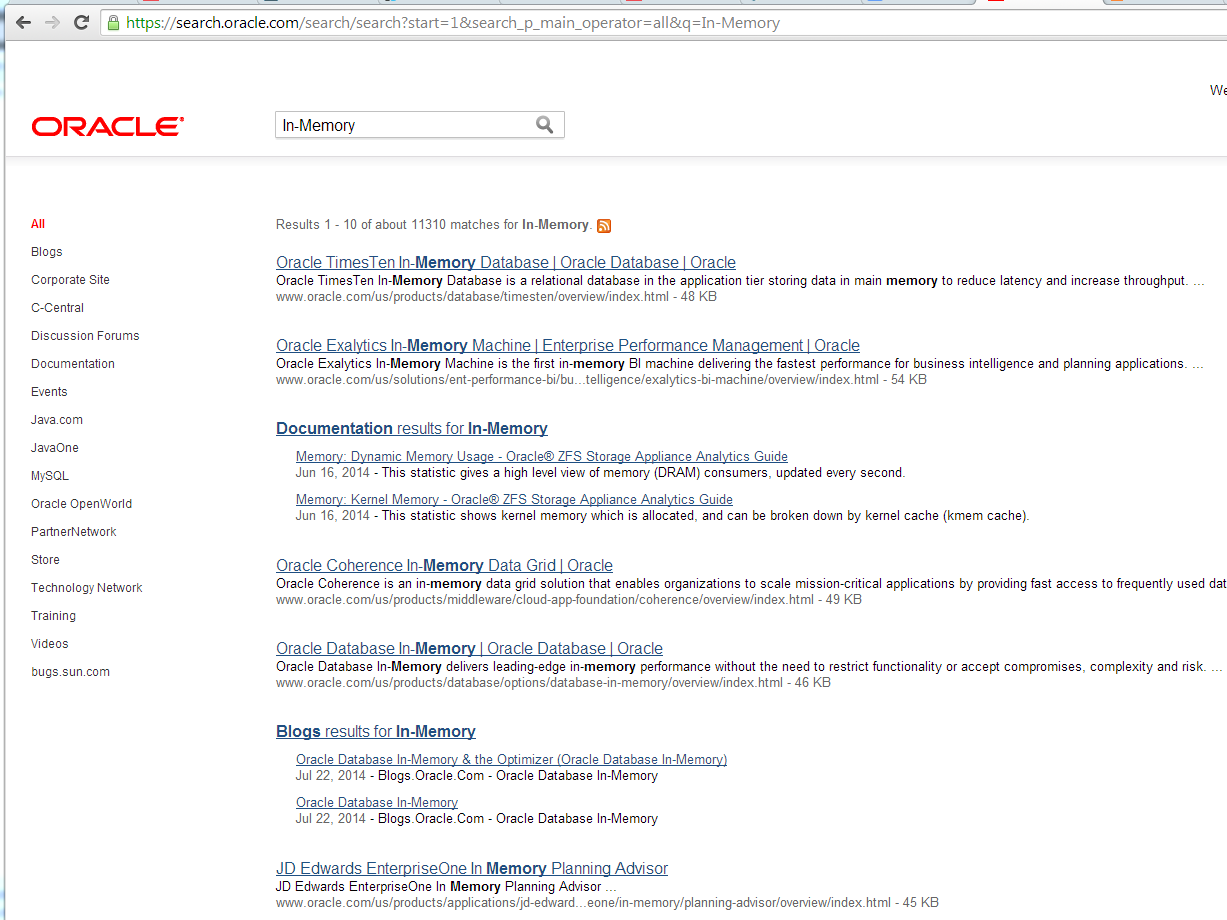
None of us can forget the era when Oracle referred to the flash storage in Exadata as a “Database In-Memory” platform. I wrote about all that in a post you can view here: click this. But I’m not blogging about any of that. Nonetheless, I remained confused about the option/feature this morning as I was waiting for my download of Oracle Database 12c Release 12.1.0.2 to complete. So, I spent a little time trying to cut through the fog and get some more information about the In-Memory Option. My first play was to search for the term in the search bar at oracle.com. The following screen shot shows the detritus oracle.com returned due to the historical misuse and term overload–but, please, remember that I’m not blogging about any of that:

In-Memory-12c-Oraclecom-Pollution

As the screenshot shows one must eyeball their way down through 8 higher-ranking search results that have nothing to do with this very important new feature before one gets to a couple of obscure blog links. All this term overload and search failure monkey-business is annoying, yes, but I’m not blogging about any of that.

What Am I Blogging About?

This is part I in a short series about Oracle licensing ramifications of the In-Memory Option/In-Memory Column Store Feature.

The very first thing I did after installing the software was to invoke the SLOB database create scripts to quickly get me on my way. The following screen shot shows how I discovered that the separately-licensed In-Memory query feature is enabled by default. If there is any confusion over my use of the word enabled, please click here for a screenshot of Oracle documentation on the parameter. And now, the screen shot showing the default in an instance of the database:

inmem1

Now, this is no huge red flag because separately-licensed features like Real Application Clusters and Partitioning are sort of “on” by default. This fact about RAC and Partitioning doesn’t bother me because a) one can simply unlink RAC to be safe from accidental usage and b) everyone that uses Enterprise Edition uses the Partitioning Option (I am correct on that assertion, right?).  However, I think things are a little different with the In-Memory Option/In-Memory Column Store feature since it is “on” by default and a simple command like the one in the following screen shot means your next license audit will be, um, more entertaining.

in-mem-timebomb

OK, please let me point out  that I’m trying as hard as I can to not make a mountain out of a mole-hill. I started this post by stating my true feelings about this release. This release is, indeed, hugely important. That said, I do not believe for a second that every Enterprise Edition deployment of Oracle Database 12c Release 12.1.0.2 will need to have the In-Memory Option/In-Memory Column Store Feature in the shopping cart–much unlike Partitioning for example. Given the crushing cost of this option/feature I expect that its use will be very selective. It’s for this reason I wanted to draw to people’s attention the fact that–in my assessment–this option/feature is very easy to use “accidentally.” It really should have a default initialization setting that renders the option/feature more dormant–but the reality is quite the opposite as I will show in Part II. (BLOG UPDATE 2014.07.26: Many Oracle separately licensed features are enabled by default but users actually have to “use” the feature to trigger feature usage as would show up in an audit. Please see Part II where I show that registered usage of this feature happens even if one doesn’t “use” the feature.)

Summary

I have to make this post short and relegate it to part I in a series because I can’t yet take it to the next level which is to write about monitoring the feature usage. Why? Well, as I tweeted earlier today, the scripts most widely used for monitoring feature usage are out of date because they don’t (yet) report on the In-Memory Column Store feature. The scripts I allude to are widely known by Google search as MOS 1317265.1. Once these are updated to report usage of the In-Memory Option/In-Memory Column Store Feature I’ll post part II in the series.

Thoughts?

Please click on the following link to view Part II in this series: Link to Part II.


BLOG UPDATE 2014.07.29: As you read this please bear in mind the words in this tweet issued by Oracle’s Maria Colgan  and consider whether I am saying you “don’t have 2 [sic] do anything” to trigger feature usage. You’ll find that I am saying the opposite in this post. The point is, however, the feature ships ready for you to do this. The feature is enabled by default as per Oracle’s spokesman as reported by informationweek.com and my example herein merely corroborates the spokesman’s assertion.

BLOG UPDATE 2014.07.28: Please don’t forget to view this post (click here) with clear proof that neither the INMEMORY_SIZE nor INMEMORY_QUERY initialization parameters  prevent triggering usage of the In-Memory feature.

BLOG UPDATE 2014.07.28: Here is a link to an Informationweek.com article as of 26 July 2014. In the comment section the author quotes an Oracle spokesman as saying “Yes, Oracle Database In-Memory is an option and it is on by default, as have been all new options since Oracle Database 11g.” :       Link to 26 July version of Informationweek.com article. Other supporting links: Screenshot 1, Screenshot 2, Screenshot 3PDF of  26 July 2014 Informationweek article

BLOG UPDATE 2014.07.25: There is now a Part II posting available in this series.  Link to Part II.


When Storage is REALLY Fast Even Zero-Second Wait Events are Top 5. Disk File Operations I/O: The Mystery Wait Event.

The SLOB code that is generally available here differs significantly from what I often test with in labs. Recently I was contorting SLOB to hammer an EMC XtremIO All-Flash Array in a rather interesting way. Those of you in the ranks of the hundreds of SLOB experts out there will notice two things quickly in the following AWR snippet:

1)   Physical single block reads are being timed by the Oracle wait interface at 601 microseconds (3604/5995141 == .000601) and this is, naturally for SLOB, the top wait event.

2)   Disk file operations I/O is ranking as a top 5 timed event. This is not typical for SLOB.


file-io-operations

The 601us latencies for XtremIO are certainly no surprise. After all, this particular EMC storage array is an All-Flash Array so there’s no opportunity for latency to suffer as is the case with alternatives such as flash-cache approaches. So what is this blog post about? It’s about Disk file operations I/O.

I needed to refresh my memory on what the Disk file operations I/O event was all about. So, I naturally went to consult the Statistics Description documentation. Unfortunately there was no mention of the wait even there so I dug further to find it documented in the Description of Wait Events section of the Oracle Database 11g documentation which states:

This event is used to wait for disk file operations (for example, open, close, seek, and resize). It is also used for miscellaneous I/O operations such as block dumps and password file accesses.

Egad. A wait is a blocking system call. Since open(2)/close(2) and seek(2) are non-blocking on normal files I suppose I could have suffered a resize operation–but wait, this tablespace doesn’t allow autoextend.  I suppose I really shouldn’t care that much given the fact that the sum total of wait time was zero seconds. But I wanted to understand more so I sought information from the user community–a search that landed me happily at Kyle Hailey’s post on oaktableworld.com here. Kyle’s post had some scripts that looked promising for providing more information about these waits but unfortunately in my case the scripts returned no rows found.

So, at this point, I’ll have to say that the sole value of this blog post is to point out the fact that a) the Oracle documentation specifically covering statistics descriptions is not as complete as the Description of Wait Events section and b) the elusive Disk file operations I/O wait event remains, well, elusive and that this is now part I in a multi-part blog series until I learn more. I’ll set up some traces and see what’s going on. Perhaps Kyle will chime in.


Interesting SLOB Use Cases – Part I. Studying ZFS Fragmentation. Introducing Bart Sjerps.

This is the first installment in a series of posts I’m launching to share interesting use cases for SLOB. I have several installments teed up but to put a spin on things I’m going to hit two birds with one stone in this installment. The first bird I’ll hit is to introduce a friend and colleague, Bart Sjerps, who I just added to my blogroll. The other bird in my cross-hairs is this interesting post Bart wrote some time back that covers a study of ZFS fragmentation using SLOB.

Bart Sjerps on ZFS Fragmentation. A SLOB study.

As always, please visit the SLOB Resources Page for SLOB kit and documentation.


EMC XtremIO – The Full-Featured All-Flash Array. Interested In Oracle Performance? See The Whitepaper.

NOTE: There’s a link to the full article at the end of this post.

I recently submitted a manuscript to the EMC XtremIO Business Unit covering some compelling lab results from testing I concluded earlier this year. I hope you’ll find the paper interesting.

There is a link to the full paper at the bottom of this block post. I’ve pasted the executive summary here:

Executive Summary

Physical I/O patterns generated by Oracle Database workloads are well understood. The predictable nature of these I/O characteristics have historically enabled platform vendors to implement widely varying I/O acceleration technologies including prefetching, coalescing transfers, tiering, caching and even I/O elimination. However, the key presumption central to all of these acceleration technologies is that there is an identifiable active data set. While it is true that Oracle Database workloads generally settle on an active data set, the active data set for a workload is seldom static—it tends to move based on easily understood factors such as data aging or business workflow (e.g., “month-end processing”) and even the data source itself. Identifying the current active data set and keeping up with movement of the active data set is complex and time consuming due to variability in workloads, workload types, and number of workloads. Storage administrators constantly chase the performance hotspots caused by the active dataset.

All-Flash Arrays (AFAs) can completely eliminate the need to identify the active dataset because of the ability of flash to service any part of a larger data set equally. But not all AFAs are created equal.

Even though numerous AFAs have come to market, obtaining the best performance required by databases is challenging. The challenge isn’t just limited to performance. Modern storage arrays offer a wide variety of features such as deduplication, snapshots, clones, thin provisioning, and replication. These features are built on top of the underlying disk management engine, and are based on the same rules and limitations favoring sequential I/O. Simply substituting flash for hard drives won’t break these features, but neither will it enhance them.

EMC has developed a new class of enterprise data storage system, XtremIO flash array, which is based entirely on flash media. XtremIO’s approach was not simply to substitute flash in an existing storage controller design or software stack, but rather to engineer an entirely new array from the ground-up to unlock flash’s full performance potential and deliver array-based capabilities that are unprecedented in the context of current storage systems.

This paper will help the reader understand Oracle Database performance bottlenecks and how XtremIO AFAs can help address such bottlenecks with its unique capability to deal with constant variance in the I/O profile and load levels. We demonstrate that it takes a highly flash-optimized architecture to ensure the best Oracle Database user experience. Please read more:  Link to full paper from emc.com.

Oracle Exadata Database Machine: Proving 160 Xeon E7 Cores Are As “Slow” As 128 Xeon E5 Cores?

Reading Data Sheets
If you are in a position of influence affecting technology adoption in your enterprise you likely spend a lot of time reading data sheets from vendors.  This is just a quick blog entry about something I simply haven’t taken the time to cover even though the topic at hand has always be a “problem.” Well, at least since the release of the Oracle Exadata Database Machine X2-8.

In the following references and screenshots you’ll see that Oracle cites 1.5 million flash read IOPS as an expected limit for both the full-rack Oracle Exadata Database Machine X3-2 and the Oracle Exadata Database Machine X3-8. All machines have limits and Exadata is no exception. Notice how I draw attention to the footnote that accompanies the flash read IOPS claim. Footnote number 3 says that both of these Exadata models are limited in flash read IOPS by the database host CPU. Let me repeat that last bit for anyone scrutinizing my words for reasons other than education: The Oracle Exadata Database Machine data sheets explicitly state flash read IOPS are limited by host CPU.

Oracle’s numbers in this case are SQL-driven from Oracle instances. I have no doubt these systems are both capable of achieving 1.5 million read IOPS from flash because, truth be told, that isn’t really all that many IOPS–especially when the IOPS throughput numbers are not accompanied by service times. In the 1990s it was all about “how much” but in modern times it’s about “how fast.” Bandwidth is an old, tired topic. Modern platforms are all about latency. Intel QPI put the problem of bandwidth to rest.

So, again, I don’t doubt the 1.5 million flash read IOPS citation. Exadata has a lot of flash cards and a lot of host processors to drive concurrent I/O. Indeed, with the concurrent processing capabilities of both of these Exadata models, Oracle would be able to achieve 1.5 million IOPS even if the service times were more in line with what one would expect with mechanical storage. Again, we never see service time citations so in actuality the 1.5 million number is just a representation of how much in-flight I/O the platform can handle.

Here is the new truth: IOPS is a storage bandwidth metric.

Host CPU Limited! How Many CPUs?
Here’s the stinger: Oracle blames host CPU for the 1.5 million flash read IOPS number. The problem with that is the X3-2 has 128 Xeon E5-2690 processor cores and the X3-8 has 160 Xeon E7-8870 processor cores. So what is Oracle’s real message here? Is it that the cores in the X3-8 are 20% slower than those in the X3-2 model? I don’t know. I can’t put words in Oracle’s mouth. However, if the data sheet is telling the truth then one of two things is true, either a) the E5-2690 processors are indeed 20% faster on a per-core basis than the E7-8870 or b) there is a processing asymmetry problem.

Not All CPU Bottlenecks Are Created Equal
Oracle would likely not be willing to dive into technical detail to the same level I do. Life is a series of choices–including who you chose to buy storage and platforms from. However, Oracle’s literature is clear about the number of active 40Gb QDR Infiniband ports there are in each configuration and this is where the asymmetry comes in. There are 8 active ports in both of these models. That means there are 8 streams of interrupt handling in both cases–regardless of how many cores there are in total.

As is the case with any networked storage, I recommend you monitor mpstat -P ALL output on database hosts to see whether there are cores nailed to the wall with interrupt processing at levels below total CPU-saturation.  Never settle for high-level aggregate CPU utilization monitoring. Instead, drill down to the per-core level to watch out for asymmetry. Doing so is just good platform scientist work.

Between now and the time you should find yourself in a proof of concept test situation with Exadata, don’t hesitate to ask Oracle why–by their own words–both 128 cores and 160 cores are equally saturated when delivering maximum read IOPS in the database grid. After all, they charge the same per core (list price) to license Oracle Database on either of those processors.

Nice and Concise?
By the way, is there anyone who actually believes that both of these platforms top out at precisely 1.5 million flash read IOPS?

Oracle Exadata Database Machine X3-2 Datasheet

X3-2-datasheet-IOPS

Oracle Exadata Database Machine X3-8 Datasheet

X3-8-datasheet-IOPS

DISCLAIMER: This post tackles citations straight from Oracle published data sheets and published literature.

SLOB 2 — A Significant Update. Links Are Here.

BLOG UPDATE: 2014.05.15:  The following link supersedes all other references to SLOB kit and patches. This will always be the up-to-date locale:  https://kevinclosson.wordpress.com/slob/

BLOG UPDATE 2013.12.26:   Quick link to download the kit

BLOG UPDATE 2012.05.05: Updated the tar archive distribution file with some bug fixes.  Simply preserve your slob.conf file and extract this tar archive over your prior SLOB install directory.

BLOG UPDATE 2012.05.04: The PDF README will no longer be bundled in with the tar archive. The README can be found here:  SLOB2 README.

BLOG UPDATE 2012.05.03: First time visitors should see the introductory page for SLOB.

About SLOB 2
I’ve already socialized the SLOB 2 update via twitter and a lot of friends have had early access to the kit. So, this is just a very brief blog entry to point to SLOB 2.

I’ve written a form of a release note that will be sufficient for current SLOB users to move forward rapidly with new SLOB 2 features. The note can be found here: SLOB 2 README or here.

Download The SLOB2 Kit
To download the software you can access the tar archive on EMC Syncplicity. Click SLOB 2 Tar Archive.

After downloading you should verify the md5sum:

$ md5sum 2013.05.05.slob2.tar
e1e67a68bf253a02532ebd556a2ea782  2013.05.05.slob2.tar
$

Announcing EMC WORLD 2013 Flash Related Sessions

Interested In EMC Flash Products Division Technology?
This is just a quick blog entry to announce sessions at EMC WORLD offered by speakers from EMC’s Flash Products Division.  The sessions I’m speaking at is the one about accelerating SQL Server and Oracle with EMC XtremSW Cache.

flash-sessions-EMCWORLD

EMCWORLD2013

My First Words on Oracle’s SPARC T5 Processor — The World’s Fastest Microprocessor?

On March 26, 2013, Oracle announced a server refresh based on the new SPARC T5 processor[1].  The press release proclaims SPARC T5 is the “World’s Fastest Microprocessor”—an assertion backed up with a list of several recent benchmark results included a published TPC-C result.

This article focuses on the recent SPARC T5 TPC-C result–a single-system world record that demonstrated extreme throughput. The SPARC T5 result bested the prior non-clustered Oracle Database result by 69%! To be fair, that was 69% better than a server based an Intel Xeon E7 processor slated to be obsolete this year (with the release of Ivy Bridge-EX). Nonetheless, throughput is throughput and throughput is all that matters, isn’t it?

What Costs Is What Matters
There are several ways to license Oracle Database. Putting aside low-end user-count license models and database editions other than Enterprise Edition leaves the most common license model which is based on per-processor licensing.

To layman, and seasoned veteran alike, mastering Oracle licensing is a difficult task. In fact, Oracle goes so far as to publish a Software Investment Guide[2] that spells out the necessity for licensees to identify personnel within their organization responsible for coping with license compliance. Nonetheless, there are some simple licensing principles that play a significant role in understanding the relevance of any microprocessor being anointed the “fastest in the world.”

One would naturally presume “fastest” connotes cost savings when dealing with microprocessors.  Deploying faster processors usually should mean fewer are needed thus yielding cost savings spanning datacenter physical and environmental savings as well as reduced per-processor licensing.  Should, that is.

What is a Processor?
Oracle’s Software Investment Guide covers the various licensing models available to customers. Under the heading “Processor Metric” Oracle offers several situations where licensing by the processor is beneficial. The guide goes on to state:

The number of required licenses shall be determined by multiplying the total number of cores of the processor by a core processor licensing factor specified on the Oracle Processor Core Factor Table

As this quoted information suggests, the matter isn’t as simple as counting the number of processor “sockets” in a server. Oracle understands that more powerful processors allow their customers to achieve more throughput per core.  So, Oracle could stand to lose a lot of revenue if per-core software licensing did not factor in the different performance characteristics of modern processors. In short, Oracle is compelled to charge more for faster processors.

As the Software Investment Guide states, one must consult the Oracle Processor Core Factor Table[3] in order to determine list price for a specific processor. The Oracle Processor Core Factor Table has a two-columns—one for the processor make and model and the other for the Licensing Factor. Multiplying the Licensing Factor times the number of processor cores produces list price for Oracle software.

The Oracle Processor Core Factor Table is occasionally updated to reflect new processors that come into the marketplace. For example, the table was updated on October 2, 2010, September 6, 2011 and again on March 26, 2013 to correspond with the availability of Oracle’s T3, T4 and T5 processor respectively.  As per the table, the T3 processor was assigned a Licensing Factor of .25 whereas the T4 and T5 are recognized as being more powerful and thus assigned a .5 factor.  This means, of course, that any customer who migrated from T3 to T4 had to ante-up for higher-cost software—unless, of course, the T4 allowed the customer to reduce the number of cores in the deployment by 50%.

The World’s Fastest Microprocessor
According to dictionary definition, something that is deemed fast is a) characterized by quick motion, b) moving rapidly and/or c) taking a comparatively short time. None of these definitions imply throughput as we know it in the computer science world. In information processing, fast is all about latency whether service times for transactions or underlying processing associated with transactions such as memory latency.

The TPC-C specification stipulates that transaction response times are to be audited along with throughput. The most important transaction is, of course, New Order. That said, the response time of transactions on a multi-processing computer have little bearing on transaction throughput. This fact is clearly evident in published TPC-C results as will be revealed later in this article.

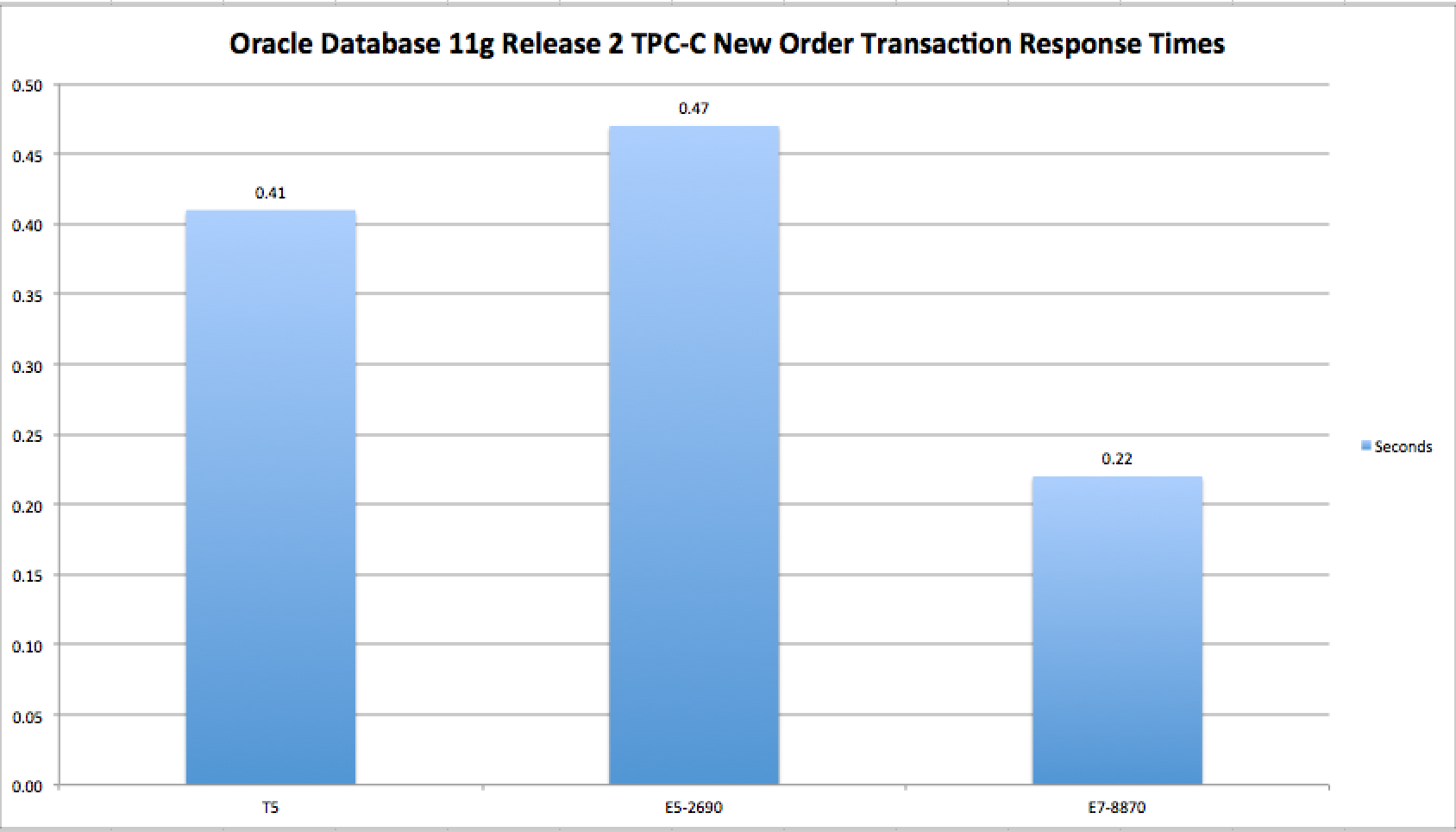
Figure 1 shows the New Order 90th-percentile response times for the three most recently published Oracle Database 11g TPC-C results[4]. Included in the chart is a depiction of Oracle’s SPARC T5 demonstrating an admirable 13% improvement in New Order response times compared to current[5] Intel two-socket Xeon server technology. That is somewhat fast. On the contrary, however, one year—to the day—before Oracle published the SPARC T5 result, Intel’s Xeon E7 processors exhibited 46% faster New Order response times than the SPARC T5. Now that, is fast.
This is a Caption

Figure 1: Comparing Oracle Database TPC-C Transaction Response Times. Various Platforms. Smaller is better.

Cost Is Still All That Matters
According to the Oracle Technology Global Price List dated March 15, 2013[6], Oracle Database Enterprise Edition with Real Application Clusters and Partitioning has a list price of USD $82,000 “per processor.” As explained above in this article, one must apply the processor core factor to get to the real list price for a given platform. It so happens that all three of the processors spoken of in Figure 1 have been assessed a core factor of .5 by Oracle. While all three of these processors are on par in the core factor category, they have have vastly different numbers of cores per socket. Moreover, the servers used in these three benchmarks had socket-counts ranging from 2 to 8. To that end, the SPARC T5 server had 128 cores, the Intel Xeon E7-8870 server had 80 cores and the Intel Xeon E5-2690 server had 16 cores.

Performance Per Oracle License
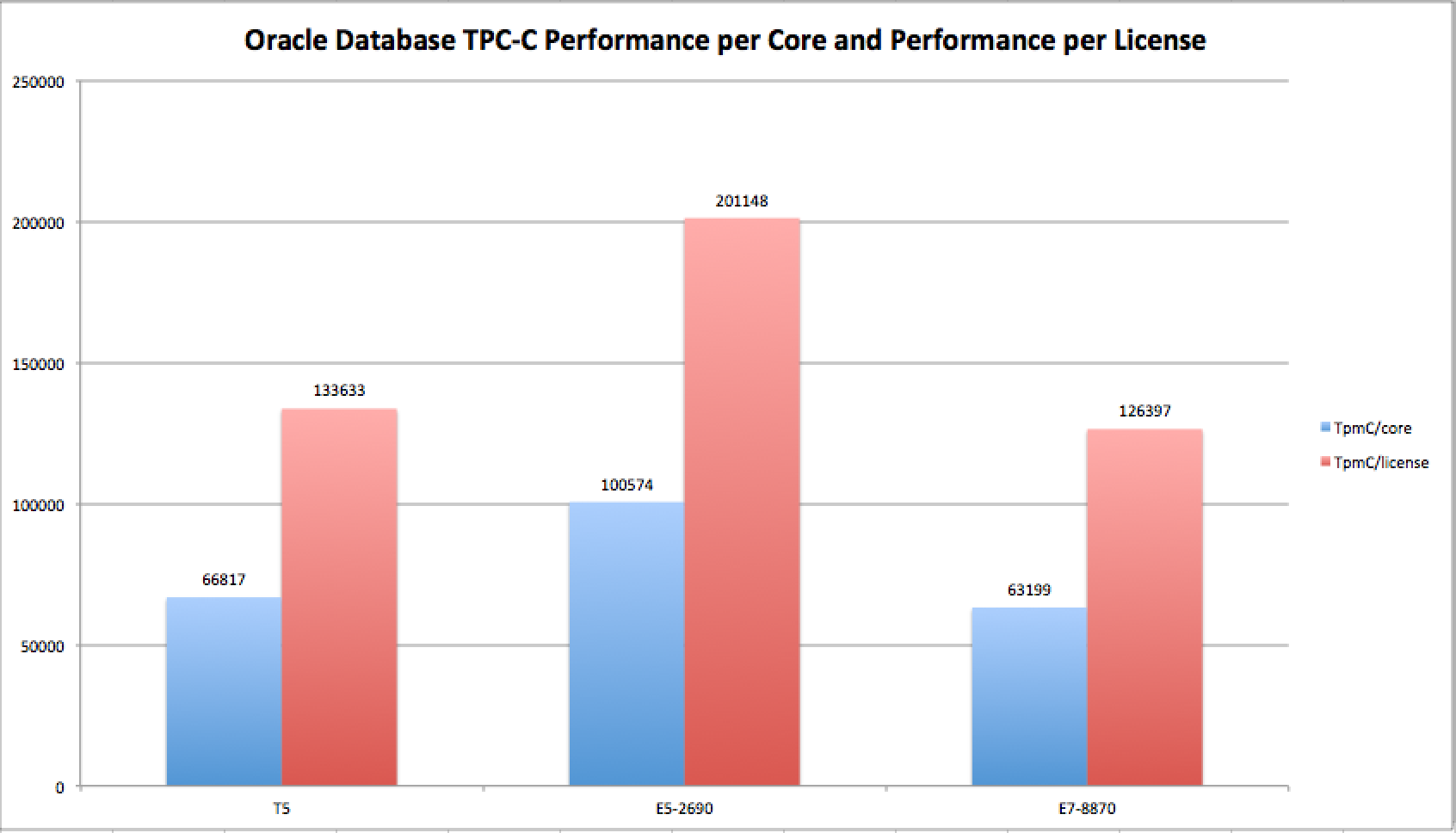
Given the core counts, license factor and throughput achieved for the three TPC-C benchmarks discussed in the previous section of this article, one can easily calculate the all-important performance-per-license attributes of each of the servers. Figure 2 presents TPC-C throughput per core and per Oracle license in a side-by-side visualization for the three recent TPC-C results.
Figure 2: Comparing Oracle Database TPC-C Performance per-core and per-license. Bigger is better.

Figure 2: Comparing Oracle Database TPC-C Performance per-core and per-license. Bigger is better.

The Importance of Response Times
In order to appreciate the rightful importance of response time in characterizing platform performance, consider the information presented in Figure 3. Figure 3 divides response time into TPC-C performance per core. Since the core factor is the same for each of these processors this is essentially weighing response time against license cost.

To add some historical perspective, Figure 3 also includes an Oracle Database 11g published TPC-C result[7] from June 2008 using Intel’s Xeon 5400 family of processors which produced 20,271 TpmC/core and .2 seconds New Order response times. It is important to point out that the core factor has always been .5 for Xeon processors. As Figure 3 shows, SPARC T5 outperforms the 2008-era result by about 35%. On the other hand, the Intel two-socket Xeon E5 result delivers 31% better results in this type of performance assessment. Finally, the Intel 8-socket Xeon E7 result outperformed SPARC T5 by 76%. If customers care about both response time and cost these are important data points.
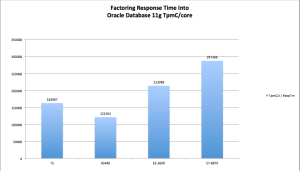
Figure 3: Performance Per Core weighted by Transaction Response Times. Bigger Is Better.

Figure 3: Performance Per Core weighted by Transaction Response Times. Bigger Is Better.

Parting Thoughts
I accept the fact that there are many reasons for Oracle customers to remain on SPARC/Solaris—the most significant being postponing the effort of migrating to Intel-based servers. I would argue, however, that such a decision amounts to postponing the inevitable. That is my opinion, true, but countless Oracle shops made that move during the decade-long decline of Sun Microsystems market share. In fact, Oracle strongly marketed Intel servers running Real Application Clusters attached to conventional storage (mostly sourced from EMC) as a viable alternative to Oracle on Solaris.

I don’t speak lightly of the difficulty in moving off of SPARC/Solaris. In fact, I am very sympathetic of the difficulty such a task entails. What I can’t detail, in this blog entry, is a comparison between re-platforming from dilapidated SPARC servers and storage to something 21st-century—such as a converged infrastructure platform like VCE.  It all seems like a pay-now or pay-later situation to me. Maybe readers with a 5-year vision for their datacenter can detail for us why one would want to gamble on the SPARC roadmap.

[4] Oracle SPARC T5 3/26/2013 http://www.tpc.org/1792, Intel Xeon E5-2690 http://www.tpc.org/1789, Intel Xeon E7-8870 http://www.tpc.org/1787

[5] As of the production date of this article, 2013 is the release target for the Ivy Bridge-EP 22nm die shrink next-generation improvement in Intel’s Xeon E5 family

Can Oracle Database Release 2 (11.2.0.3) Properly Count Cores? No. Does It Matter All That Much? Not Really..

…and with a blog post title like that who would bother to read on? Only those who find modern platforms interesting…

This is just a short, technically-light blog post to point out an oddity I noticed the other day.

This information may well be known to everyone else in the world as far as I know, but it made me scratch my head so I’ll blog it. Maybe it will help some wayward googler someday.

AWR Reports – Sockets, Cores, CPUs
I’m blogging about the Sockets/Cores/CPUs reported in the top of an Oracle AWR report.

Consider the following from a Sandy Bridge Xeon (E5-2680 to be exact) based server.

Note: These are AWR reports so I obfuscated some of the data such as hostname and instance name.

WORKLOAD REPOSITORY report for

DB Name         DB Id    Instance     Inst Num Startup Time    Release     RAC
------------ ----------- ------------ -------- --------------- ----------- ---
SLOB          3521916847 SLOB                1 29-Sep-12 05:27 11.2.0.3.0  NO

Host Name        Platform                         CPUs Cores Sockets Memory(GB)
---------------- -------------------------------- ---- ----- ------- ----------
NNNN             Linux x86 64-bit                   32    16       2      62.87

OK, that’s simple enough. We all know that E5-2680 is an 8-core part with SMT (Simultaneous Multi-threading) enabled. Further, this was a 2U 2-socket box. So, sure, 2 sockets and a sum of 16 cores. However, with SMT I get 32 “CPUs”. I’ve quoted CPU because they are logical processors.

The next example is a cut from an old Harpertown Xeon (Xeon 5400) AWR report. Again, we all know the attributes of that CPU. It was pre-QPI, pre-SMT and it had 4 cores. This was a 2-socket box—so no mystery here. AWR is reporting 2 sockets, a sum of 8 cores and since they are simple cores we see 8 “CPUs”.

WORKLOAD REPOSITORY report for

DB Name         DB Id    Instance     Inst Num Startup Time    Release     RAC
------------ ----------- ------------ -------- --------------- ----------- ---
XXXX          1247149781 xxxx1               1 27-Feb-13 11:32 11.2.0.3.0  YES

Host Name        Platform                         CPUs Cores Sockets Memory(GB)
---------------- -------------------------------- ---- ----- ------- ----------
xxxxxxxx.mmmmmm. Linux x86 64-bit                    8     8       2      62.88

Now The Oddity
Next I’ll show a modern AMD processor. First, I’ll grep some interesting information from /proc/cpuinfo and then I’ll show the top of an AWR report.

$ cat  /proc/cpuinfo | egrep 'processor|vendor_id|model name'
processor       : 31
vendor_id       : AuthenticAMD
model name      : AMD Opteron(TM) Processor 6272

$ head -10 mix_awr_16_8k.16.16

WORKLOAD REPOSITORY report for

DB Name         DB Id    Instance     Inst Num Startup Time    Release     RAC
------------ ----------- ------------ -------- --------------- ----------- ---
XXXXXX         501636137 XXXXXX              1 24-Feb-13 12:21 11.2.0.3.0  NO

Host Name        Platform                         CPUs Cores Sockets Memory(GB)
---------------- -------------------------------- ---- ----- ------- ----------
oel63            Linux x86 64-bit                   32    16       2     252.39

The system is, indeed, a 2-socket box. And cpuinfo is properly showing the processor model number (Opteron 6200 family). Take note as well that the tail of cpuinfo output is CPU 31 so the Operating System believes there are 32 “CPUs”. However, AWR is showing 2 sockets, a sum of 16 cores and 32 CPUs. That’s where the mystery arises. See, the Operton 6200 16-core parts (such as the 6272) are a multi-chip module (MCM) consisting of two soldered dies each with 4 “bulldozer modules.” And never forget that AMD does not do multithreading. So that’s 2x2x4 cores in each socket. However, AWR is reporting a sum of 16 cores in the box. Since there are two sockets, AWR should be reporting 2 sockets, a sum of 32 cores and 32 CPUs. Doing so would more accurately follow the convention we grew accustomed to in the pre-Intel QPI days—as was the case above with the Xeon 5400.

In summary, none of this matters much. The Operating System knows the cores are there and Oracle thinks there are 32 “CPUs”. If you should run across a 2-socket AMD Operton 6200-based system and see this oddity, well, it won’t be so odd any longer.

Multiple Multi-Core Modules on Multiple Dies Glued Together (MCM)?
…and two of them in one system? That’s the “N” In NUMA!

Can anyone guess how many NUMA nodes there are when a 2-Socket box with AMD 6272 parts is booted at the BIOS with NUMA on? Does anyone know what the model is called when one boots NUMA x64 hardware with NUMA disabled in the BIOS (or grub.conf numa=off)? Well, SUMA, of course!

My Oaktable World 2012 Video Session Is Now Online

Oaktable World 2012 was an event held during last year’s Oracle OpenWorld 2012 at a venue within walking distance of the Moscone Center. More information about Oaktable World can be found here.

The venue lent itself to good deep-technical discussions and free-thinking. However, as people who attended OpenWorld 2012 know, San Francisco was enduring near all-time record high temperatures. It must have been 98F inside the venue. The heat was only so much fun. I had to throw in a pretty nasty head cold. All of that aside, I took the podium one afternoon and was pleased to have a full house to present to.

The slides I brought touched on such topics as performance per core across generations of x64 hardware and methodologies for studying such things. I also spoke of Intel’s Turbo Boost 2.0 and how folks should add clock frequency monitoring tools to their standard bad of tricks.

The final master of the video is the fruit of Marcin Przepiorowski’s labor. For some reason there was a lot of audio/video troubles in the master. Marcin really outdid himself to stitch all this back together. Thanks, Marcin.

So, a lot was lost from the session—to include the Q/A. However, I’d like to offer a link to the video and open this post up for questions on the material.

The video can be found here.


Using Linux Perf(1) To Analyze Database Processes – Part I

Troubleshooting Runaway Processes
Everyone reads Tanel Poder’s material—for good reason.

I took particular interest in his recent post about investigating where an apparently runaway, cpu-bound, Oracle foreground process is spending its time.  That article can be found here.

I’ve been meaning to do some blogging about analyzing Oracle execution with perf(1). I think Tanel’s post is a good segue for me to do so. You might ask, however, why I would bother attempting to add value in a space Tanel has already blogged. Well, to that I would simply say that modern systems professionals need as many tools as they can get their hands on.

Tanel, please ping me if you object, for any reason, to my direct links to your scripts.

Monitoring Window
Tanel’s approach to monitoring his cpu-bound foreground process is based on the pstack(1) utility. Once he identified the spinning process he fired off a 100 pstack commands in a loop. For each iteration, the output of pstack was piped through a text processing script (os_explain).  From my reading of that script I estimate it probably takes about 10 milliseconds to process the data flowing into it. I’m estimating here so please bear with me. If pstack execution requires zero wall clock time I think these 100 snoops at the process stack likely occur in 1 second of wall clock time. According to Tanel, the SQL takes about 23 minutes to complete. If the foreground process is looping just a small amount of code then I see no problem monitoring a small portion of its overall execution time. Since you can see what Tanel is doing you know it would be simple to grab the process every so often throughout its life and monitor the approximate 1 second with the 100 iterations of pstack. The technique and tools Tanel shares here are extensible. That is good.

Perturbation
The Linux pstack utility stops the execution of a process in order to read its stack and produce output to standard out. Performance engineering techniques should always be weighed against the perturbation levied by the monitoring method.  I recall the olden days of CA Unicenter brutally punishing a system just to report performance metrics. Ouch.

Monitoring a cpu-bound process, even periodically, with pstack will perturb performance. There is such a thing as an acceptable amount of perturbation though. Once must decide for themselves what that acceptable level is.

I would like to offer an example of pstack perturbation. For this exercise I will use the silly core-stalling program I call “fat.” This program suffers a lot of processor stalls because it has very poor cache locality. The program can be found here along with its cousin, “skinny.” Aptly named, skinny fits in cache and does not stall.  The following shows that the program executes in 51.251 seconds on my Nehalem Xeon server when executed in isolation.  However, when I add 100 pokes with pstack the run time suffers 5% degradation.

$
$ cat p.sh
#!/bin/bash

time ./fat &
p=`ps -f | awk ' $NF ~ /.fat/ { print $2 }'`

for i in {1..100}
do
	pstack $p
done  > /dev/null 2>&1
wait
$
$ sh ./p.sh

real	0m53.836s
user	0m50.604s
sys	0m0.024s
$
$ time ./fat

real	0m51.251s
user	0m51.221s
sys	0m0.013s
$

I know 5% is not a lot but this is a cpu-bound process so that is a lot of cycles. Moreover, this is a process that is not sharing any data nor exercising any application concurrency mechanisms (e.g., spinlocks, semaphores).  I understand there is little danger in perturbing the performance of some runaway processes but if such a process is also sharing data there can be ancillary affect when troubleshooting a large-scale problem.  Before I move on I’d like to show how the execution time of “fat” changes when I gather 100 pstacks as soon as the process is invoked and then wait 10 seconds before gathering another 100 stack readings. As the following shows, the perturbation meter climbs up to 13%:

$ cat p2.sh
#!/bin/bash

time ./fat &
p=`ps -f | awk ' $NF ~ /.fat/ { print $2 }'`

for t in 1 2
do
	for i in {1..100}
	do
		pstack $p
	done  > /dev/null 2>&1
sleep 10
done

wait
$ sh ./p2.sh

real	0m57.930s
user	0m51.480s
sys	0m0.050s
$

Performance Profiling With perf(1)
As I said, I’ve been trying to work out the time to blog about how important perf(1) should be to you in your Oracle monitoring—or any performance analysis for that matter. It requires a modern Linux distribution (e.g., RHEL 6, OEL 6) though. I can’t write a tutorial on perf(1) in this post. However, since I’m on the topic of perturbation via monitoring tools, I’ll offer an example of perf-record(1) using my little “fat” program:

$ time perf record ./fat
[ perf record: Woken up 8 times to write data ]
[ perf record: Captured and wrote 1.812 MB perf.data (~79187 samples) ]

real	0m52.299s
user	0m52.234s
sys	0m0.046s
$

$ perf report --stdio | grep fat
# cmdline : /usr/bin/perf record ./fat
    99.81%      fat  fat                [.] main
     0.14%      fat  [kernel.kallsyms]  [k] __do_softirq
     0.02%      fat  libc-2.12.so       [.] __memset_sse2
     0.01%      fat  [kernel.kallsyms]  [k] clear_page_c
     0.01%      fat  [kernel.kallsyms]  [k] _raw_spin_unlock_irqrestore
     0.00%      fat  [kernel.kallsyms]  [k] get_page_from_freelist
     0.00%      fat  [kernel.kallsyms]  [k] free_pages_prepare

So, we see that monitoring with perf(1) does levy a small tax—2%. However, I just monitored the entire execution of the program.

Monitor Oracle Foreground Process With perf-record(1)
Now I’ll run the program Tanel used in his example.  I’ll record 5 minutes of execution by identifying the process ID of the spinning shadow process and then using the –p option to perf-record(1). The way perf(1) works is to monitor the entire execution of the program you attach to—unless you give it a process to keep it busy (or use the -c option). Now don’t be confused. In the following example I’m telling perf-record(1) to monitor the shadow process. The usage of sleep 300 is just my way of telling it to finish in 5 minutes.

$ cat t.sh

sqlplus / as sysdba < /dev/null 2>&1 &
[1] 462
$ ps -f
UID        PID  PPID  C STIME TTY          TIME CMD
oracle     462  2259  0 10:11 pts/0    00:00:00 sh ./t.sh
oracle     463   462  0 10:11 pts/0    00:00:00 sqlplus   as sysdba
oracle     465  2259  0 10:11 pts/0    00:00:00 ps -f
oracle    2259  2258  0 Feb14 pts/0    00:00:00 -bash
$ ps -ef | grep 463 | grep -v grep
oracle     463   462  0 10:11 pts/0    00:00:00 sqlplus   as sysdba
oracle     464   463 89 10:11 ?        00:00:14 oracleSLOB (DESCRIPTION=(LOCAL=YES)(ADDRESS=(PROTOCOL=beq)))
$ sudo perf record -p 464 sleep 300
[ perf record: Woken up 35 times to write data ]
[ perf record: Captured and wrote 8.755 MB perf.data (~382519 samples) ]
$

$ perf report
$ perf report --stdio
# ========
# captured on: Mon Feb 18 10:17:02 2013
# ========
#
# Events: 286K cpu-clock
#
# Overhead  Command      Shared Object                       Symbol
# ........  .......  .................  ...........................
#
    29.84%   oracle  oracle             [.] kglic0
    11.08%   oracle  oracle             [.] kgxExclusive
    11.02%   oracle  oracle             [.] kglGetHandleReference
     6.66%   oracle  oracle             [.] kglGetMutex
     6.47%   oracle  oracle             [.] kgxRelease
     4.91%   oracle  oracle             [.] kglGetSessionUOL
     4.48%   oracle  oracle             [.] kglic_cbk
     3.79%   oracle  oracle             [.] kgligl
     3.44%   oracle  oracle             [.] kglMutexHeld
     3.12%   oracle  oracle             [.] kgligp
     1.96%   oracle  oracle             [.] kqlpgCallback
     1.92%   oracle  oracle             [.] kglReleaseMutex
     1.88%   oracle  oracle             [.] kglGetBucketMutex
     1.80%   oracle  oracle             [.] kglReleaseBucketMutex
     1.47%   oracle  oracle             [.] kglIsMutexHeld
     1.18%   oracle  oracle             [.] kglMutexNotHeld
     1.04%   oracle  oracle             [.] kglReleaseHandleReference
     0.51%   oracle  oracle             [.] kghalf
     0.33%   oracle  oracle             [.] qerfxFetch
     0.32%   oracle  oracle             [.] lnxmin
     0.31%   oracle  oracle             [.] qerfxGCol
     0.26%   oracle  oracle             [.] qeruaRowProcedure
     0.24%   oracle  oracle             [.] kqlfnn

$ perf report --stdio | grep oracle | sed 's/\%//g' | awk '{ t=t+$1 } END { print t }'
99.98
$

If you study Tanel’s post and compare it to mine you’ll see differences in the cost accounting Tanel has associated with certain Oracle kernel routines. That’s no huge problem. I’d like to explain what’s happening.

When I used perf-record(1) to monitor the shadow process for 300 seconds it collected 382,519 samples. When using a pstack approach, on the other hand, just be aware that you are getting a glimpse of whatever happens to be on the stack when the program is stopped. You might be missing a lot of important events. Allow me to offer an illustration of this effect.

Do You see What I See?
Envision a sentry  guarding a wall and taking a photo every 1 second. Intruders jumping over the wall with great agility are less likely to be in view when he snaps his photo. On the other hand, an intruder taking a lot longer to cross the wall (carrying a large bag of “loot” for instance) suffers greater odds of showing up in one of his photos. The sentry might get 10 photos of slow intruders while missing hundreds of intruders who happen to be more nimble–thus getting over the wall more quickly.  For all we know, the slow intruder is carrying bags of coal while the more nimble intruders are packing a pockets full of diamonds. Which intruder matters more? It depends on how cold the sentry is I guess 🙂 It’s actually a wee-bit like that with software performance analysis. Catch me some time and I’ll explain why a CPI (cycles per instruction)  of 1 is usually bad thing. Ugh, I digress.

Tanel’s approach/kit works on a variety of operating systems and versions of Linux. It also does not require any elevated privilege. I only aim to discuss the differences.

Summary
I’ve lightly covered the topic of performance monitoring perturbation and have given a glimpse into what I envision will end up as a multiple-part series on perf(1).


DISCLAIMER

I work for Amazon Web Services. The opinions I share in this blog are my own. I'm *not* communicating as a spokesperson for Amazon. In other words, I work at Amazon, but this is my own opinion.

Enter your email address to follow this blog and receive notifications of new posts by email.

Join 741 other subscribers
Oracle ACE Program Status

Click It

website metrics

Fond Memories

Copyright

All content is © Kevin Closson and "Kevin Closson's Blog: Platforms, Databases, and Storage", 2006-2015. Unauthorized use and/or duplication of this material without express and written permission from this blog’s author and/or owner is strictly prohibited. Excerpts and links may be used, provided that full and clear credit is given to Kevin Closson and Kevin Closson's Blog: Platforms, Databases, and Storage with appropriate and specific direction to the original content.