Archive Page 5

Little Things Doth Crabby Make – Part XVIII. Automatic Storage Management Won’t Let Me Use My Disk For My Files! Yes, It Will!

It’s been a long time since my last installment in the Little Things Doth Crabby Make series and to be completely honest this particular topic isn’t really all that fit for a LTDCM installment because it covers something that is possible but less than expedient.  That said, there are new readers of this blog and maybe it’s time they google “Little Things Doth Crabby Make” to see where this series has been. This post might rustle up that curiosity!

So what is this blog post about? It’s about stuffing any file system file into Automatic Storage Management space. OK, so maybe this is just morbid curiosity or trivial pursuit. Maybe it’s just a parlor trick. I would agree with any of those descriptions. Nonetheless maybe there are 42 or so people out there who didn’t know this. If so, this post is for them.

ASMCMD cp Command

The cp sub-command of ASM lets you stuff certain database files into ASM. We all know this. However, just to make it all fresh in people’s minds I’ll show a screen shot of me trying to push a compressed tar archive of $ORACLE_HOME/bin/oracle up into ASM:

2014.02.04-pic-0

Well, that’s not surprising. But what happens if I take heed of the error message and attempt to placate? The block size is 8KB so the following screen shot shows me rounding up the size of the compressed tar archive to an 8192B blocking factor:

2014.02.04-pic-0.1

ASMCMD still won’t gobble up the file. That’s still not all that surprising because after ASMCMD checked the geometry of the file it then read the file looking for a header or any file magic it could understand.  As you can see ASMCMD doesn’t see a file type it understands. The following screen shot shows me pre-pending the tar archive with file magic I know ASMCMD must surely understand. I have a database with a tablespace called foo that I created in a non-Oracle Disk Manager naming convention (foo.dbf). The screen shot shows me:

  1. Extracting the foo.dbf file
  2. “Borrowing” 1MB from the head of the file
  3. Creating a compressed tar archive of the Oracle Database executable
  4. Rounding up the size of the compressed tar archive to an 8192B blocking factor

2014.02.04-pic1


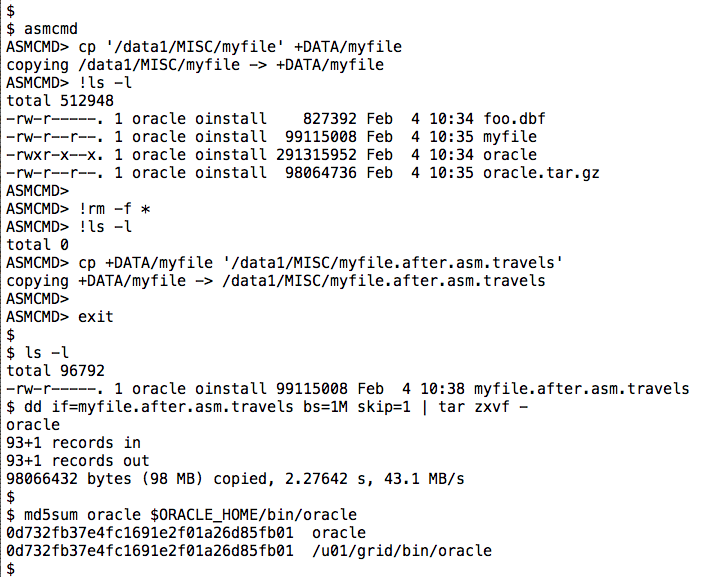
So now I have a file that has the “shape” of a datafile and the necessary header information from a datafile. The next screen shot shows:

  1. ASMCMD cp command pushing my file into ASM
  2. Removal of all of my current working directory files
  3. ASMCMD cp command pulling the file form ASM and into my current working directory
  4. Extracting the contents of the “embedded” tar archive
  5. md5sum(1) proof the file contents survived the journey

2014.02.04-pic2

OK, so that’s either a) something nobody would ever do or b) something that can be done with some elegant execution of some internal database package in a much less convoluted way or c) a combination of both “a” and “b” or d) a complete waste of my time to post, or, finally, e) a complete waste of your time reading the post. I’m sorry for “a”,”b”,”c” and certainly “e” if the case should be so.

Now you must wonder why I put this in the Little Things Doth Crabby Make series. That’s simple. I don’t like any “file system” imposing restrictions on file types 🙂


Scrutinizing Exadata X5 Datasheet IOPS Claims…and Correcting Mistakes

I want to make these two points right out of the gate:

  1. I do not question Oracle’s IOPS claims in Exadata datasheets
  2. Everyone makes mistakes

Everyone Makes Mistakes

Like me. On January 21, 2015, Oracle announced the X5 generation of Exadata. I spent some time studying the datasheets from this product family and also compared the information to prior generations of Exadata namely the X3 and X4. Yesterday I graphed some of the datasheet numbers from these Exadata products and tweeted the graphs. I’m sorry  to report that two of the graphs were faulty–the result of hasty cut and paste. This post will clear up the mistakes but I owe an apology to Oracle for incorrectly graphing their datasheet information. Everyone makes mistakes. I fess up when I do. I am posting the fixed slides but will link to the deprecated slides at the end of this post.

We’re Only Human

Wouldn’t IT be a more enjoyable industry if certain IT vendors stepped up and admitted when they’ve made little, tiny mistakes like the one I’m blogging about here? In fact, wouldn’t it be wonderful if some of the exceedingly gruesome mistakes certain IT vendors make would result in a little soul-searching and confession? Yes. It would be really nice! But it’ll never happen–well, not for certain IT companies anyway. Enough of that. I’ll move on to the meat of this post. The rest of this article covers:

  • Three Generations of Exadata IOPS Capability
  • Exadata IOPS Per Host CPU
  • Exadata IOPS Per Flash SSD
  • IOPS Per Exadata Storage Server License Cost

Three Generations of Exadata IOPS Capability

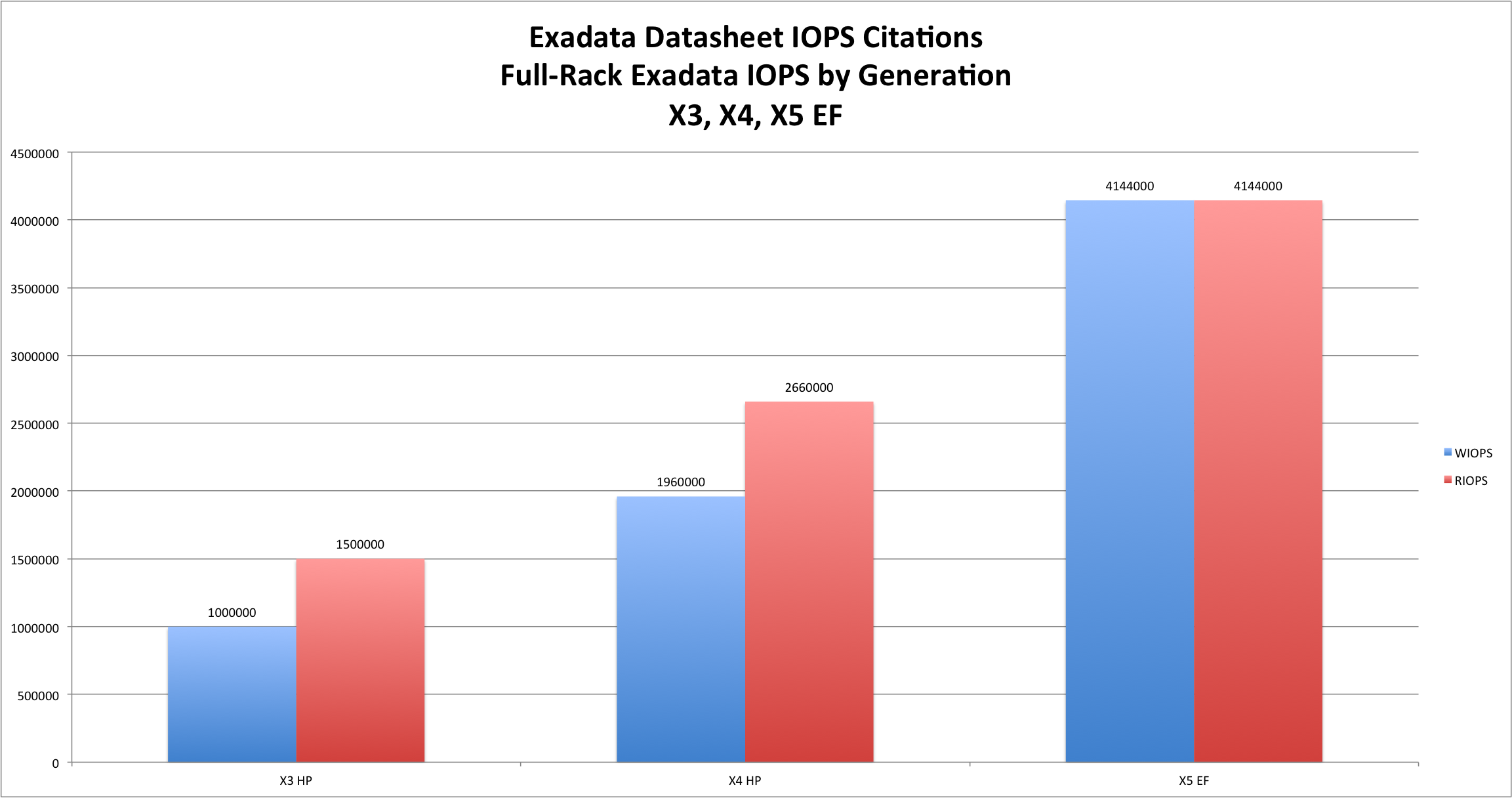
The following chart shows how Oracle has evolved Exadata from the X3 to the X5 EF model with regard to IOPS capability. As per Oracle’s datasheets on the matter these are, of course, SQL-driven IOPS. Oracle would likely show you this chart and nothing else. Why? Because it shows favorable,  generational progress in IOPS capability. A quick glance shows that read IOPS improved just shy of 3x and write IOPS capability improved over 4x from the X3 to X5 product releases. These are good numbers. I should point out that the X3 and X4 numbers are the datasheet citations for 100% cached data in Exadata Smart Flash Cache. These models had 4 Exadata Smart Flash Cache PCIe cards in each storage server (aka, cell). The X5 numbers I’m focused on reflect the performance of the all-new Extreme Flash (EF) X5 model. It seems Oracle has started to investigate the value of all-flash technology and, indeed, the X5 EF is the top-dog in the Exadata line-up. For this reason I choose to graph X5 EF data as opposed to the more pedestrian High Capacity model which has 12 4TB SATA drives fronted with PCI Flash cards (4 per storage server). exadata-evolution-iops-gold-1 The tweets I hastily posted yesterday with the faulty data points aimed to normalize these performance numbers to important factors such as host CPU, SSD count and Exadata Storage Server Software licensing costs.  The following set of charts are the error-free versions of the tweeted charts.

Exadata IOPS Per Host CPU

Oracle’s IOPS performance citations are based on SQL-driven workloads. This can be seen in every Exadata datasheet. All Exadata datasheets for generations prior to X4 clearly stated that Exadata IOPS are limited by host CPU. That is a very important fact to understand because SQL-driven IOPS is a host metric no matter what your storage is.

Indeed, anyone who studies Oracle Database with SLOB knows how all of that works. SQL-driven IOPS requires host CPU. Sadly, however, Oracle ceased stating the fact that IOPS are host-CPU bound in Exadata as of the advent of the X4 product family. I presume Oracle stopped correctly stating the factual correlation between host CPU and SQL-driven IOPS for only the most honorable of reasons with the best of customers’ intentions in mind.

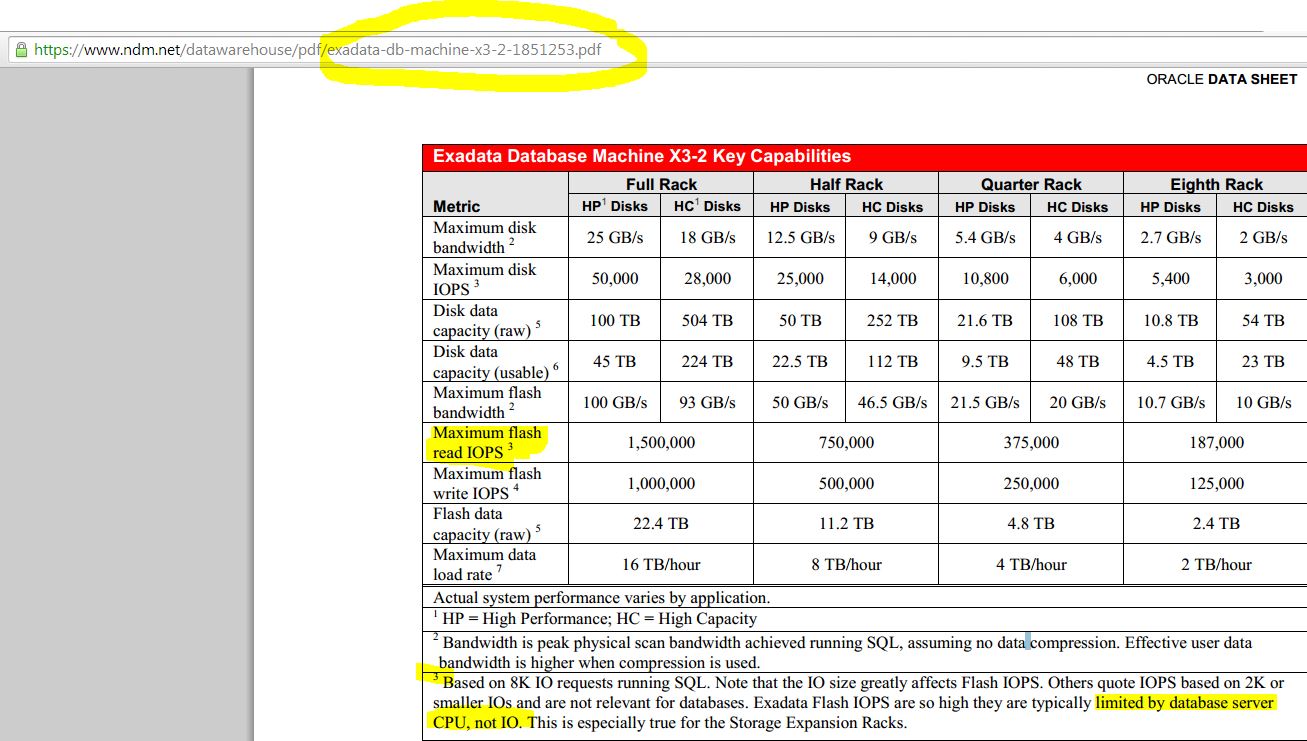
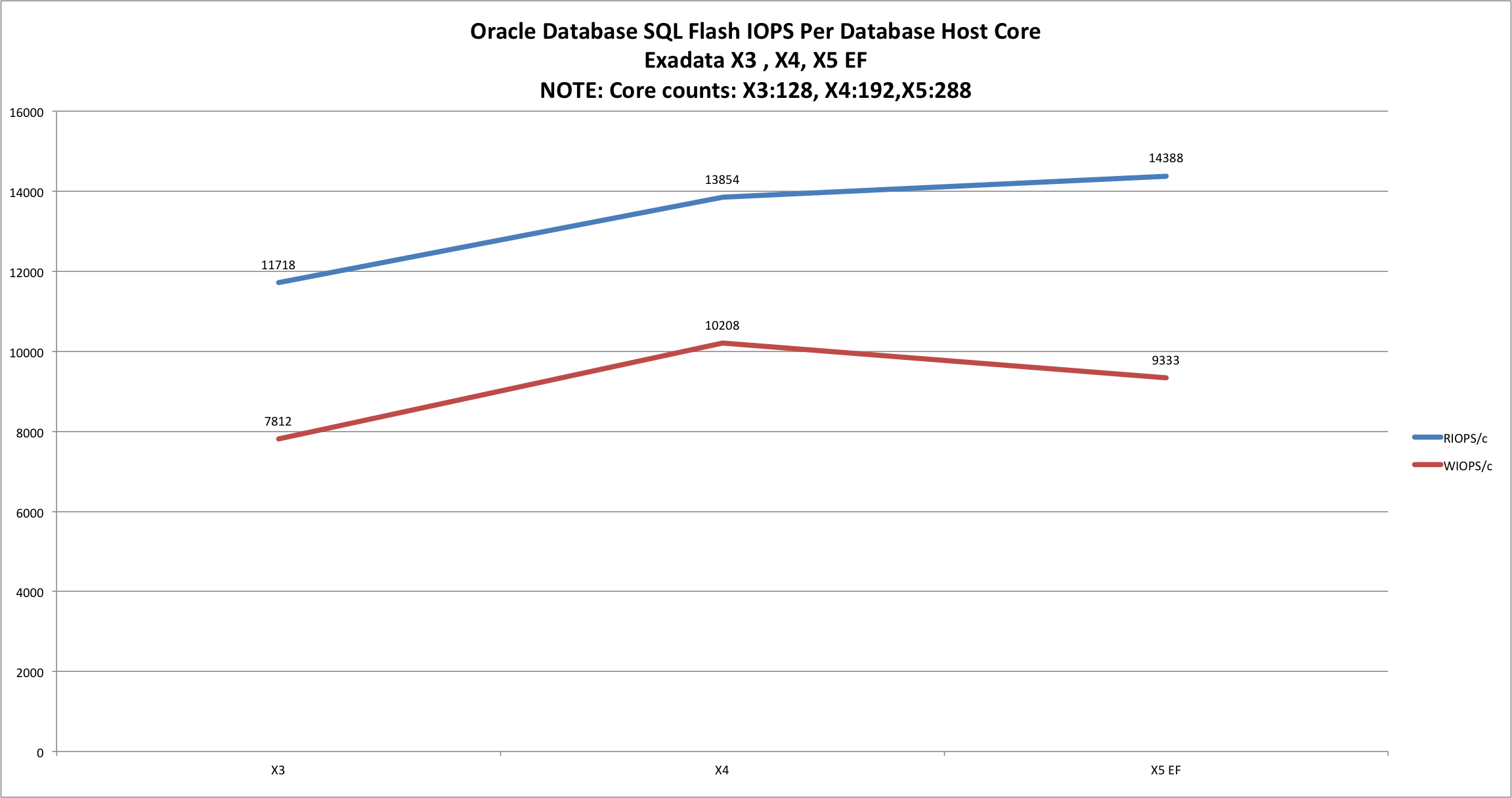
In case anyone should doubt my assertion that Oracle historically associated Exadata IOPS limitations with host CPU I submit the following screen shot of the pertinent section of the X3 datasheet:   X3-datasheet-truth Now that the established relationship between SQL-driven IOPS and host CPU has been demystified, I’ll offer the following chart which normalizes IOPS to host CPU core count: exadata-evolution-iops-per-core-gold I think the data speaks for itself but I’ll add some commentary. Where Exadata is concerned, Oracle gives no choice of host CPU to customers. If you adopt Exadata you will be forced to take the top-bin Xeon SKU with the most cores offered in the respective Intel CPU family.  For example, the X3 product used 8-core Sandy Bridge Xeons. The X4 used 12-core Ivy Bridge Xeons and finally the X5 uses 18-core Haswell Xeons. In each of these CPU families there are other processors of varying core counts at the same TDP. For example, the Exadata X5 processor is the E5-2699v3 which is a 145w 18-core part. In the same line of Xeons there is also a 145w 14c part (E5-2697v3) but that is not an option to Exadata customers.

All of this is important since Oracle customers must license Oracle Database software by the host CPU core. The chart shows us that read IOPS per core from X3 to X4 improved 18% but from X4 to X5 we see only a 3.6% increase. The chart also shows that write IOPS/core peaked at X4 and has actually dropped some 9% in the X5 product. These important trends suggest Oracle’s balance between storage plumbing and I/O bandwidth in the Storage Servers is not keeping up with the rate at which Intel is packing cores into the Xeon EP family of CPUs. The nugget of truth that is missing here is whether the 145w 14-core  E5-2697v3 might in fact be able to improve this IOPS/core ratio. While such information would be quite beneficial to Exadata-minded customers, the 22% drop in expensive Oracle Database software in such an 18c versus 14c scenario is not beneficial to Oracle–especially not while Oracle is struggling to subsidize its languishing hardware business with gains from traditional software.

Exadata IOPS Per Flash SSD

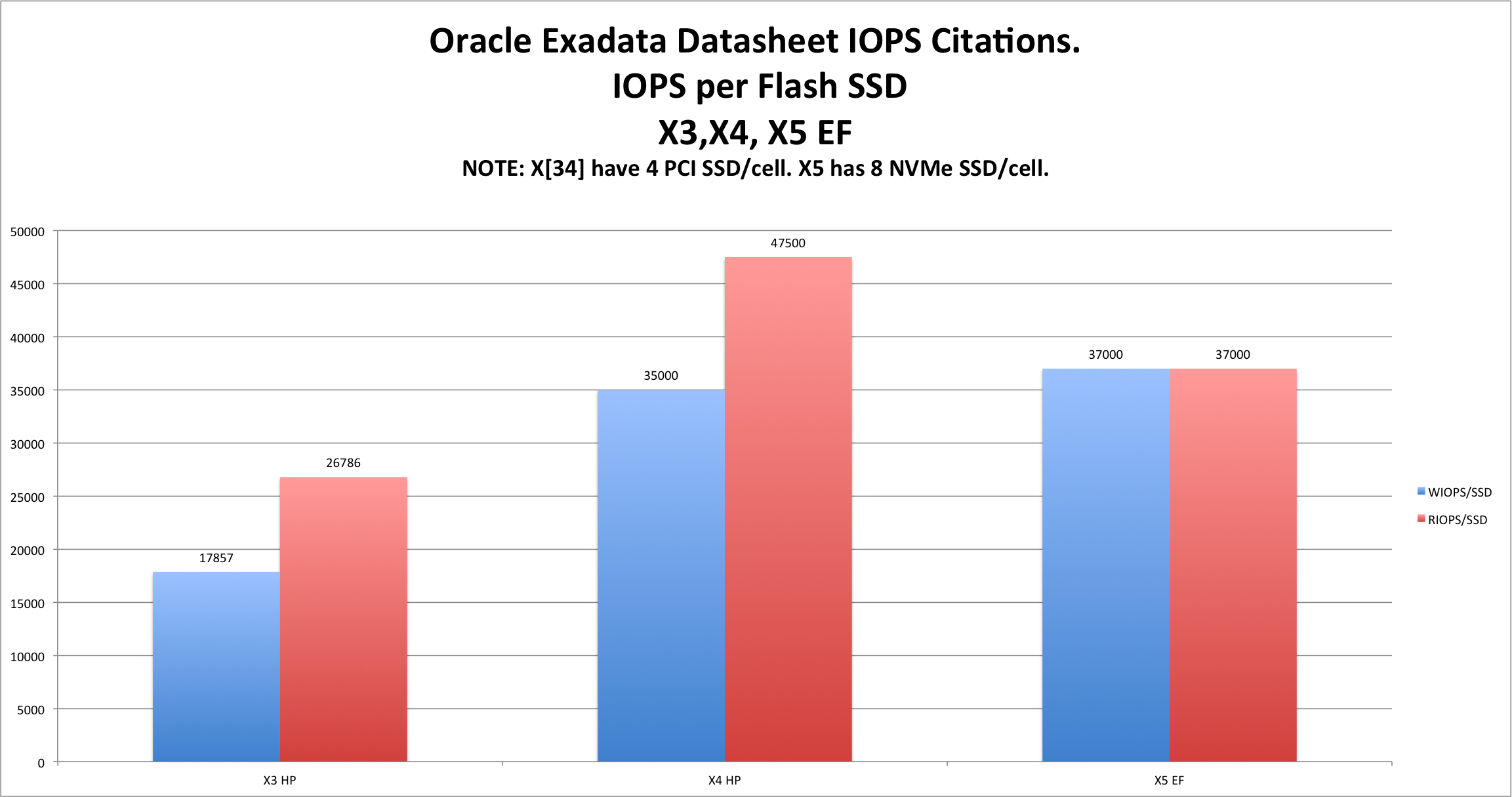
Oracle uses their own branded Flash cards in all of the X3 through X5 products. While it may seem like an implementation detail, some technicians consider it important to scrutinize how well Oracle leverages their own components in their Engineered Systems. In fact, some customers expect that adding significant amounts of important performance components, like Flash cards, should pay commensurate dividends. So, before you let your eyes drift to the following graph please be reminded that X3 and X4 products came with 4 Gen3 PCI Flash Cards per Exadata Storage Server whereas X5 is fit with 8 NVMe flash cards. And now, feel free to take a gander at how well Exadata architecture leverages a 100% increase in Flash componentry: exadata-evolution-iops-per-SSD-gold This chart helps us visualize the facts sort of hidden in the datasheet information. From Exadata X3 to Exadata X4 Oracle improved IOPS per Flash device by just shy of 100% for both read and write IOPS. On the other hand, Exadata X5 exhibits nearly flat (5%) write IOPS and a troubling drop in read IOPS per SSD device of 22%.  Now, all I can do is share the facts. I cannot change people’s belief system–this I know. That said, I can’t imagine how anyone can spin a per-SSD drop of 22%–especially considering the NVMe SSD product is so significantly faster than the X4 PCIe Flash card. By significant I mean the NVMe SSD used in the X5 model is rated at 260,000 random 8KB IOPS whereas the X4 PCIe Flash card was only rated at 160,000 8KB read IOPS. So X5 has double the SSDs–each of which is rated at 63% more IOPS capacity–than the X4 yet IOPS per SSD dropped 22% from the X4 to the X5. That means an architectural imbalance–somewhere.  However, since Exadata is a completely closed system you are on your own to find out why doubling resources doesn’t double your performance. All of that might sound like taking shots at implementation details. If that seems like the case then the next section of this article might be of interest.

IOPS Per Exadata Storage Server License Cost

As I wrote earlier in this article, both Exadata X3 and Exadata X4 used PCIe Flash cards for accelerating IOPS. Each X3 and X4 Exadata Storage Server came with 12 hard disk drives and 4 PCIe Flash cards. Oracle licenses Exadata Storage Server Software by the hard drive in X3/X4 and by the NVMe SSD in the X5 EF model. To that end the license “basis” is 12 units for X3/X5 and 8 for X5. Already readers are breathing a sigh of relief because less license basis must surely mean less total license cost. Surely Not! Exadata X3 and X4 list price for Exadata Storage Server software was $10,000 per disk drive for an extended price of $120,000 per storage server. The X5 EF model, on the other hand, prices Exadata Storage Server Software at $20,000 per NVMe SSD for an extended price of $160,000 per Exadata Storage Server. With these values in mind feel free to direct your attention to the following chart which graphs the IOPS per Exadata Storage Server Software list price (IOPS/license$$). exadata-evolution-iops-per-license-cost-gold The trend in the X3 to X4 timeframe was a doubling of write IOPS/license$$ and just short of a 100% improvement in read IOPS/license$$. In stark contrast, however, the X5 EF product delivers only a 57% increase in write IOPS/license$$ and a troubling, tiny, 17% increase in read IOPS/license$$. Remember, X5 has 100% more SSD componentry when compared to the X3 and X4 products.

Summary

No summary needed. At least I don’t think so.

About Those Faulty Tweeted Graphs

As promised, I’ve left links to the faulty graphs I tweeted here: Faulty / Deleted Tweet Graph of Exadata IOPS/SSD: http://wp.me/a21zc-1ek Faulty / Deleted Tweet Graph of Exadata IOPS/license$$: http://wp.me/a21zc-1ej

References

Exadata X3-2 datasheet: http://www.oracle.com/technetwork/server-storage/engineered-systems/exadata/exadata-dbmachine-x3-2-ds-1855384.pdf Exadata X4-2 datasheet: http://www.oracle.com/technetwork/database/exadata/exadata-dbmachine-x4-2-ds-2076448.pdf Exadata X5-2 datasheet: http://www.oracle.com/technetwork/database/exadata/exadata-x5-2-ds-2406241.pdf X4 SSD info: http://www.oracle.com/us/products/servers-storage/storage/flash-storage/f80/overview/index.html X5 SSD info: http://docs.oracle.com/cd/E54943_01/html/E54944/gokdw.html#scrolltoc Engineered Systems Price List: http://www.oracle.com/us/corporate/pricing/exadata-pricelist-070598.pdf , http://www.ogs.state.ny.us/purchase/prices/7600020944pl_oracle.pdf

Recommended Reading: Oracle Database 12c NUMA-Related Topics

This is a short post to recommend some recent blog posts by Nikolay Manchev and Bertrand Drouvot on the topic of Oracle Database 12c NUMA awareness.

Nikolay provides a very helpful overview on Linux Control Groups and how they are leveraged by Oracle Database 12c. Bertrand Drouvot carried the topic a bit further by leveraging SLOB to assess the impact of NUMA remote memory on a cached Oracle Database workload. Yes, SLOB is very useful for more than physical I/O! Good job, Bertrand!

These are good studies and good posts!

Also, one can refer to MOS 1585184.1 for more information on Control Groups and a helpful script to configure CGROUPS.

The following links will take you to Nikolay and Bertrand’s writings on the topic:

http://manchev.org/2014/03/processor-group-integration-in-oracle-database-12c/

https://bdrouvot.wordpress.com/2015/01/07/measure-the-impact-of-remote-versus-local-numa-node-access-thanks-to-processor_group_name/


SLOB 2.2 Not Generating AWR reports? Testing Large User Counts With Think Time? Think Processes and SLOB_DEBUG.

I’ve gotten a lot of reports of folks branching out into SLOB 2.2 large user count testing with the SLOB 2.2 Think Time feature. I’m also getting reports that some of the same folks are not getting the resultant AWR reports one expects from a SLOB test.

If you are not getting your AWR reports there is the old issue I blogged about here (click here). That old issue was related to a Redhat bug.  However, if you have addressed that problem, and still are not getting your AWR reports from large user count testing, it might be something as simple as the processes initialization parameter. After all, most folks have been accustomed to generating massive amounts of physical I/O with SLOB at low session counts.

I’ve made a few changes to runit.sh that will help future folks should they fall prey to the simple processes initialization parameter folly. The fixes will go into SLOB 2.2.1.3. The following is a screen shot of these fixes and what one should expect to see in such situation in the future. In the meantime, do take note of SLOB_DEBUG as mentioned in the screenshot:


slob2.2-processes-folly

SLOB Data Loading Case Studies – Part II. SLOB 2.2 For High-Bandwidth Data Loading.

BLOG UPDATE 2015.07.24: For all testing recipes please visit the SLOB Recipes section of kevinclosson.net/slob

This is Part II in a series. Part I can be found here (click here). Part I in the series covered a very simple case of SLOB data loading. This installment is aimed at how one can use SLOB as a platform test for a unique blend of concurrent, high-bandwidth data loading, index creation and CBO statistics gathering.

Put SLOB On The Box – Not In a Box

As a reminder, the latest SLOB kit is always available here: kevinclosson.net/slob .

Often I hear folks speak of what SLOB is useful for and the list is really short. The list is so short that a single acronym seems to cover it—IOPS, just IOPS and nothing else. SLOB is useful for so much more than just testing a platform for IOPS capability. I aim to make a few blog installments to make this point.

SLOB for More Than Physical IOPS

I routinely speak about how to use SLOB to study host characteristics such as NUMA and processor threading (e.g., Simultaneous Multithreading on modern Intel Xeons). This sort of testing is possible when the sum of all SLOB schemas fit into the SGA buffer pool. When testing in this fashion, the key performance indicators (KPI) are LIOPS (Logical I/O per second) and SQL Executions per second.

This blog post is aimed at suggesting yet another manner of platform testing with SLOB–specifically concurrent bulk data loading.

The SLOB data loader (~SLOB/setup.sh) offers the ability to test non-parallel, concurrent table loading, index creation and CBO statistics collection.

In this blog post I’d like to share a “SLOB data loading recipe kit” for those who wish to test high performance SLOB data loading. The contents of the recipe will be listed below. First, I’d like to share a platform measurement I took using the data loading recipe. The host was a 2s20c40t E5-2600v2 server with 4 active 8GFC paths to an XtremIO array.

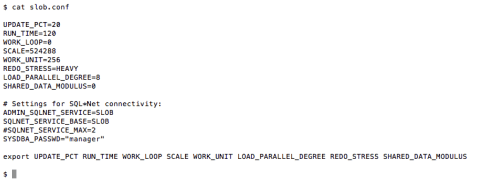
The tar archive kit I’ll refer to below has the full slob.conf in it, but for now I’ll just use a screen shot. Using this slob.conf and loading 512 SLOB schema users generates 1TB of data in the IOPS tablespace. Please note the attention I’ve drawn to the slob.conf parameters SCALE and LOAD_PARALLEL_DEGREE. The size of the aggregate of SLOB data is a product of SCALE and the number of schemas being loaded. I drew attention to LOAD_PARALLEL_DEGREE because that is the key setting in increasing the concurrency level during data loading. Most SLOB users are quite likely not accustomed to pushing concurrency up to that level. I hope this blog post makes doing so seem more worthwhile in certain cases.

SLOB-dataload-slob.conf

The following is a screenshot of the output from the SLOB 2.2 data loader. The screenshot shows that the concurrent data loading portion of the procedure took 1,474 seconds. On the surface that would appear to be a data loading rate of approximately 2.5 TB/h. One thing to remember, however, is that SLOB data is loaded in batches controlled by LOAD_PARALLEL_DEGREE. Each batch loads LOAD_PARALLEL_DEGREE number of tables and then creates a unique indexes and performs CBO statistics gathering.  So the overall “data loading” time is really data loading plus these ancillary tasks. To put that another way, it’s true this is a 2.5TB data loading use case but there is more going on than just simple data loading. If this were a pure and simple data loading processing stream then the results would be much higher than 2.5TB/h. I’ll likely blog about that soon.

slob2.2-load-1TB

As the screenshot shows the latest SLOB 2.2 data loader isolates the concurrent loading portion of setup.sh. In this case, the seed table (user1) was loaded in 20 seconds and then the concurrent loading portion completed in 1,474 seconds.

That Sounds Like A Good Amount Of Physical I/O But What’s That Look Like?

To help you visualize the physical I/O load this manner of testing places on a host, please consider the following screenshot. The screenshot shows peaks of vmstat 30-second interval reporting of approximately 2.8GB/s physical read I/O combined with about 435 MB write I/O for an average of about 3.2GB/s. This host has but 4 active 8GFC fibre channel paths to storage so that particular bottleneck is simple to solve by adding another 4 port HBA! Note also how very little host CPU is utilized to generate the 4x8GFC saturating workload. User mode cycles are but 15% and kernel mode utilization was 9%. It’s true that 24% sounds like a lot, however, this is a 2s20c40t host and therefore 24% accounts for only 9.6 processor threads–or 5 cores worth of bandwidth. There may be some readers who were not aware that 5 “paltry” Ivy Bridge Xeon cores are capable of driving this much data loading!

NOTE: The SLOB method is centered on the sparse blocks. Naturally, fewer CPU cycles are required for loading data into sparse blocks.

Please note, the following vmstat shows peaks and valleys. I need to remind you that SLOB data loading consists of concurrent processing of not only data loading (Insert as Select) but also a unique index creation and CBO statistics gathering. As one would expect I/O will wane as the loading process shifts from the bulk data load to the index creation phase and then back again.

vmstat-SLOB-dataload

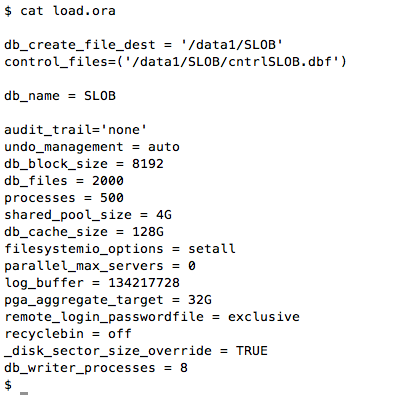
Finally, the following screenshot shows the very minimalist init.ora settings I used during this testing.

SLOB-dataload-load.ora

The Recipe Kit

The recipe kit can be found in the following downloadable tar archive. The kit contains the necessary files one would need to reproduce this SLOB data loading time so long as the platform has sufficient performance attributes. The tar archive also has all output generated by setup.sh as the following screenshot shows:

slob-data-load-kit

The SLOB 2.2 data loading recipe kit can be downloaded here (click here). Please note, the screenshot immediately above shows the md5 checksum for the tar archive.

Summary

This post shows how one can tune the SLOB 2.2 data loading tool (setup.sh) to load 1 terabyte of SLOB data in well under 25 minutes. I hope this is helpful information and that, perhaps, it will encourage SLOB users to consider using SLOB for more than just physical IOPS testing.

How Do I Know I Have The Latest SLOB Kit?

This is a quick blog post to show SLOB users how to determine whether they are using the latest SLOB kit. If you visit kevinclosson.net/slob you’ll see the webpage I captured in the following screenshot.

Once on the SLOB Resources page you can simply hover over the “SLOB 2.2 (Click here)” hyperlink and the bottom of your browser will show the full name of the tar archive. Alternatively you can use md5sum(1) on Linux (or md5 on Mac) to get the checksum of the tar archive you have and compare it to the md5sum I put on the web page (see the arrow).


latest-slob

Announcing XtremIO Performance Engineering Lab Report: Facts About Redo Logging And NAND Flash.

I invite you to please read this report.

NAND Flash is good for a lot of things but not naturally good with write-intensive workloads. Unless, that is, skillful engineering is involved to mitigate the intrinsic weaknesses of NAND Flash in this regard. I assert EMC XtremIO architecture fills this bill.

Regardless of your current or future plans for adopting non-mechanical storage I hope this lab report will show some science behind how to determine suitability for non-mechanical storage–and NAND Flash specifically–where Oracle Database redo logging is concerned.

Please note: Not all lab tests are aimed at achieving maximum theoretical limits in all categories. This particular lab testing required sequestering precious lab gear for a 104 hour sustained test.

The goal of the testing was not to show limits but, quite to the contrary, to show a specific lack of limits in the area of Oracle Database redo logging. For a more general performance-focused paper please download this paper (click here).  With that caveat aside, please see the following link for the redo logging related lab report:

Link to XtremIO Performance Engineering Lab Report (click here).


Redo-Durability-splash

Announcing SLOB 2.2 : Think Time and Limited-Scope User-Data Modification

This is a hasty blog post to get SLOB 2.2 out to those who are interested.

Where To Get The Kit

Please visit kevinclosson.net/slob

About The New Kit

In addition to doing away with the cumbersome “seed” table and procedure.sql, this kit introduces 5 new slob.conf parameters. By default these parameters are disabled.

This SLOB distribution does not require re-executing setup.sh. One can simply adopt the kit and use it to test existing SLOB databases. The following explains the new slob.conf parameters:

DO_UPDATE_HOTSPOT=FALSE

When set to TRUE, modify SQL will no longer affect random rows spanning each session’s schema. Instead, each session will only modify HOTSPOT_PCT percent of their data.

HOTSPOT_PCT=10

This parameter controls how much of each session’s schema gets modified when UPDATE_PCT is non-zero. The default will limit the scope of each session’s data modifications to a maximum of 10% of their data.

THINK_TM_MODULUS=0

When set to non-zero this is a frequency control on how often sessions will incur think time. For example, if set to 7, every seventh SQL statement will be following by a sleep (think time) for a random amount of time between THINK_TM_MIN and THINK_TM_MAX. It’s best to assign a prime number to THINK_TM_MODULUS.

THINK_TM_MIN=.1

The low-bound for selection of a random period to sleep when THINK_TM_MODULUS triggers a think time event.

THINK_TM_MAX=.5

The high-bound for selection of a random period to sleep when THINK_TM_MODULUS triggers a think time event.

Notes About Think Time

The resolution supported for think time is seconds and values in the hundreds of seconds are supported.

Additional Helpful Files

The additional tarball (at the following link) has a slob.conf, simple.ora and awr.txt that show a way to have 256 sessions produce the following load profile (on 2s16c32t E5 Xeon):

https://my.syncplicity.com/share/geydubw3q42okrt/think-time-help-files.tar

load-profile-think-time

Quick Links to Helpful Literature on Oracle Database In-Memory Column Store.

I’m surprised to find that Google is not cleanly ranking the helpful set of blog posts by Oracle’s Maria Colgan on the Oracle Database 12c In-Memory Column Store feature so I thought I’d put together this convenient set of links. Google search seems to only return a few of them in random order.

Over time I may add other helpful links regarding Oracle’s new, exciting caching technology.

Starter Information

Getting Started With Oracle Database In-Memory. Part I.

Getting Started With Oracle Database In-Memory. Part II.

Getting Started With Oracle Database In-Memory. Part III.

Getting Started With Oracle Database In-Memory. Part IV. 

In-Memory Column Store With Real Application Clusters

The following are links to information about Oracle Database In-Memory on Real Application Clusters:

Oracle Database In-Memory on RAC. Part I.

In-Memory Product That Requires Proprietary Storage?

How could the brand of storage matter for an in-memory cache feature? Good question.

Fellow Oaktable Network member Christian Antognini has produced a very important article regarding how Oracle Database 12c In-Memory Column Store with Real Application Clusters is questionable unless using Oracle storage (Exadata, SPARC SuperCluster).  I found Christian’s article very interesting because, after all, the topic at hand is an in-memory cache product (a.k.a., In-Memory Column Store). I fail to see any technical reason why Oracle wouldn’t support an in-memory product with blocks from any and all storage. It is in-memory after all, isn’t it? Please visit Christian’s article here: The Importance of the In-Memory DUPLICATE Clause for a RAC System.


SLOB Patch. AWR Post-Processing Script (awr_info.sh) Fix.

BLOG UPDATE 2015.01.20: Please Note! This patch has been deprecated. Please go to kevinclosson.net/slob to get the latest SLOB kit with the latest awr_info.sh.

BLOG UPDATE 2014.09.11: Please note: the following is a link to a more recent update of the awr_info.sh script. This version adds DB Time, DB CPU and Logical I/O: click here. The MD5 sum for this version of awr_info.sh is:  a28a38b11040bb94f08a8f817792c75c

The SLOB kit comes with a little script that extracts interesting information from the awr.txt file produced at the end of a SLOB test. This is just a quick blog entry to point folks to a patched version of awr_info.sh that works properly with all Oracle Database 11g releases as well as Oracle Database 12c.

Oracle changed AWR format in the 11.2.0.4 and 12c releases so the old awr_info.sh script (in the publicly available SLOB kit) has been faulty for some time now.

I have a release of SLOB in the works that will include this awr_info.sh as well as improved data loader and improvements to the driver script (runit.sh) that includes optional, tunable think time between iterations of the SLOB work loop in slob.sql. For the time being please get a copy of the patched version of awr_info.sh.

New awr_info.sh Output

This version of awr_info.sh also gleans and outputs logical read (SGA buffer pool cached block accesses) data.

The following screen shot shows the patched awr_info.sh generating proper output for awr.txt files collected by SLOB databases running out of the 11.2.0.3, 11.2.0.4 and 12c releases.

2014.09.11-awr_info-example

The following picture is what Microsoft Excel looks like when I cut and paste the output of awr_info.sh. I’ve highlighted the new column for logical reads.

2014.09.11-awr_info-xls-example

Exadata Cell Single Block Physical Reads?

Yes, the above picture does show AWR output from a run where the top wait event was cell single block physical read. Exadata? Yes! That’s because SLOB users often share their testing results from the Exadata platform.  However, I do not get enough Exadata AWR reports to work through all of the awr_info.sh issues related to Exadata. To that end, latency information is not calculated and presented as is the case with db file sequential read. For what it’s worth this particular AWR report shows Exadata single block reads serviced with average latencies of 507 microseconds ( 7233/14256602).

Where To Get The Patch?

BLOG UPDATE 2014.12.09: Please Note! The following awr_info.sh readme and script supercede all prior versions mentioned in this blog:

Patch README

awr_info.sh patch


SLOB Failing To Generate AWR Reports? Red Hat Bug 919793!

This is a quick blog post to help folks that are testing with SLOB at high user (session) counts. The situation may arise where you are testing SLOB on a large configuration, with or without SQL*Net, and the SLOB driver (runit.sh) is failing to produce Automatic Workload Repository (a.k.a AWR) reports.

This problem will generally be seen on RHEL 6 variants that implement the much maligned /etc/security/limits.d/90-nproc.conf method of preventing fork bombs. For more information on this configuration file please refer to Red Hat bug 919793.

If you are not getting AWR reports under the condition I describe then the problem is most likely due to 90-nproc.conf short circuiting the ulimit(3) tuning you’ve established.

As an example remedy, please consider the following settings I recommended to my colleagues at VCE for performance testing of the vBlock Specialized System for High Performance Databases:

SS-HPDB-fork-bomb


XtremIO @ Tech Field Day 2014

As scientists, interested in what’s happening in platform technology, readers of my blog will find my colleague Itzik Reich’s recent blog on EMC XtremIO to be very informative. Enjoy!

Itzikr's Blog

image

Hi,

during the week of VMworld 2014, we had the pleasure of presenting in front of the audience of the tech field day delegates.

attached below are the links to the session Josh Goldstein delivered, enjoy!

EMC XtremIO Introduction

EMC XtremIO Architecture – Consistent and Predictable Performance

EMC XtremIO Data Services

View original post

SLOB Physical I/O Randomness. How Random Is Random? Random!

I recently read a blog post by Kyle Hailey regarding some lack of randomness he detected in the Orion I/O generator tool. Feel free to read Kyle’s post but in short he used dtrace to detect Orion was obliterating a very dense subset of the 96GB file Orion was accessing.

I’ve used Orion for many years and, in fact, wrote my first Orion related blog entry about 8 years ago. I find Orion to be useful for some things and of course DBAs must use Orion’s cousin CALIBRATE_IO as a part of their job. However, neither of these tools perform database I/O. If you want to see how database I/O behaves on a platform it’s best to use a database. So, SLOB it is. But wait! Is SLOB is just another storage cache-poking randomness-challenged distraction from your day job? No, it isn’t.

But SLOB Is So Very Difficult To Use

It’s quite simple actually. You can see how simple SLOB is to set up and test by visiting my picture tutorial.

How Random Is Random? Random!

SLOB is utterly random. However, there are some tips I’d like to offer in this post to show you how you can choose even higher levels of randomness in your I/O testing.

Kyle used dtrace and some shell commands to group block visits into buckets. Since I’m analyzing the randomness of SLOB I’ll use a 10046 trace on the database sessions. First I’ll run a 96 user SLOB test with slob.conf->UPDATE_PCT=0.

After the SLOB test was completed I scrambled around to find the trace files and worked out a simple set of sed(1) expressions to spit out the block numbers being visited by each I/O of type db file sequential read:

how-random2

I then grouped the blocks being visited into buckets much the same way Kyle did in his post:

how-random3

I’ll show some analysis of the those buckets later in the post.  Yes, SLOB is random as analysis of 96u.blocks.txt will show but it can be even more random if one configures a RECYCLE buffer pool. One of the lesser advertised features of SLOB is the fact that all working tables in the SLOB schemas are created with BUFFER_POOL RECYCLE in the storage clause. The idea behind this is to support the caching of index blocks in the SGA buffer pool. When no RECYCLE pool is allocated there is a battle for footprint in the SGA buffer pool causing even buffers with index blocks to be reused for buffering table/index blocks of the active transactions. Naturally when indexes are not cached there will be slight hot-spots for constant, physical, re-reads of the index blocks. The question becomes what percentage of the I/O do these hot blocks account for?

To determine how hot index blocks are I allocated a recycle buffer pool and ran another 2 minute SLOB test. As per the following screen shot I again grouped block visits into buckets:

how-random4

After having both SLOB results (with and without RECYCLE buffer pool) I performed a bit of text processing to determine how different the access patterns were in both scenarios. The following shows:

  • The vast majority of blocks are visited 10 or less times in both models
  • The RECYCLE pool model clearly flattens out the re-visit rates as the hotest block is visited only 12 times compared to the 112 visits for the hottest block in the default case
  • If 12 is the golden standard for sparsity (as per the RECYCLE pool test case) then even the default is quite sparse because dense buckets accounted for only 84,583 physical reads compared to the nearly 14 million reads of blocks in the sparse buckets

how-random5

The following table presents the data including the total I/O operations traced. The number of sparse visits are those blocks that were accessed less than or equal to 10 times during the SLOB test. I should point out that there will naturally be more I/O during a SLOB test when index accesses are forced physical as is the case with the default buffer pools. That is, the RECYCLE buffer pool case will have a slightly higher logical I/O rate (cache hits) due to index buffer accesses.

table

Summary

If you want to know how database I/O performs on a platform use a database. If using a database to test I/O on a platform then by all means drive it with SLOB ( a database I/O tool).

Regarding randomness, even in the default case SLOB proves itself to be very random. If you want to push for even more randomness then the way forward is to configure db_recycle_cache_size.

Enjoy SLOB! The best place to start with SLOB is the SLOB Resources Page.


Oracle Database 12c In-Memory Feature – Part V. You Can’t Use It If It’s Not “Enabled.” Not Being Able To Use A Feature Is An Important “Feature.”

This is part 5 in a series: Part I, Part II, Part III, Part IV, Part V.

Synopsis

This blog post is the last word on the matter.

Enabled?  It’s About Usage!

You don’t get charged for Oracle feature usage unless you use the feature. So why does Oracle inconsistently use the word enabled when we care about usage? If enabled precedes usage then enabled is a sanctified term. Please read on…

It’s All About Getting The Last Word? No, It’s About Taking Care Of Customers.

On August 6, 2014  Oracle shared their last word and official statement on the matter of bug-ridden tracking of the Oracle Database 12c  In-Memory feature usage in a quote to the press at CBR. I’ll paraphrase first and then quote the article. Here is what I hear when I read the words of Oracle’s spokesman:

Yeah, my bad, we have a bug. The defective code erroneously tracks feature usage for an Enterprise Edition additional cost option priced at $23,000 per processor core. Don’t worry. When we track this particular feature usage we’ll ignore it should you be audited. You have our spoken word that we’ll just shine this one on. Here, let me trade a few confusing words about usage without using the word enabled or disabled since those are taboo.

My paraphrase probably draws a more serene picture than the visions of tip-toeing and side-stepping conjured up by the following words I’ll quote from the CBR article. Bear in mind the fact that the bug spoken of in the quote is 19308780–a bug, by the way, that is not readable by maintenance contract holders. Now I’ll quote the article:

Recording that the In-Memory option is in use in this case is a bug and we will fix it in the first patchset update coming in October.

Yes, we knew it was a bug. I merely had to do the hard work of getting Oracle to acknowledge it. The article continued with the following quote. Please ignore the fact that Oracle’s spokesman refers to me common. Focus instead on the fact that throughout parts 1 through 4 in my series I suffered erroneous  feature usage reporting because of a bug (software defect). I quote:

Kevin initially claimed that feature tracking could report In-Memory usage, and therefore impact licensing, without the end-user doing anything. This was and is still not the case. Customer licensing of Oracle Database In-Memory is not impacted by the bug that Maria notes in her blog. When an end-user explicitly undertakes actions to set the INMEMORY attribute on a table but the In-Memory column store has not been allocated (by setting the inmemory_size parameter to a non zero value), the bug results in feature tracking incorrectly reporting In-Memory ‘in use’. However as no column store has been allocated, the feature is not in use and therefore there is no licensing impact.

Ah yes. The old, “it’s not in use but it reports it’s in use situation.” That’s could have been conveyed in very short sentences…could have.

Since the bug spoken of in the above quote is not visible to contract holders I’m just going to let you mull over the circular logic.  This whole situation could be a lot simpler if Oracle would either a) make a bug description visible to contract holders so customers know what is broken and how to test whether it got fixed when the patch is eventually applied and/or b) add this defect to MOS 1309070.1 which is a bug that tracks all the other bugs in feature usage reporting. Yes, indeed, there are other bugs of this sort with other features. All software has bugs.

Last Word On The Matter

My last word on the matter has to do with the fact that the feature cannot be unlinked. It is a very expensive–and very useful, important feature. As I pointed out in Part II the feature cannot be absolutely disabled at the executable level as is the case for other high cost options like Real Application Clusters and Partitioning.  I think Oracle is trying to tell us it is impossible computer science to make it an unlinkable feature–at least that’s how I interpret the following words in a blog post at Oracle.com:

Oracle Database In-Memory is not a bolt on technology to the Oracle Database. It has been seamlessly integrated into the core of the database as a new component of the Shared Global Area (SGA). When the Oracle Database is installed, Oracle Database In-Memory is installed. They are one and the same. You can’t unlink it or choose not to install it.

Now maybe this is not saying there is no way to code the feature as unlinkable. Maybe it’s saying the choice was made to not make it unlinkable. I don’t know. If, however, we are to believe that the mere fact the feature uses the SGA makes  it some sort of atomic-level symbiotic parasite, well, that argument doesn’t  hold water. Indeed, Real Application Clusters is massively integrated with the SGA. Ever heard of Cache Fusion? With Cache Fusion data blocks get shuttled from one SGA to another across hosts in a cluster! Real Application Clusters is unlinkable–that’s unthinkable!

What Is Unlinkable Anyway

There might be folks that don’t know what we mean when we say a feature is unlinkable. This doesn’t mean all the code for the feature is yanked out of the binary. It simply means that a single–or perhaps a few–binary objects are linked into the Oracle executable that enables the feature. If unlinked there is absolutely no way to use the feature–as is the case with, for instance, Real Application Clusters.

And not being able to use the feature is an important feature!

So let’s ponder the insurmountable computer science that must surely be involved in implementing the In-Memory Column Store feature as unlinkable.

Oracle has told us the INMEMORY_SIZE initialization parameter is the on/off  button for the feature. That means there is a single, central on/off button that is, indeed, able to be manipulated even by the user. Can you imagine how difficult it must be to implement a global variable–even a simple boolean–that get’s linked in and checked when one boots the database? Not hard to grasp. What if the variable had a silly name like inmemory_deactivated. What if the feature activation module–let’s call it inmem.o–had inmemory_deactived=TRUE but an alternate module called  inmemON.o had inmemory_deactivated=FALSE. In much the same way we relink Real Application Clusters, the link scripts manipulate the file name so that the default (with feature deactivated) gets replaced with the activated module–only if the user wants the possibility of using the feature. How would all this deep, dark, complex code come together? Well, when the database instance is booted inmemory_deactivated is evaluated and regardless of the user’s setting of INMEMORY_SIZE the In-Memory feature is really, truly, disabled–and most importantly not usable. No possibility for confusion. Would that be better than a game of Licensed-Feature Usage Prevention Twister(tm)?

1966_Twister_Cover

Intensely Deep Engineering Difficulty

Now, imagine that. We didn’t even have to use the back of a cocktail napkin to draw out a solution to the mysteries behind how utterly unlinkable the In-Memory Database feature must surely be. We simply a)  drew upon our understanding of other SGA-integrated features like Real Application Clusters and b) recalled how unlinking works for other features and c) drew upon our basic level understanding of the C programming language vis a vis global variables and object linking.

Let me summarize all that: There is a single user-modifiable boot-time parameter that disables In-Memory Database as per Oracle’s blog and spokesman assertions. Um, that’s a pretty simple focal point to make the feature unlinkable.

Summary

Yes, Oracle could implement a method for making the In-Memory Column Store feature an unlinkable option just like they did for Real Application Clusters. I can only imagine why they chose not to (visions of USD $23,000 per processor core).

SLOB Data Loading Case Studies – Part I. A Simple Concurrent + Parallel Example.

Introduction

This is Part I in a short series of posts dedicated to loading SLOB data.  A link to Part II is provided below.

The SLOB loader is called setup.sh and it is, by default a concurrent, data loader. The SLOB configuration file parameter controlling the number of concurrent data loading threads is called LOAD_PARALLEL_DEGREE. In retrospect I should have named the parameter LOAD_CONCURRENT_DEGREE because unless Oracle Parallel Query is enabled there is no parallelism in the data loading procedure. But if LOAD_PARALLEL_DEGREE is assigned a value greater than 1 there is concurrent data loading.

Occasionally I hear of users having trouble with combining Oracle Parallel Query with the concurrent SLOB loader. It is pretty easy to overburden a system when doing something like concurrent, parallel data loading–in the absence of tools like Database Resource Management I suppose. To that end,  this series will show some examples of what to expect when performing SLOB data loading with various init.ora settings and combinations of parallel and concurrent data loading.

In this first example I’ll show an example of loading with LOAD_PARALLEL_DEGREE set to 8. The scale is 524288 SLOB rows which maps to 524,288 data blocks because SLOB forces a single row per block. Please note, the only slob.conf parameters that affect data loading are LOAD_PARALLEL_DEGREE and SCALE. The following is a screen shot of the slob.conf file for this example:

SLOB-data-load-3

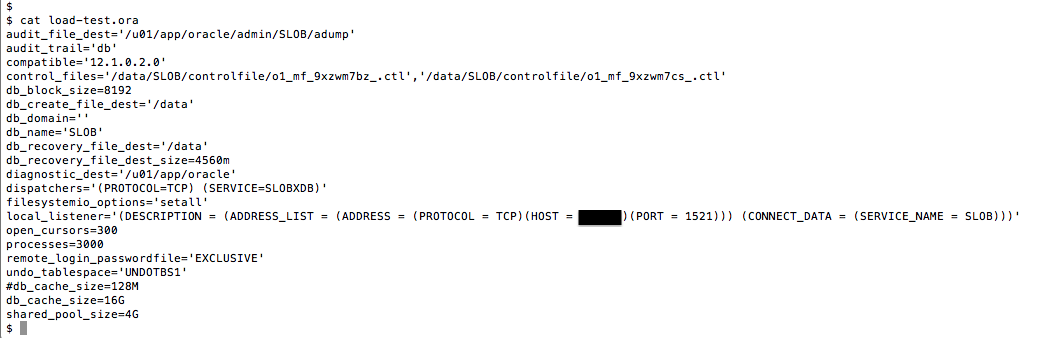
The next screen shot shows the very simple init.ora settings I used during the data loading test. This very basic initialization file results in default Oracle Parallel Query, therefore  this example is a concurrent + parallel data load.

SLOB-data-load-6

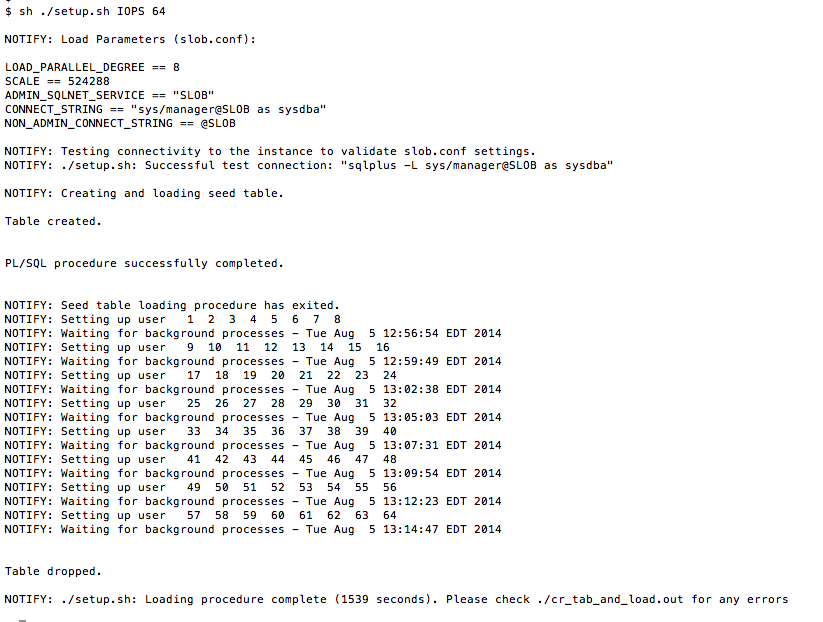
The next screen shot shows that I directed setup.sh to load 64 SLOB schemas into a tablespace called IOPS. Since SCALE is 524,288 this example loaded roughly 256GB (8192 * 524288 * 64) of data into the IOPS tablespace.

SLOB-data-load-1

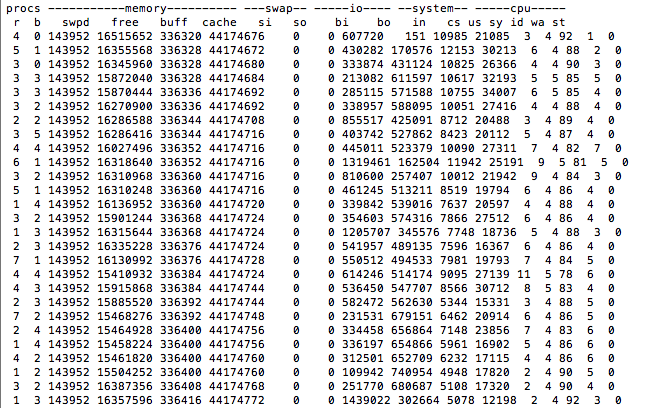
As reported by setup.sh the data loading completed in 1,539 seconds or a load rate of roughly 600GB/h. This loading rate by no means shows any intrinsic limit in the loader. In future posts in this series I’ll cover some tuning tips to improve data loading.  The following screen shot shows the storage I/O rates in kilobytes during a portion of the load procedure. Please note, this is a 2s16c32t 115w Sandy Bridge Xeon based server. Any storage capable of I/O bursts of roughly 1.7GB/s (i.e., 2 active 8GFC Fibre Channel paths to any enterprise class array) can demonstrate this sort of SLOB data loading throughput.

SLOB-data-load-2


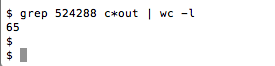
After setup.sh completes it is good to count how many loader threads were able to successfully load the specified number of rows. As the example shows I simply grep for the value of slob.conf->SCALE from cr_tab_and_load.out. Remember, SLOB in its current form, loads a zeroth schema so the return from such a word count (-l) should be one greater than the number of schemas setup.sh was directed to load.

SLOB-data-load-4

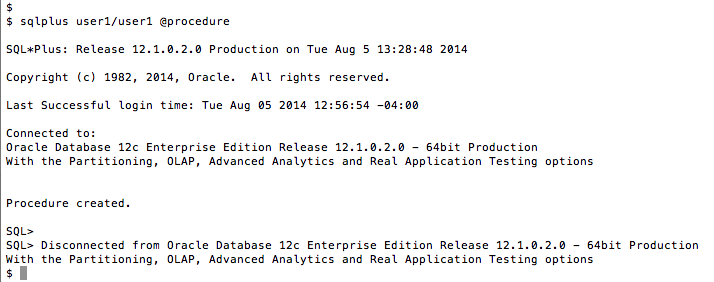
The next screen shot shows the required execution of the procedure.sql script. This procedure must be executed after any execution of setup.sh.

SLOB-data-load-7

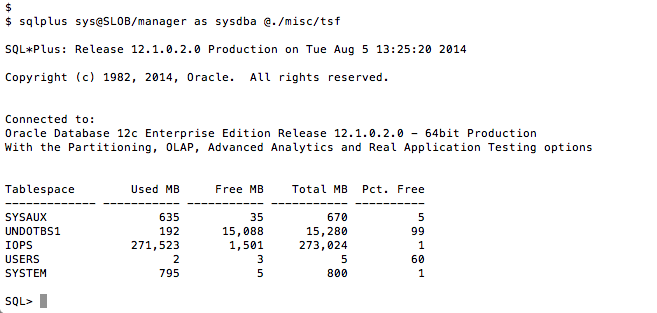
Finally, one can use the SLOB/misc/tsf.sql script to report the size of the tablespace used by setup.sh. As the following screenshot shows the  IOPS tablespace ended up with a  little over 270GB which can be accounted for by the size of the tables based on slob.conf, the number of schemas and a little overhead for indexes.


SLOB-data-load-5

Summary

This installment in the series has shown expected screen output from a simple example of data loading. This example used default Oracle Parallel Query settings, a very simple init.ora and a concurrent loading degree of 8 (slob.conf->LOAD_PARALLEL_DEGREE) to load data at a rate of roughly 600GB/h.

Part II in the series: Part II (Click it)


DISCLAIMER

I work for Amazon Web Services. The opinions I share in this blog are my own. I'm *not* communicating as a spokesperson for Amazon. In other words, I work at Amazon, but this is my own opinion.

Enter your email address to follow this blog and receive notifications of new posts by email.

Join 741 other subscribers
Oracle ACE Program Status

Click It

website metrics

Fond Memories

Copyright

All content is © Kevin Closson and "Kevin Closson's Blog: Platforms, Databases, and Storage", 2006-2015. Unauthorized use and/or duplication of this material without express and written permission from this blog’s author and/or owner is strictly prohibited. Excerpts and links may be used, provided that full and clear credit is given to Kevin Closson and Kevin Closson's Blog: Platforms, Databases, and Storage with appropriate and specific direction to the original content.