Archive for the 'oracle' Category


HP Oracle Database Machine. A Thing of Beauty Capable of “Real Throughput!”

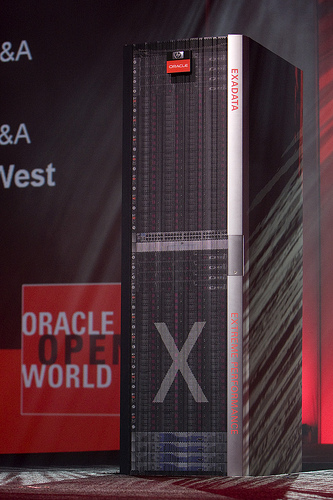
As they say, a blog without photographs is simply boring. Here is a picture of a single-rack HP Oracle Database Machine. It is stuffed with 8 nodes for Real Application Clusters and 14 Oracle Exadata Storage Servers with 168 3.5″ SAS hard drives. My lab work on a SAS-version of one just like this yields 13.6 GB/s throughput for table scans with offloaded filtration and column projection.

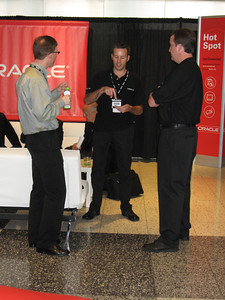
The next photo is a shot of (from the left) Mike Hallas, Greg Rahn and myself in the Moscone North Demo of the HP Oracle Database Machine. Mike and Greg are in the Oracle Real-World Performance Group. Great guys!

Real Throughput or Effective Throughput?

Mike worked (jointly with Bob Carlin) on the latest scale-out Proof of Concept that drove a mulit-rack HP Oracle Database Machine to 70 GB/s scanning tables with 4.28:1 compression—or in terms used more commonly by The Competition™—299.6 GB/s. Of course 300 GB/s is the effective scan rate, but be aware that The Competition™ often times expresses their throughput using their effective throughput. I don’t play that game. I’ll say if it is throughput or effective throughput. Wordy, I know, but I’m not as short-winded as The Competition™ it seems.

I’ve blogged about the Real-World Performance Group (under the esteemed Andrew Holdsworth) before. Those guys are awesome! Come to think of it, I have to bestow the “A” word on the MAA team as well in spite of the fact that Mike Nowak was “too busy” to catch a beer with me during the entire OW week. That’s weak! 🙂

Oracle Exadata Storage Server. Frequently Asked Questions. Part II

This is installment number two in my series on Oracle Exadata Storage Server and HP Oracle Database Machine frequently asked questions. I recommend you also visit Exadata Storage Server Frequently Asked Questions Part I. I’m mostly cutting and pasting questions from the comment threads of my blog posts about Exadata and mixing in some assertions I’ve seen on the web and re-wording them as questions.

Later today The Pythian Group will be conducting a podcast question and answer interview with me that will be available on their website shortly thereafter. I’ll post a link to that when it is available.

Questions and Answers

Q. [I’m] willing to bet this is a full-blown Oracle instance running on each Exabyte [sic] Storage Server.

A. No, bad bet. Exadata Storage Server Software is not an Oracle Database instance. I happened to have an xterm with a shell process sitting in a directory with the self-extracting binary distribution file in it. We can tell by the size of the file that there is no room for a full-blown Oracle Database distribution:

$ ls -l cell*

-rwxr-xr-x 1 root root 206411729 Sep 12 22:04 cell-080905-1-rpm.bin

Q. This must certainly be a difficult product to install, right?

A. HP installs the software on their manufacturing floor. Nonetheless I’ll point out that installing Oracle Exadata Storage Server Software is a single execution of the binary distribution file without options or arguments. Further, initializing a Cell is a single command with two options of which only one requires an argument; such as the following example where I specify a bonded Infiniband interface for interconnect 1:

# cellcli

CellCLI: Release 11.1.3.0.0 – Production on Fri Sep 26 10:56:17 PDT 2008

Copyright (c) 2007, 2008, Oracle. All rights reserved.

Cell Efficiency Ratio: 10,956.8

CellCLI> create cell cell01 interconnect1=bond0

After this command completes I’ve got a valid cell. There are no preparatory commands (e.g., disk partitioning, volume management, etc).

Q. I’m trying to grasp whether this is really just being pitched at the BI and data warehouse space, or whether it has real value in the OLTP space as well.

A. Oracle Exadata Storage Server is the best block server for Oracle Database, bar none. That being said, in the current release, Exadata Storage Server is in fact optimized for DW/BI workloads, not OLTP.

Q. I know we shouldn’t set too much store in these things, but are there plans to submit TPC benchmarks?

A. You are right that there should not be as much stock placed in TPC benchmarks, but they are a necessary evil. I don’t work in that space, but could you imagine Oracle not doing some audited benchmarks? Seems unlikely to me.

On the topic of TPC benchmarks, I was taking a gander at the latest move in the TPC-C “arms race.” This IBM RS600 p595 result of 6,085,166 TpmC proves that the TPC-C is not (has never been) an I/O efficiency benchmark. If you throw more gear at it, you get a bigger number! Great!

How about a stroll down memory lane.

When I was in Database Engineering in Sequent Computer Systems back in 1998, Sequent published a world-record Oracle TPC-C result on our NUMA system. We achieved 93,901 TpmC using 64GB main memory. The 6,085,166 IBM number I just cited used 4TB main memory. So how fulfilling do you think it must be to do that much work on a TPC-C just to prove that in 10 years nothing has changed! The Sequent result comes in at 1 TpmC per 714KB main memory and the IBM result at 1 TpmC per 705KB main memory. Now that’s what I want to do for a living! Build a system with 10,992 disk drives and tons of other kit just to beat a 10-year-old result by 1.3%. Yes, we are now totally convinced that if you throw more memory at the workload you get a bigger number! In the words of Gomer Pyle, “Soo-prise, Soo-prise, Soo-prise.” Ok, enough of that, I don’t like arms-race benchmarks.

Q. From the Oracle Exadata white paper: “No cell-to-cell communication is ever done or required in an Exadata configuration.”and a few paragraphs later: “Data is mirrored across cells to ensure that the failure of a cell will not cause loss of data, or inhibit data accessibility” Can both these statements be true and would we need to purchase a minimum of two cells for a small-ish ASM environment?

A. Cells are entirely autonomous and the two statements are true indeed. Consider two ASM disks out in a Fibre Channel SAN. Of course we know those two disks are not “aware of each other” just because ASM is using blocks from each to perform mirroring. The same is true for Oracle Exadata Storage Server cells and the drives housed inside them. As for the second part of the questions, yes, you must have a minimum of two cells. In spite of the fact that Cells are shared nothing (unaware of each other), ASM is in fact Cell-aware. ASM is intelligent enough to not mirror between 2 drives in the same Cell.


Q. Can this secret sauce help with write speeds?

A. That depends. If you have a workload suffering from the loss of processor cycles associated with standard Unix/Linux I/O libraries then, sure. If you have an application that uses storage provisioned from an overburdened back-end Fibre Channel disk loop (due to application collusion) then, sure. Strictly speaking, the “secret sauce” is the Oracle Exadata Storage Server Software and it does not have any features for write acceleration. Any benefit would have to come from the fact that the I/O pipes are ridiculously fast and the I/O protocol is ridiculously lightweight and the system on a whole is naturally balanced. I’ll blog about the I/O Resource Management (IORM) feature of Exadata soon as I feel it has positive attributes that will help OLTP applications. Although it is not an acceleration feature, it eliminates situations where applications steal storage bandwidth from each other.

Q. I like your initial overview of the product, but I believe that you need to compare both Netezza and Exadata side by side in real-world scenarios to gauge their performance.

A. I partially agree. I cannot go and buy a Netezza and legally produce competitive benchmark results based on the gear. Just read any EULA for any storage management software and you’ll see the bold print. Now that doesn’t mean Oracle’s competitors don’t do that. I think the comparison will come in the form of reduced Netezza sales. Heaven knows the 16% drop in Netezza stock was not as brutal as I expected.

Q. Re. [your] comparison to Netezza [in your first Exadata related post]. It’s bit of apple to oranges, really. You assume 80MB/s per disk for Exadata and for some reason only 70MB/s per disk for Netezza. Also, you have 168 disks spinning in parallel on Exadata and 112 on Netezza. Had your assumptions been tha same, sequential IO throughput would be similar, at least theoretically.

A. Reader, I invite you to explain to us how you think native SATA 7,200 RPM disk drives are going to match 15K RPM SAS drives. When I put 70 MB/s into the equation I was giving quite a benefit of the doubt (as if I’ve never measured SATA performance). Please, if you have a Netezza let us know how much streaming I/O you get from a 7,200 RPM SATA drive once you read beyond the first few outside sectors. I have also been using the more conservative 80 MB/s for our SAS drives. I’m highballing SATA and low-balling SAS. That sounds fair to me. As for the comparison between the numbers of drives, well, Netezza packaging limits the drive (SPU) count to 112 per cabinet. It would suit me fine if it takes a 1 plus another half rack to match a single HP Oracle Database Machine. That empty half of the rack would be annoying from a space constraint point of view though. Nonetheless, if you did go with a rack and a half (168 SPU), would that somehow cancel out the base difference in drive performance between SATA and SAS?
Oracle Exadata Storage Server. Part II.

I have to run over and man a live single-rack HP Oracle Database Machine Demonstration in Moscone North, so I thought I’d take just a moment to post some links to more official Oracle information on Oracle Exadata Storage Server:

Main Oracle Exadata Storage Server Webpage

Oracle Exadata Storage Server Product Whitepaper

I plan to start a FAQ-style series of blog posts regarding the HP Oracle Database Machine and Oracle Exadata Storage Server as soonas possible.

Yesterday was a big day for me, and the extremely talented team I work with. Having the pleasure of doing performance architecture work on Oracle’s most important new product in ages (my humble opinion) has been quite an adventure. One of the last Oracle Exadata Storage Server tasks I worked on prior to the release was a Proof of Concept for Winter Corporation. Expect the report from that work to be available in the next few days. I’ll post a link to that when it is ready.

Oracle Exadata Storage Server. Part I.

Brute Force with Brains.
Here is a brief overview of the Oracle Exadata Storage Server key performance attributes:

  • Intelligent Storage. Ship less data due to query intelligence in the storage.
  • Bigger Pipes. Infiniband with Remote Direct Memory Access. 5x Faster than Fibre Channel.
  • More Pipes. Scalable, redundant I/O Fabric.

Yes, it’s called Oracle Exadata Storage Server and it really was worth the wait. I know it is going to take a while for the message to settle in, but I would like to take my first blog post on the topic of Oracle Exadata Storage Server to reiterate the primary value propositions of the solution.

  • Exadata is fully optimized disk I/O. Full stop! For far too long, it has been too difficult to configure ample I/O bandwidth for Oracle, and far too difficult to configure storage so that the physical disk accesses are sequential.
  • Exadata is intelligent storage. For far too long, Oracle Database has had to ingest full blocks of data from disk for query processing, wasting precious host processor cycles to discard the uninteresting data (predicate filtering and column projection).

Oracle Exadata Storage Server is Brute Force. A Brawny solution.
A single rack of the HP Oracle Database Machine (based on Oracle Exadata Storage Server Software) is configured with 14 Oracle Exadata Storage Server “Cells” each with 12 3.5″ hard drives for a total of 168 disks. There are 300GB SAS and 1TB SATA options. The database tier of the single-rack HP Oracle Database Machine consists of 8 Proliant DL360 servers with 2 Xeon 54XX quad-core processors and 32 GB RAM running Oracle Real Application Clusters (RAC). The RAC nodes are interconnected with Infiniband using the very lightweight Reliable Datagram Sockets (RDS) protocol. RDS over Infiniband is also the I/O fabric between the RAC nodes and the Storage Cells. With the SAS storage option, the HP Oracle Database Machine offers roughly 1 terabyte of optimal user addressable space per Storage Cell-14 TB total.

Sequential I/O
Exadata I/O is a blend of random seeks followed by a series of large transfer requests so scanning disk at rates of nearly 85 MB/s per disk drive (1000 MB/s per Storage Cell) is easily achieved. With 14 Exadata Storage Cells, the data-scanning rate is 14 GB/s. Yes, roughly 80 seconds to scan a terabyte-and that is with the base HP Oracle Database Machine configuration. Oracle Exadata Storage Software offers these scan rates on both tables and indexes and partitioning is, of course, fully supported-as is compression.

Comparison to “Old School”
Let me put Oracle Exadata Storage Server performance into perspective by drawing a comparison to Fibre Channel SAN technology. The building block of all native Fibre Channel SAN arrays is the Fibre Channel Arbitrated Loop (FCAL) to which the disk drives are connected. Some arrays support as few as 2 of these “back-end” loops, larger arrays support as many as 64. Most, if not all, current SAN arrays support 4 Gb FCAL back-end loops which are limited to no more than 400MB/s of read bandwidth. The drives connected to the loops have front-end Fibre Channel electronics and-forgetting FC-SATA drives for a moment-the drives themselves are fundamentally the same as SAS drives-given the same capacity and rotational speed. It turns out that SAS and Fibre drives, of the 300GB 15K RPM variety, perform pretty much the same for large sequential I/O. Given the bandwidth of the drives, the task of building a SAN-based system that isn’t loop-bottlenecked requires limiting the number of drives per loop to 5 (or 10 for mirroring overhead). So, to match a single rack configuration of the HP Oracle Database Machine with a SAN solution would require about 35 back-end drive loops! All of this math boils down to one thing: a very, very large high-end SAN array.

Choices, Choices: Either the Largest SAN Array or the Smallest HP Oracle Database Machine
Only the largest of the high-end SAN arrays can match the base HP Oracle Database Machine I/O bandwidth. And this is provided the SAN array processors can actually pass through all the I/O generated from a full complement of back-end FCAL loops. Generally speaking, they just don’t have enough array processor bandwidth to do so.

Comparison to the “New Guys on the Block”
Well, they aren’t really that new. I’m talking about Netezza. Their smallest full rack has 112 Snippet Processing Units (SPU) each with a single SATA disk drive-and onboard processor and FPGA components-for a total user addressable space of 12.5 TB. If the data streamed off the SATA drives at, say, 70 MB/s, the solution offers 7.8 GB/s-42% slower than a single-rack HP Oracle Database Machine.

Big, Efficient Pipes
Oracle Exadata Storage Server delivers I/O results directly into the address space of the Oracle Database Parallel Query Option processes using the Reliable Datagram Sockets (RDS) protocol over Infiniband. As such, each of the Oracle Real Application Clusters nodes are able to ingest a little over a gigabyte of streaming data per second at a CPU cost of less than 5%, which is less than the typical cost of interfacing with Fibre Channel host-bus adaptors via traditional Unix/Linux I/O calls. With Oracle Exadata Storage Server, the Oracle Database host processing power is neither wasted on filtering out uninteresting data, nor plucking out columns from the rows. There would, of course, be no need to project in a colum-oriented database but Oracle Database is still row-oriented.

Oracle Exadata Storage Server is Intelligence Storage. Brainy Software.
Oracle Exadata Storage Server truly is an optimized way to stream data to Oracle Database. However, none of the traditional Oracle Database features (e.g., partitioning, indexing, compression, Backup/Restore, Disaster Protection, etc) are lost when deploying Exadata. Combining data elimination (via partitioning) with compression further exploits the core architectural strengths of Exadata. But what about this intelligence? Well, as we all know, queries don’t join all the columns and few queries ever run without a WHERE predicate for filtration. With Exadata that intelligence is offloaded to storage. Exadata Storage Cells execute intelligent software that understands how to perform filtration as well as column projection. For instance, consider a query that cites 2 columns nestled in the middle of a 100-column  row and the WHERE predicate filters out 50% of the rows. With Exadata, that is exactly what is returned to the Oracle Parallel Query processes.

By this time it should start to make sense why I have blogged in the past the way I do about SAN technology, such as this post about SAN disk/array bottlenecking.  Configuring a high-bandwidth SAN requires a lot of care.

Yes, this is a very short, technically-light blog entry about Oracle Exadata Storage Server, but this is day one. I didn’t touch on any of the other really exciting things Exadata does in the areas of I/O Resource Management, offloaded online backup and offloaded join filters, but I will.

Oracle OpenWorld Bound

Where’s Waldo?

As infrequently as I’ve posted over the last few months I’m sort of surprised I even have any readers remaining!

I will be at OpenWorld and I’d love to meet up with as many of you as I can. I’ll be working the Oracle Demo Ground in Moscone North on late Wednesday afternoon and Thursday morning. Until that point I’ll be attending sessions and catching up with a lot of folks I only get to see at the show these days. Feel free to send me an email at the address listed in my contact section of the blog.

If you are one of the people who like, or dislike, my positions on Fibre Channel SANS (i.e., the “Manly Man Series”), or want to talk more about why most Oracle shops aren’t realizing hard drive bandwidth, then send me a note and we’ll see if we can chat.

I’m really looking forward to the show this year. There seems to be significant buzz about the show, as this ComputerWorld.com article will attest.

Don’t forget to stop by the official OpenWorld Blog.

I Know Nothing About Data Warehouse Appliances and Now, So Won’t You – Part IV. Microsoft takes over DATAllegro.

It looks like my blog entries about DATAllegro (such as this piece about DATAllegro and magic 4GFC throughput) are going to start to sound a wee bit different:

Microsoft buys DATAllegro

Oracle Database 10g 10.2.0.4 Cannot Boot a Large SGA on AMD Servers Running Linux

In the comment thread of my recent blog entry entitled Of Gag-Orders, Excitement, and New Products, a fellow blogger, Jeff Hunter wrote:

I’d be happy if the major innovation was being able to run a 10.2.0.4 16G SGA on x86_64.

He offered a link to a thread on his blog where he has been chronicling his unsuccessful attempts to boot a 16GB SGA on the same iron that seemed to have no problem doing so with 10.2.0.3.

What’s New?

Oracle Database 10g release 10.2.0.4 has additional rudimentary support for NUMA in the Linux port, true, but Jeff has tried with NUMA enabled and disabled (via boot options) none of which has fixed his problems. In his latest installment on this thread I noticed that the title of the post has renamed the thread to “The Great NUMA debate” and the post ends with Jeff reporting that he still is having trouble with his 16GB SGA, but also that he can’t boot even a 4GB SGA. Jeff wrote:

I still couldn’t start a 16GB SGA. Interestingly enough, I couldn’t start a 4G SGA either! I had to go back to booting without numa=off. The saga continues…

Unfortunately, I can’t jump in and debug what is wrong on his configuration and I don’t know what the debate is. However, I can take a moment to post evidence that Oracle Database 10g 10.2.0.4 can in fact boot a 16GB SGA-in both AMD Opteron SUMA mode and NUMA mode. No, I don’t have any large memory AMD systems around to test this myself. But I certainly use to. So, I decided to call in a favor to my old friend Mary Meredith (yes, old Sequent folks stick together) who has taken over for me in the role I vacated at HP/PolyServe when left to join Oracle. I asked Mary if she’d mind booting a 16GB SGA on one of those large memory AMD systems I use to have available to me…and she did:

$ sqlplus / as sysdba
SQL*Plus: Release 10.2.0.4.0 - Production on Mon Jul 6 09:15:35 2008
Copyright (c) 1982, 2007, Oracle.  All Rights Reserved.
Connected to an idle instance.
SQL> startup pfile=create1.ora
ORACLE instance started.
Total System Global Area 1.7700E+10 bytes
Fixed Size                  2115104 bytes
Variable Size             503319008 bytes
Database Buffers         1.7180E+10 bytes
Redo Buffers               14659584 bytes
Database mounted.
Database opened.

$ numactl --hardware
available: 1 nodes (0-0)
node 0 size: 32146 MB
node 0 free: 13821 MB
node distances:
node   0
  0:  10

So, here we see 10.2.0.4 on a SUMA-configured Proliant DL585 with a 16GB buffer pool. I asked Mary if she’d be willing to boot in NUMA mode (Linux boot option) and give it a try, and she did:

$ sqlplus / as sysdba
SQL*Plus: Release 10.2.0.4.0 - Production on Mon Jul 7 10:03:35 2008
Copyright (c) 1982, 2007, Oracle.  All Rights Reserved.
Connected to an idle instance.
SQL> startup pfile=create1.ora
ORACLE instance started.
Total System Global Area 1.7700E+10 bytes
Fixed Size                  2115104 bytes
Variable Size             503319008 bytes
Database Buffers         1.7180E+10 bytes
Redo Buffers               14659584 bytes
Database mounted.
Database opened.
SQL> quit

But she reported that she didn’t get any hugepages:

$ cat /proc/meminfo|grep Huge
HugePages_Total:  8182
HugePages_Free:   8182
HugePages_Rsvd:      0
Hugepagesize:     2048 kB

I pointed out that 8192 2MB hugepages is not big enough. I recommended she up that to 8500 and then start the database up under strace so we could capture the shmget() call to ensure it was flagging in SHM_HUGETLB, and it was:

$ cat /proc/meminfo|grep Huge
HugePages_Total:  8500
HugePages_Free:   7132
HugePages_Rsvd:   7073
Hugepagesize:     2048 kB

And from the strace:

6510  shmget(0x1420f290, 17702060032, IPC_CREAT|IPC_EXCL|SHM_HUGETLB|0600) = 393219

And…

$ ipcs -m
------ Shared Memory Segments --------
key        shmid      owner      perms      bytes      nattch     status
0x00000000 0          root      644        72         2
0x00000000 32769      root      644        16384      2
0x00000000 65538      root      644        280        2
0x1420f290 393219     oracle    600        17702060032 12

Also, in the NUMA configuration we see a good, even distribution of pages allocated from each of the “nodes”, with the exception of node zero which until Linux gets fully NUMA-aware will always be over-consumed:

$ numactl --hardware
available: 4 nodes (0-3)
node 0 size: 7906 MB
node 0 free: 2025 MB
node 1 size: 8080 MB
node 1 free: 3920 MB
node 2 size: 8080 MB
node 2 free: 3969 MB
node 3 size: 8080 MB
node 3 free: 3926 MB
node distances:
node   0   1   2   3
  0:  10  20  20  20
  1:  20  10  20  20
  2:  20  20  10  20
  3:  20  20  20  10

We also see that the shmget() call did flag in SHM_HUGETLB and correspondingly we see the shmkey in the ipcs output. We also see hugepages being used, although mostly just reserved.

So, I haven’t been able to see Jeff’s strace output or other such diagnostic information so I can’t help there. However, this blog post is meant to be a confidence booster to any wayward googler who might happen to be having difficulty booting a VLM SGA on AMD Opteron running Linux with Oracle Database 10g release 10.2.0.4.

Extra Credit

So, if Mary had booted in NUMA mode without hugepages, does anyone think it would have resulted in such a nice even consumption of pages from the nodes, or would it have looked like Cyclops? We all recall Cyclops, don’t we? In case you don’t here is a link:
Oracle on Opteron with Linux–The NUMA Angle Part VI. Introducing Cyclops.

Oracle Database Doesn’t Use Hugepages Correctly. What’s Better, Reserved or Used?

I’ve received questions about HugePages_Rsvd a few times in the last few months. After googling for HugePages_Rsvd +Oracle and not seeing a whole lot, I thought I’d put out this quick blog entry.

Here I have a system with 600 hugepages reserved:

# cat /proc/meminfo | grep HugePages
HugePages_Total: 600
HugePages_Free: 600
HugePages_Rsvd: 0

Next, I boot up this 1.007GB SGA:

SQL*Plus: Release 11.1.0.6.0 - Production on Tue Jul 8 11:25:14 2008

Copyright (c) 1982, 2008, Oracle.  All rights reserved.

Connected to an idle instance.

SQL> startup
ORACLE instance started.

Total System Global Area 1081520128 bytes
Fixed Size                  2166960 bytes
Variable Size             339742544 bytes
Database Buffers          734003200 bytes
Redo Buffers                5607424 bytes
Database mounted.
Database opened.
SQL>

Booting this SGA only used up 324 pages:

#  cat /proc/meminfo | grep HugePages
HugePages_Total:   600
HugePages_Free:    276
HugePages_Rsvd:    195

If my buffers are 700 MB and my variable SGA component is 324 MB, why weren’t 512 hugepages used? Let’s see what happens when I start using some buffers and library cache. I’ll run catalog.sql and catproc.sql and then check hugepages again:

#  cat /proc/meminfo | grep HugePages
HugePages_Total:   600
HugePages_Free:    237
HugePages_Rsvd:    156

That used up another 39 hugepages, or 78 MB. At this point my SGA usage still leaves about 305 MB of unbacked virtual memory. If I were to run some OLTP, the rest would get allocated. The idea here is that it really makes no sense to do the allocation overhead until the pages are actually touched. It makes no sense to go to all the trouble in VM land if the pages might never be used. Think about an errant program that allocates a sizable amount of hugepages just to rapidly die. While that’s not Oracle, the Linux guys have to keep a pretty general-purpose mindset. This really goes back to the olden days of Unix when folks argued the virtues of pre-allocating swap to ensure there would never be a condition where a swap-out couldn’t be satisfied. The problem with that approach was that before calls like vfork() became popular there was a ton of overhead on large systems just to retire VM resources of very short lived processes, such as those which fork() only to immediately exec().

OK, so that was a light-reading blog entry, but some googler, someday, might find it interesting.

Yes, that was a come-on title…so surprising, isn’t it? 🙂

I Ain’t Not Too Purdie Smart, But I Know One Thing For Certain: MAA Literature is Required Reading!

You Need to See What These Folks Have to Say

It is hereby official! I absolutely must put out a plug for the MAA team and the fruits of their labor now that I have personally worked with them on a project. I’m sure it’s no credit to them, per se, but honestly, this team is really, really sharp!

Go get some of those papers!

I Know Nothing About Data Warehouse Appliances and Now, So Won’t You – Part III. Tuning Data Warehouse Appliances.

I spent a little time last night perusing Stuart Frost’s blog (CEO, DATAllegro) and learned something new. Microsoft, it appears, has ported Windows and SQL Server to platforms beyond x86, x86_64 and IA64. I quote:

Database vendors such as Oracle and Microsoft have to build their software to run on any hardware. Hence there are a plethora of tuning parameters and options for the DBA and sys admins to setup.

No, MSFT products do not run on enough platforms to somehow make them difficult to tune.

Oracle’s port list has gotten “quite small” over the years due to the death of all the niche players (Sequent, Pyramid, SGI, Data General, etc). The 10gR2 list is down to 20 ports according to OTN. And, yes, deploying the same database software on a 4 CPU platform and a 128 CPU platform in the same day might make most Oracle professionals give a little extra consideration to certain tuning parameters. I don’t think that is a weakness on the part of Oracle though.

From what I can see of DATAllegro, the primary ingredient in the DATAllegro secret sauce is strong focus on getting full bandwidth from all the drives. That is a difficult value proposition to argue with, but the topic is certainly nothing new as my post entitled Hard Drives Are Arcane Technology. So Why Can’t I Realize Their Full Bandwidth Potential? will attest.

Tuning Your Toaster or Refrigerator

So this whole blog entry was to call out Stuart Frost’s comment that insinuted Oracle is difficult to deal with because it is ported to so many platforms. I hate to break the news, but platform specific Oracle tunables (i.e., init.ora) have been on the steep downhill trend since Oracle8i. They are considered very undesirable, but they do, for obvious reasons, exist in some ports. Having said that, how does having a few extra port-specific tunables in, say, the HP-UX port supposedly make life more difficult for an Oracle DBA working in a Linux shop? It doesn’t. It is a red herring.

If you think the fact that DATAllegro is marketed as an appliance somehow limits it tunables to the degree of your toaster or refrigerator, just remember that there is Ingres in there and you can feel free to read the 37 pages in the Ingres DBA Guide dedicated to storage structures alone.

I’m not too smart, but I know for certain that my refrigerator didn’t come with 37 pages of documentation explaining the ice maker attachment.

I Know Nothing About Data Warehouse Appliances and Now, So Won’t You – Part II. DATAllegro Supercharges Fibre Channel Performance.

BLOG CORRECTION: The next to the last paragragh has been edited to offer more clarity on which components impose limits on I/O transfer sizes.

I’m going to tell you something nobody else knows. You’ve heard it here first. Ready? Here’s the deal, no more than 800 MB/s can pass through two 4 Gb Fibre Channel HBAs into any host system memory. It’s that simple. If you want more than 800 MB/s available for your CPUs, you have to either add more 4 Gb HBAs or go with 8 Gb Fibre, or drop FCP all together and go with something that can deliver at that level, but this isn’t a plug for the Manly Man Series on Fibre Channel Technology, I’m blogging about Data Warehouse Appliance technology, specifically DATAllegro.

Exit Conventional Wisdom, and Electronics!

Here is a graphic of the V3 DATAllegro building block. It’s two Dell 2950s (a.k.a., Compute Nodes) each plumbed with two 4 Gb Fibre Channel HBAs to a small EMC CX3 array. According to this piece on DATAllegro’s website, they are the only people on the planet to push more than is electronically possible through two 4 Gb HBAs, I quote:

Data for each compute node is partitioned into six files on dedicated disks with a shared storage node. Multi-core allows each of these six partitions to be read in parallel. Data is streamed off these partitions using DATAllegro Direct Data StreamingTM (DDS) technology that maximizes sequential reads from each disk in the array. DDS ensures the appliance architecture is not I/O bound and therefore pegged by the rate of improvement of storage technology. As a result, read rates of over 1.2 GBps per compute node are possible.

That’s right. I wasn’t going to point out that each compute node is fed by six disks, because if I did I’d also have to tell you they are 7200 RPM SATA drives, mirrored. Supposedly we are to believe that the pixy dust known as Direct Data StreamingTM can, uh, pull data at what rate per spindle? Yes, that’s right, they say 200 MB/s per drive! Folks, I’ve got 7200 LFF SATA drives all over the place and you can’t get more than 80 MB/s per drive from these things (and that is actually fairly tough to do). Even EMC’s own specification sheet for the CX3 spells out the limit as 31-64 MB/s. I’ll attest that if your code stays out on the outer, say, 10% of the drive you can stream as much as 75-80 MB/s from these things. So with the DATAllegro system, and using my best numbers (not EMC’s published numbers), you’d only expect to get some 480 MB/s from 6 7200 RPM SATA drives (6×80). Wow, that Direct Data StreamingTM technology must be really cool, albeit totally cloak and dagger. Let’s not stop there.

What about this 1.2 GB/s per compute node claim? How do you pump that through 2 x 4 Gb FC HBAs? You don’t. Not even DATAllegro with all those Cool SoundingTM technologies. What’s really being said in that DATAllegro overview piece is that their effective ingestion rate is some 1.2 GB/s, I quote:

Compression expands throughput: Within each node, two of the multi-core processors are reserved for software compression. This increases I/O throughput from 800MBps from the shared storage node to over 1.2 GBps for each compute node.

They could just come out and say it, but they expect you to believe in magic. I’ll quote Stuart Frost (CEO, DATAllegro) on more of this magic, secret sauce:

Another very important aspect of performance is ensuring sequential reads under a complex workload. Traditional databases do not do a good job in this area – even though some of the management tools might tell you that they are! What we typically see is that the combination of RAID arrays and intervening storage infrastructure conspires to break even large reads by the database into very small reads against each disk.

Traditional databases are only victims of what storage arrays do with the I/O requests by way of slicing and dicing. Further, the OS and FC HBA impose limits for the size of large I/O requests. It is not a characteristic of a traditional database system. Even a Totally Rad Non-Traditional RDBMSTM like the one DATAllegro embeds in their compute nodes (spoiler: it’s Ingres, nothing new) will fall prey to what the array controller does with large I/O requests. But more to the point, FC HBAs and the Linux (CentOS for DATAllegro) block I/O layer impose limits on the size of transfers and that is generally 1MB.

If I’m wrong, I expect DATAllegro to educate us, with proof, not more implied Awesomely Fabulicious CoolFlips Technology TM. In the end, however, no matter whether they managed to code custom FC HBA drivers and somehow obtained custom firmware for the CX3 to achieve larger transfer sizes than anyone else or not, I’ll bet dollars to donuts they can’t push more than 800 MB/s through dual 4 Gb FCP HBAs, and certainly not from 6 7200 RPM SATA drives.

I Know Nothing About Data Warehouse Appliances, and Now, So Won’t You – Part I

I’ve been watching all these come-lately DW/BI technologies for a while now-especially the ever-so-highly-revered “appliances.” I’m also interested in columnar orientation as my past posts on columnar technology (e.g., columnar technology I, columnar technology II) will attest.

Rows and Columns, or Columns and Rows?

I don’t know, because in that famed Unfrozen Caveman Lawyer style, these things confuse me. However, Stuart Frost, CEO of DATAllegro, puts it this way in his fledgling blog:

At the end of the day, column orientation is just one approach to limiting the amount of data read for a given query. In effect, it’s an extreme form of vertical partitioning of the data. In modern row-oriented systems such as DATAllegro, we use sophisticated horizontal partitioning to limit the number of rows read for each query.

Clue’isms are Truisms

Huh? “Sophisticated horizontal partitioning?” Now that is a novel approach. And if all I want to scan is a column or two with Oracle, I’ll create an index. Is it really that much more complicated than that? An index is columnar representation after all. Heck, I could even partition that “columnar representation” with a sophisticated horizontal partitioning technology (that has been in Oracle since the early 1990s) to further reduce the data ingestion cost.

Indexes == Anathema

Oops, I should wash my mouth out with soap. After all, the “appliances” shall save you from the torment of creating a few indexes, right? Well, maybe not. The term of the day is “Index-Light Appliance.”

So I have to ask, what if I were to implement an Oracle-based data warehouse that used, say, 5 indexes. Would that be an Index-Light approach?

Oracle is taking steps to make the configuration of hardware for a DW/BI deployment a bit simpler. If you haven’t yet seen it, the Optimized Warehouse Initiative is worth investigating.

Little Things Doth Crabby Make Part V. Oracle Professionals Have No Experience Beyond Oracle. Didn’t You Know That?

Learning “New and Exciting” Things About Really Old Stuff

…that’s what Max Kanat-Alexander seems to be doing based upon his recent Oracle-bashing rant. Now, I’m not calling Max to the mat because I’ve learned that the Web grants virtual get out of jail free cards to people earning a living developing free stuff, and I have in the recent past been a user of bugzilla (Max is the primary developer), albeit not by choice. I never could get too excited about a bug tracking system that wasn’t integrated with customer support, contracts, field logistics and other general CRM. There certainly is no shortage of bug tracking software, but I’m not blogging about that.

Hey, Old Dogs: Time For New Tricks

The bit I don’t like about Max’s rant is the absurd assertion that Oracle professionals must certainly have never used any other database. I quote:

Most Oracle DBAs, it seems, have never used any other database system. Or they have, but it was in Ancient Times before there was a SQL Standard or something. (By the way, that would have to have been before 1992, when SQL-92 was made. Hi, welcome to the 90’s!)

The nineties? Please! The first SQL ANSI standard was 1986–7 years after Oracle made the first SQL-based commercial RDBMS with lessons taken from the System/R and other playbooks. Yes, 1986, which according to Max’s profile coincided with his days in elementary school. That coincided with the time period in which I was developing and maintaining Informix ACE/ALL applications that fronted IBM 370 mainframes. No, Max, Oracle professionals are not, by and large, rdbms-xenophobes. In fact, the opposite is true. Most shops that deploy Oracle also deploy other products because they have real data centers. By the way, using databases before there was a SQL standard (1986, not 1992) wouldn’t have much to do with SQL because it was, uh, quite scarce.

Max quickly throws us a bone:

I don’t think Oracle is a totally worthless product.

But seemingly recants with the following red-herring:

I know that my Oracle install stopped working once just because I had added, oh, a fifth database to it. Apparently you have to explicitly tell Oracle (with a very cryptic command that’s specific to just your system, because it involves filesystem paths) that you want to have more than about five databases.

I’m not even going to validate that assertion by discussing it. Wait, I changed my mind. No, I’m not going to do it-the assertion is absurd. Just because one tries to base more than 5 databases from a single ORACLE_HOME and had a filesystem-related problem certainly doesn’t mean it can’t be done or isn’t supported. It’s all about configuration resources. How about 80 databases from a single shared ORACLE_HOME in a cluster?

No, Max, we don’t like Oracle because we are ignorant. We use it to solve problems. Can some of those problems be solved by free stuff? I suppose, but I don’t care.

Max continues:

Okay, so I’m biased and I have an unusual viewpoint…[text deleted]…Most people aren’t porting a shipping ANSI SQL application to many different databases. But I am, which means I’ve learned a lot about all the databases.

Huh? Applications supported on all of Oracle, DB2, SQL Server, etc, etc? Avante Garde!

Finally, Max lays it all out there in true protest style:

  1. In every other database out there, an empty string and NULL are not the same thing. The Oracle SQL Reference tells you not to treat an empty string like a NULL (because they might change that behavior in the future), but they don’t actually give you any way to not treat it like a NULL!
  2. You can’t SELECT a CLOB (that’s a TEXT field to the rest of the world) if there’s a GROUP BY clause. What?
  3. Subtracting one month from March 29, 2007 gives you…February 29, 2007, a day that never existed. In fact, because it never existed, Oracle throws an error if you do that. Other databases just give you February 28 (or March 1 if you’re adding, I think).
  4. Oracle doesn’t support the ANSI SQL “LIMIT” clause, it uses something weird in the WHERE clause instead.
  5. Oracle has a hard limit on IN clauses of 1000 items. But it doesn’t complain if you OR together multiple IN clauses with 1000 items each…
  6. Oracle doesn’t allow identifiers to be longer than 32 characters (index names, column names, etc.).
  7. Oracle doesn’t support ON UPDATE CASCADE for foreign keys. Even MySQL supports that, nowadays.

And each of these 7 points have not been churned over and over about a million times on the Web?

Readers, have anything to say about this?

Little Things Doth Crabby Make Part IV. Shared Disk for Oracle11g Clusterware: Not Shared Unless Writable.

While doing an install of 11g x86_64 11.1.0.6 Clusterware today I hit a problem I’ve seen before but had to think for a moment about what was the cause of the error. I figured if I had to scratch my head on this one, someone, someday would likely be out googling for the answer. Here is the error text as it appears in the log:

The location /data/ocr.dat, entered for the Oracle
Cluster Registry (OCR) is not shared across all the nodes in the cluster.
Specify a shared raw partition or cluster file system file that is visible by
the same name on all nodes of the cluster.

In the following screenshot you can see that in the shell at the bottom I first did a chown ora.dba of the nfs directory where I want to locate the OCR file. Clear evidence of cheating. See, when I did that I was able to proceed to the next screen (voting disk). I instead hit the back button on the voting disk screen and changed the ownership of the /data directory just to raise the error and make this quick blog entry. Nice, aren’t I? Anyway, the deal is that this is an error message without an error number erroring erroneously-afterall, the /data directory was in fact shared between the nodes. The problem was that the install precedure uses a write in that directory as evidence of whether it is shared or not. If it isn’t writable it thinks it isn’t shared.

Words Matter–Words Proven By Dataupia.

For sentimental reasons I’ve taken interest in Dataupia. See, their offices are in One Alewife Center, Cambridge, Mass and due to my background in NUMA technology I harbor sentimental feelings for the MIT Alewife System, which, along with DASH were truly the front-front runners in early non-commercial implementations of NUMA technology. However, beyond that cursory connection between Dataupia’s operations location and an obscure non-commercial NUMA system, I quickly find myself confounded by Dataupia. But confounded on the basis of the technology?  Oh, no, I’m much too petty for that.

What confounds me is how to pronounce the name of this outfit. Yes, you heard right. Let me get this straight, I’m told that some pronounce it day-tah-toe-pee-yah. Ugh, I only see one letter t. I’ve heard folks pronounce it day-tah-yoo-toe-pee-ah. I say it is impossible to get more than 5 syllables out of Dataupia and I still only see one letter t.

That leaves me with the only phonetically correct possibility: day-tah-you-pee-ah.

How Much Data (Love) Do You Need?
I hate poor marketing…with a passion. Even more so when it smells so similar to a Leo Sayer tune. Check out the following screen shot. What does “as much data as an organization needs” mean? But honestly, repeating the very same lyrics in the next stanza-just for emphasis sake, or just in case we had forgotten so quickly. And while I’m being so petty, could someone tell me what in the heck “persistent access” is supposed to mean? Even after reading that pair of words twice within 20 words in the same paragraph I still don’t understand it. The only thing that comes to mind when I think of persistent access is VNC or Sun Ray. Anyway, here is the screen shot:

Proofless Benchmarks
Does anyone see any proof in this link to a supposed “benchmark?”


DISCLAIMER

I work for Amazon Web Services. The opinions I share in this blog are my own. I'm *not* communicating as a spokesperson for Amazon. In other words, I work at Amazon, but this is my own opinion.

Enter your email address to follow this blog and receive notifications of new posts by email.

Join 819 other subscribers
Oracle ACE Program Status

Click It

website metrics

Fond Memories

Copyright

All content is © Kevin Closson and "Kevin Closson's Blog: Platforms, Databases, and Storage", 2006-2015. Unauthorized use and/or duplication of this material without express and written permission from this blog’s author and/or owner is strictly prohibited. Excerpts and links may be used, provided that full and clear credit is given to Kevin Closson and Kevin Closson's Blog: Platforms, Databases, and Storage with appropriate and specific direction to the original content.