Archive for the 'Exadata' Category

Recent SPARC T4-4 TPC-H Benchmark Results. Proving Bandwidth! But What Storage?

On 30 November, 2011 Oracle published the second result in a recent series of TPC-H benchmarks. The prior result was a 1000GB scale result with a single SPARC T4-4 connected to 4 Sun Storage F5100 Flash Arrays configured as direct attached storage (DAS).  We can ascertain the DAS aspect by reading the disclosure report where we see there were 16 SAS host bus adaptors in the T4-4. As an aside, I’d like to point out that the F5100 is “headless” which means in order to provision Real Application Clusters storage one must “front” the device with a protocol head (e.g., COMSTAR) such as Oracle does when running TPC-C with the SPARC SuperCluster. I wrote about that style of storage presentation in one of my recent posts about SPARC SuperCluster. It’s a complex approach, is not a product, but it works.

The more recent result, published on 30 November, was a 3000TB scale result with a single SPARC T4-4 server and, again, the storage was DAS. However, this particular benchmark used Sun Storage 2540-M2 (OEMed storage from LSI or Netapp?) attached with Fibre Channel. As per the disclosure report there were 12 8GFC FC HBAs (dual port) for a maximum read bandwidth of 19.2GB/s (24 x 800MB/s). The gross capacity of the storage was 45,600GB which racked up entirely in a single 42U rack.

So What Is My Take On All This?

Shortly after this 3TB result went public I got an email from a reader wondering if I intended to blog about the fact that Oracle did not use Exadata in this benchmark. I replied that I am not going to blog that point because while TPC-H is an interesting workload it is not a proper DW/BI workload. I’ve blogged about that fact many times in the past. The lack of Exadata TPC benchmarks is in itself a non-story.

What I do appreciate gleaning from these results is information about the configurations and, when offered, any public statements about I/O bandwidth achieved by the configuration.  Oracle’s press release on the benchmark specifically called out the bandwidth achieved by the SPARC T4-4 as it scanned the conventional storage via 24 8GFC paths. As the following screen shot of the press release shows, Oracle states that the single-rack of conventional storage achieved 17 GB/s.

Oracle Press Release: 17 GB/s Conventional Storage Bandwidth.

I could be wrong on the matter, but I don’t believe the Sun Storage 2540 supports 16GFC Fibre Channel yet. If it had, the T4-4 could have gotten away with as few as 6 dual-port HBAs. It is my opinion that 24 paths is a bit cumbersome. However, since it wasn’t a Real Application Clusters configuration, the storage network topology even with 24 paths would be doable by mere mortals. But, again, I’d rather have a single rack of storage with a measly 12 FC paths for 17 GB/s and since 16GFC is state of the art that is likely how a fresh IT deployment of similar technology would transpire.

SPARC T4-4 Bandwidth

I do not doubt Oracle’s 17GB/s measurement in the 3TB result. The fact is, I am quite astounded that the T4-4 has the internal bandwidth to deal with 17GB/s data flow. That’s 4.25GB/s of application data flow per socket. Simply put, the T4-4 is a very high-bandwidth server. In fact, when we consider the recent 1T result the T4-4 came within about 8% of the HP Proliant DL980 G7 with 8 Xeon E7 sockets and their PREMA chipset . Yes, within 8% (QphH) of 8 Xeon E7 sockets with just 4 T4 sockets. But is bandwidth everything?

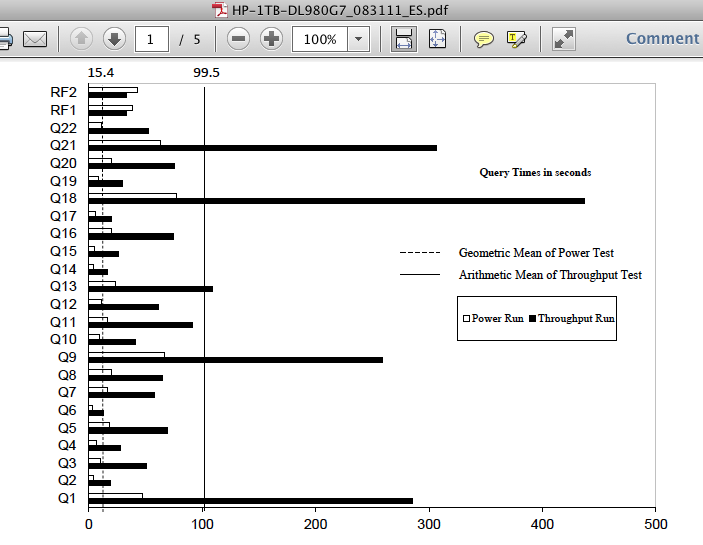
The T4 architecture favors highly-threaded workloads just like the T3 before it. This attribute of the T4 is evident in the disclosure reports as well. Consider, for instance, that the 1TB SPARC T4 test was conducted with 128 query streams whereas the HP Proliant DL980 case used 7. The disparity in query response times between these two configurations running the same scale test is quite dramatic as the following screen shots of the disclosure reports show. With the HP DL980, only query 18 required more than 300 seconds of processing whereas not a single query on the SPARC T4 finished in less than 1200 seconds.

DL980:
SPARC T4:

Summary

These recent SPARC T4-4  TPC result proved several things:

1.    Conventional Storage Is Not Dead. Achieving 17GB/s from storage with limited cabling is nothing to sneeze at.

2.    Modern servers have a lot of bandwidth.

3.    There is a vast difference between a big machine and a fast machine. The SPARC T4 is a big (bandwidth) system.

Finally, I did not blog about the fact that the SPARC T4 TPC-H benchmarks do not leverage Exadata storage. Why? Because it simply doesn’t matter. TPC-H is not a suitable test for a system like Exadata. Feel free to Google the matter…you’ll likely find some of my other writings stating the same.

Application Developers Asking You For Urgent Response To A Database Provisioning Request? Tell Them: “Go Do It Yourself!”

…then calmly close the door and get back to work! They’ll be exceedingly happy!

The rate at which new applications pour forth from corporate IT is astounding. Nimble businesses, new and old, react to bright ideas quickly and doing so often requires a new application.  Sure, the backbone ERP system is critical to the business and without it there would be no need for any other application in the enterprise. This I know. However…

When an application developer is done white-boarding a high-level design to respond to a bright idea in the enterprise it’s off to the DBA Team to get the train rolling for a database to back-end the new application. I’d like to tell the DBA Team what to tell the application developer. Are you ready? The response should be:

Go do it yourself! Leave me alone. I’m busy with the ERP system

You see, the DBA Team can say that and still be a good corporate citizen because this hypothetical DBA Team works in a 21st century IT shop where Database As A Service is not just something they read about in the same blog I’ve been following for several years, namely Steve Bobrowski’s blog Database As A Service.

Steve’s blog contains a list of some of the pioneers in this technology space. I’m hoping that my trackback to his blog will entice him to include a joint VMware/EMC product on the list. I’d like to introduce readers of this blog to a very exciting technology that I think goes a long way towards realizing the best of what cloud database infrastructure can offer:

VMware vFabric(tm) Data Director

I encourage readers to view this demo of vFabric Data Director and  read the datasheet because this technology is not just chest-thumping IdeaWare™.  I am convinced this is the technology that will allow those in the DBA community to tell their application developers to “go do it yourself” and make their company benefit from IT even more by doing so.

What Can This Post Possibly Have To Do With Oracle Exadata?
Folks who read this blog know I can’t resist injecting trivial pursuit.

The architect and lead developer of vFabric Data Director technology is one of the three concept inventors of Oracle Exadata or, as it was soon to be called within Oracle, Storage Appliance for Grid Environments (SAGE). One of the others of that “team of three” was a crazy-bright engineer with whom I spent time scrutinizing the affect of NUMA on spinlocks (latches) in Oracle Database in the Oracle8i time frame.

It is a small world and, don’t forget, if a gifted application developer approaches your desk for a timely, urgent request for database provisioning just tell him/her to go do it yourself! They’ll be glad you did!

Exadata Database Machine X2-2 or X2-8? Sure! Why Not? Part II.

In my recent post entitled Exadata Database Machine X2-2 or X2-8? Sure! Why Not? Part I, I started to address the many questions folks are sending my way about what factors to consider when choosing between Exadata Database Machine X2-8 versus Exadata Database Machine X2-2. This post continues that thread.

As my friend Greg Rahn points out in his recent post about Exadata, the latest Exadata Storage Server is based on Intel Xeon 5600 (Westmere EP) processors. The Exadata Storage Server is the same whether the database grid is X2-2 or X2-8. The X2-2 database hosts are also based on Intel Xeon 5600. On the other hand, the X2-8 database hosts are based on Intel Xeon 7500 (Nehalem EX). This is a relevant distinction when thinking about database encryption.

Transparent Database Encryption

In his recent post, Greg brings up the topic of Oracle Database Transparent Data Encryption (TDE). As Greg points out, the new Exadata Storage Server software is able to leverage Intel Advanced Encryption Standard New Instructions (Intel AES-NI) found in the Intel Integrated Performance Primitives (Intel IPP) library because the processors in the storage servers are Intel Xeon 5600 (Westmere EP). Think of this as “hardware-assist.” However, in the case of the database hosts in the X2-8, there is no hardware-assist for TDE as Nehalem EX does not offer support for the necessary instructions. Westmere EX will—someday. So what does this mean?

TDE and Compression? Unlikely Cousins?

At first glance one would think there is nothing in common between TDE and compression. However, in an Exadata environment there is storage offload processing and for that reason roles are important to understand. That is, understanding what gets done is sometimes not as important as who is doing what.

When I speak to people about Exadata I tend to draw the mental picture of an “upper” and “lower” half. While the count of servers in each grid is not split 50/50 by any means, thinking about Exadata in this manner makes understanding certain features a lot simpler. Allow me to explain.

Compression

In the case of compressing data, all work is done by the upper half (the database grid). On the other hand, decompression effort takes place in either the upper or lower half depending on certain criteria.

  • Upper Half Compression. Always.
  • Lower Half Compression. Never
  • Lower Half Decompression. Data compressed with Hybrid Columnar Compression (HCC) is decompressed in the Exadata Storage Servers when accessed via Smart Scan. Visit my post about what triggers a Smart Scan for more information.
  • Upper Half Decompression. With all compression types, other than HCC, decompression effort takes place in the upper half. When accessed without Smart Scan, HCC data is also decompressed in the upper half.

Encryption

In the case of encryption, the upper/lower half breakout is as follows:

  • Upper Half Encryption. Always. Data is always encrypted by code executing in the database grid. If the processors are Intel Xeon 5600 (Westmere EP), as is the case with X2-2, there is hardware assist via the IPP library. The X2-8 is built on Nehalem EX and therefore does not offer hardware-assist encryption.
  • Lower Half Encryption. Never.
  • Lower Half Decryption. Smart Scan only. If data is not being accessed via Smart Scan the blocks are returned to the database host and buffered in the SGA (see the Seven Fundamentals). Both the X2-2 and X2-8 are attached to Westmere EP-based storage servers. To that end, both of these configurations benefit from hardware-assist decryption via the IPP libarary. I reiterate, however, that this hardware-assist lower-half decryption only occurs during Smart Scan.
  • Upper Half Decryption. Always in the case of data accessed without Smart Scan. In the case of X2-2, this upper-half decryption benefits from hardware-assist via the IPP library.

That pretty much covers it and now we see commonality between compression and encryption. The commonality is mostly related to whether or not a query is being serviced via Smart Scan.

That’s Not All

If HCC data is also stored in encrypted form, a Smart Scan is able to filter out vast amount of encrypted data without even touching it. That is, HCC short-circuits a lot of decryption cost. And, even though Exadata is really fast, it is always faster to not do something at all than to shift into high gear and do it as fast as possible.

Exadata Database Machine X2-2 or X2-8? Sure! Why Not? Part I.

I’ve been getting a lot of questions about why one would choose Exadata Database Machine X2-8 over Exadata Database Machine X2-2. That’s actually a tough question, however, some topics do spring to mind. I’ll start a list:

  1. The Exadata Database Machine X2-8 only comes in full-rack configurations. No way to “start small.”
  2. The Exadata Database Machine X2-2 only (immediately) supports Oracle Linux. If Solaris is attractive to you then the X2-2 is not an option at the time of this blog entry. That is slated to change soon.
  3. Database Host RAM. The aggregate database grid RAM in a full-rack X2-2 system is 768 GB but 2 TB with the X2-8. The list is quite long for areas that benefit from the additional memory. Such topics as large user counts (consolidation or otherwise), join processing, and very large SGA come to mind. And, regarding large SGA, don’t forget, the Exadata Database Machine supports in-memory Parallel Query as well.

Not on the numbered list is the more sensitive topic of processor power. While these sorts of things are very workload-dependent, I’d go with 16 Intel Xeon 7500 (Nehalem EX) processors over 16 Intel Xeon 5600 (Westmere EP) for most any workload.

So, readers, what reasons would motivate you in one direction or the other?

Seven Fundamentals Everyone Should Know About Exadata

I speak to a lot of customers, prospects and co-workers about Exadata.  Even though Exadata has been in production for two years I still do not presume everyone has a grasp of some of the more important fundamentals of Exadata. I’ll routinely get asked about how very large SGA buffering can enhance Exadata Smart Scan or how Storage Indexes might improve OLTP workloads and other such non sequiturs.

There are a lot of sessions about Exadata being offered at Oracle OpenWorld 2010 and for good reason.  Exadata is exciting technology! It dawns on me, however, that a few words explaining some of the more fundamental aspects of Exadata might help folks absorb more of what they are hearing in the sessions they attend next week.

I consider the following seven terms and definitions utterly important for folks to know before sitting through an Exadata presentation. In fact, there may even be some sessions offered by presenters who could also benefit from the following 242 words?

  • Cell Offload Processing.
    • Work performed by the Storage Servers that would otherwise have to be executed in the database grid. Includes functionality like Smart Scan, datafile initialization, RMAN offload, Hybrid Columnar Compression (HCC) decompression.
  • Smart Scan.
    • Most relevant Cell Offload Processing for improving Data Warehouse / Business Intelligence query performance. Smart Scan is the agent for offloading filtration, projection, Storage Index exploitation and HCC decompression.
  • Full Scan or Index Fast Full Scan.
    • The required access method chosen by the query optimizer in order to trigger a Smart Scan.
  • Direct Path Reads.
    • Required buffering model for a Smart Scan. The flow of data from a Smart Scan cannot be buffered in the SGA buffer pool. Direct path reads can be performed for both serial and parallel queries. Direct path reads are buffered in process PGA (heap).
  • Result Set.
    • Data returned by the SQL processing layer. The SQL processing layer is in the Oracle Database. The data flowing from a Smart Scan is not a result set.
  • Exadata Smart Flash Cache.
    • Flash Cache in each of the Storage Servers. Not to be confused with Database Flash Cache which is Flash in the database grid and not compatible with Exadata. Smart Scan aggressively scans both HDD and Flash media concurrently. When data is present in the flash cache scan rates of 50 GB/s on Exadata Version 2 hardware are the norm for full rack configurations. Maximum theoretical scan rates (a.k.a., datasheet scan rates) for Exadata are *only* possible for fully offloaded scans. A fully offloaded scan is generated by a SQL query that finds no rows. Blog Update: Please consider viewing the following 2 minute Youtube video with a demonstration of how complex SQL processing throttles Exadata Smart Scan to roughly 10% of maximum theoretical scans rates:http://www.youtube.com/watch?v=JuWVjSp42yM
  • Storage Index.
    • Dynamic, in-memory indexes. The role of Storage Index technology is not to aid in locating data faster but instead to eliminate I/O. With Storage Indexes the Exadata Storage Server software can determine whether or not a given storage region contains rows relevant to the query and decide to not read the storage region. Storage Indexes are only examined during a Smart Scan.

I hope you’ll find this helpful.

Oracle Exadata Database Machine I/O Bottleneck Revealed At… 157 MB/s! But At Least It Scales Linearly Within Datasheet-Specified Bounds!

It has been quite a while since my last Exadata-related post. Since I spend all my time, every working day, on Exadata performance work this blogging dry-spell should seem quite strange to readers of this blog. However, for a while it seemed to me as though I was saturating the websphere on the topic and Exadata is certainly more than a sort of  Kevin’s Dog and Pony Show. It was time to let other content filter up on the Google search results. Now, having said that, there have been times I’ve wished I had continued to saturate the namespace on the topic because of some of the totally erroneous content I’ve seen on the Web.

Most of the erroneous content is low-balling Exadata with FUD, but a surprisingly sad amount of content that over-hypes Exadata exists as well. Both types of erroneous content are disheartening to me given my profession. In actuality, the hype content is more disheartening to me than the FUD. I understand the motivation behind FUD, however, I cannot understand the need to make a good thing out to be better than it is with hype. Exadata is, after all, a machine with limits folks. All machines have limits. That’s why Exadata comes in different size configurations  for heaven’s sake! OK, enough of that.

FUD or Hype? Neither, Thank You Very Much!
Both the FUD-slinging folks and the folks spewing the ueber-light-speed, anti-matter-powered warp-drive throughput claims have something in common—they don’t understand the technology.  That is quickly changing though. Web content is popping up from sources I know and trust. Sources outside the walls of Oracle as well. In fact, two newly accepted co-members of the OakTable Network have started blogging about their Exadata systems. Kerry Osborne and Frits Hoogland have been posting about Exadata lately (e.g., Kerry Osborne on Exadata Storage Indexes).

I’d like to draw attention to Frits Hoogland’s investigation into Exadata. Frits is embarking on a series that starts with baseline table scan performance on a half-rack Exadata configuration that employs none of the performance features of Exadata (e.g., storage offload processing disabled). His approach is to then enable Exadata features and show the benefit while giving credit to which specific aspect of Exadata is responsible for the improved throughput. The baseline test in Frits’ series is achieved by disabling both Exadata cell offload processing and Parallel Query Option! To that end, the scan is being driven by a single foreground process executing on one of the 32 Intel Xeon 5500 (Nehalem EP) cores in his half-rack Database Machine.

Frits cited throughput numbers but left out what I believe is a critical detail about the baseline result—where was the bottleneck?

In Frits’ test, a single foreground process drives the non-offloaded scan at roughly 157MB/s. Why not 1,570MB/s (I’ve heard everything Exadata is supposed to be 10x)? A quick read of any Exadata datasheet will suggest that a half-rack Version 2 Exadata configuration offers up to 25GB/s scan throughput (when scanning both HDD and FLASH storage assets concurrently). So, why not 25 GB/s? The answer is that the flow of data has to go somewhere.

In Frits’ particular baseline case the data is flowing from cells via iDB (RDS IB) into heap-buffered PGA in a single foreground executing on a single core on a single Nehalem EP processor. Along with that data flow is the CPU cost paid by the foreground process in its marshalling all the I/O (communicating with Exadata via the intelligent storage layer) which means interacting with cells to request the ASM extents as per its mapping of the table segments to ASM extents (in the ASM extent map). Also, the particular query being tested by Frits performs a count(*) and predicates on a column. To that end, a single core in that single Nehalem EP socket is touching every row in every block for predicate evaluation. With all that going on, one should not expect more than 157MB/s to flow through a single Xeon 5500 core. That is a lot of code execution.

What Is My Point?
The point is that all systems have bottlenecks somewhere. In this case, Frits is creating a synthetic CPU bottleneck as a baseline in a series of tests. The only reason I’m blogging the point is that Frits didn’t identify the bottleneck in that particular test. I’d hate to see the FUD-slingers suggest that a half-rack Version 2 Exadata configuration bottlenecks at 157 MB/s for disk throughput related reasons about as badly as I’d hate to see the hype-spewing-light-speed-anti-matter-warp rah-rah folks suggest that this test could scale up without bounds. I mean to say that I would hate to see someone blindly project how Frits’ baseline test would scale with concurrent invocations. After all, there are 8 cores, 16 threads on each host in the Version 2 Database Machine and therefore 32/64 in a half rack (there are 4 hosts). Surely Frits could invoke 32 or 64 sessions each performing this query without exhibiting any bottlenecks, right? Indeed, 157 MB/s by 64 sessions is about 10 GB/s which fits within the datasheet claims. And, indeed, since the memory bandwidth in this configuration is about 19 GB/s into each Nehalem EP socket there must surely be no reason this query wouldn’t scale linearly, right? The answer is I don’t have the answer. I haven’t tested it. What I would not advise, however, is dividing maximum theoretical arbitrary bandwidth figures (e.g., the 25GB/s scan bandwidth offered by a half-rack) by a measured application throughput requirement  (e.g., Frits’ 157 MB/s) and claim victory just because the math happens to work out in your favor. That would be junk science.

Frits is not blogging junk science. I recommend following this fellow OakTable member to see where it goes.


DISCLAIMER

I work for Amazon Web Services. The opinions I share in this blog are my own. I'm *not* communicating as a spokesperson for Amazon. In other words, I work at Amazon, but this is my own opinion.

Enter your email address to follow this blog and receive notifications of new posts by email.

Join 741 other subscribers
Oracle ACE Program Status

Click It

website metrics

Fond Memories

Copyright

All content is © Kevin Closson and "Kevin Closson's Blog: Platforms, Databases, and Storage", 2006-2015. Unauthorized use and/or duplication of this material without express and written permission from this blog’s author and/or owner is strictly prohibited. Excerpts and links may be used, provided that full and clear credit is given to Kevin Closson and Kevin Closson's Blog: Platforms, Databases, and Storage with appropriate and specific direction to the original content.
