SLOB can be obtained at this link: Click here.
This post is just a simple set of screenshots I recently took during a fresh SLOB deployment. There have been a tremendous number of SLOB downloads lately so I thought this might be a helpful addition to go along with the documentation. The examples I show herein are based on a 12.1.0.2 Oracle Database but these principles apply equally to 12.1.0.1 and all Oracle Database 11g releases as well.
Synopsis
- Create a tablespace for SLOB.
- Run setup.sh
- Verify user schemas
- Execute runit.sh. An Example Of Wait Kit Failure and Remedy
- Execute runit.sh Successfully
- Using SLOB With SQL*Net
- Test SQL*Net Configuration
- Execute runit.sh With SQL*Net
- More About Testing Non-Linux Platforms
Create a Tablespace for SLOB
If you already have a tablespace to load SLOB schemas into please see the next step in the sequence.

Run setup.sh
Provided database connectivity works with ‘/ as sysdba’ this step is quite simple. All you have to do is tell setup.sh which tablespace to use and how many SLOB users (schemas) load. The slob.conf file tells setup.sh how much data to load. This example is 16 SLOB schemas each with 10,000 8K blocks of data. One thing to be careful of is the slob.conf->LOAD_PARALLEL_DEGREE parameter. The name is not exactly perfect since this actually controls concurrent degree of SLOB schema creation/loading. Underneath the concurrency may be parallelism (Oracle Parallel Query) so consider setting this to a rather low value so as to not flood the system until you’ve practiced with setup.sh for a while.

Verify Users’ Schemas
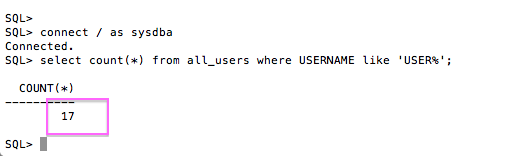
After taking a quick look at cr_tab_and_load.out, as per setup.sh instruction, feel free to count the number of schemas. Remember, there is a “zero” user so setup.sh with 16 will have 17 SLOB schema users.
Execute runit.sh. An Example Of Wait Kit Failure and Remedy
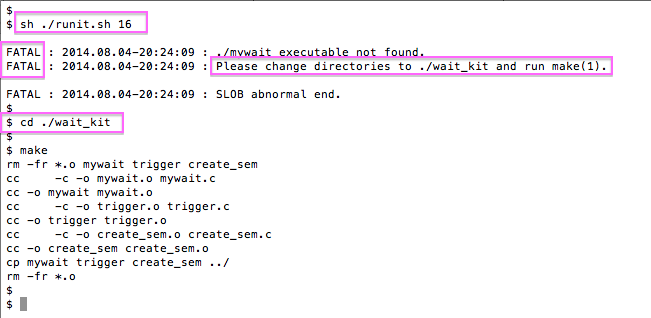
This is an example of what happens if one misses the detail to create the semaphore wait kit as per the documentation. Not to worry, simply do what the output of runit.sh directs you to do. Note, while runit.sh supports just a single argument as shown here, SLOB 2.3 and beyond have additional options to support Multiple Schema Model. Please see the documentation for more information on recently added options to runit.sh.
Execute runit.sh Successfully
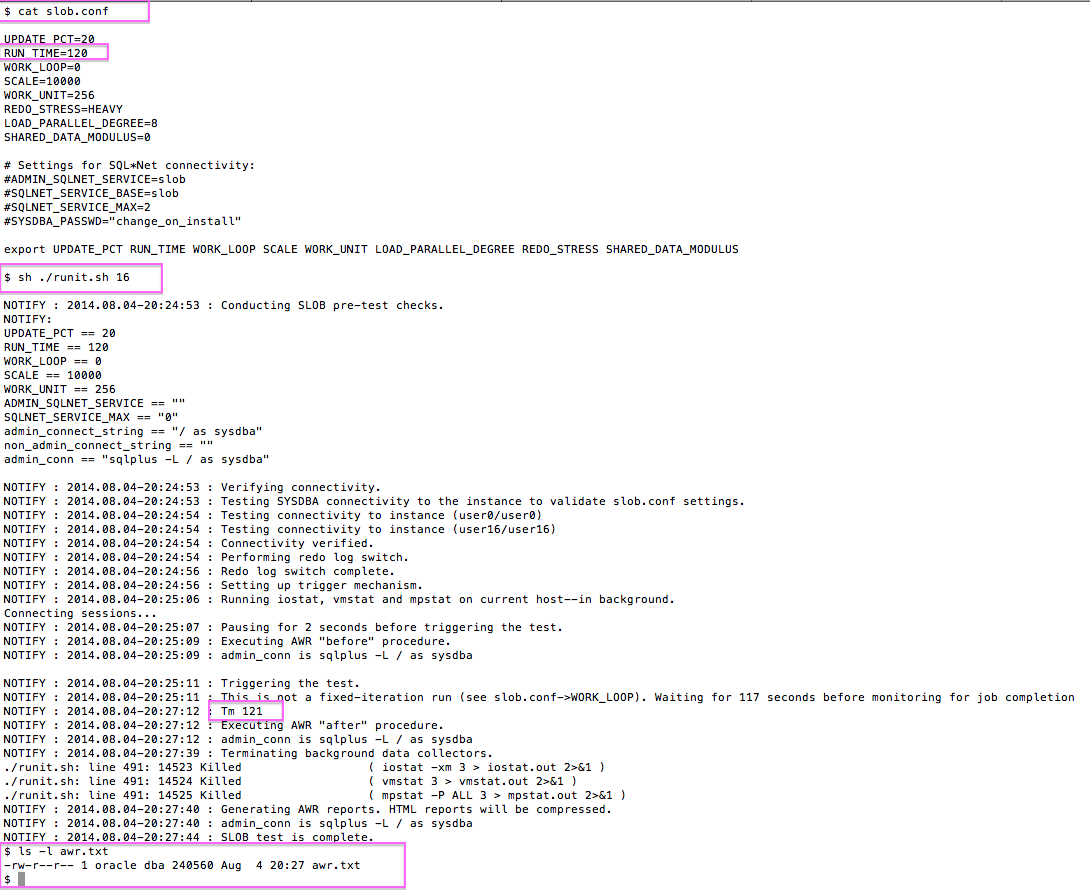
The following is an example of a healthy runit.sh test.
Using SLOB with SQL Net
Strictly speaking this is all optional if all you intend to do is test SLOB on your current host. However, if SLOB has been configured in a Windows, AIX, or Solaris box this is how one tests SLOB. Testing these non-Linux platforms merely requires a small Linux box (e.g., a laptop or a VM running on the system you intend to test!) and SQL*Net.
Test SQL*Net Configuration
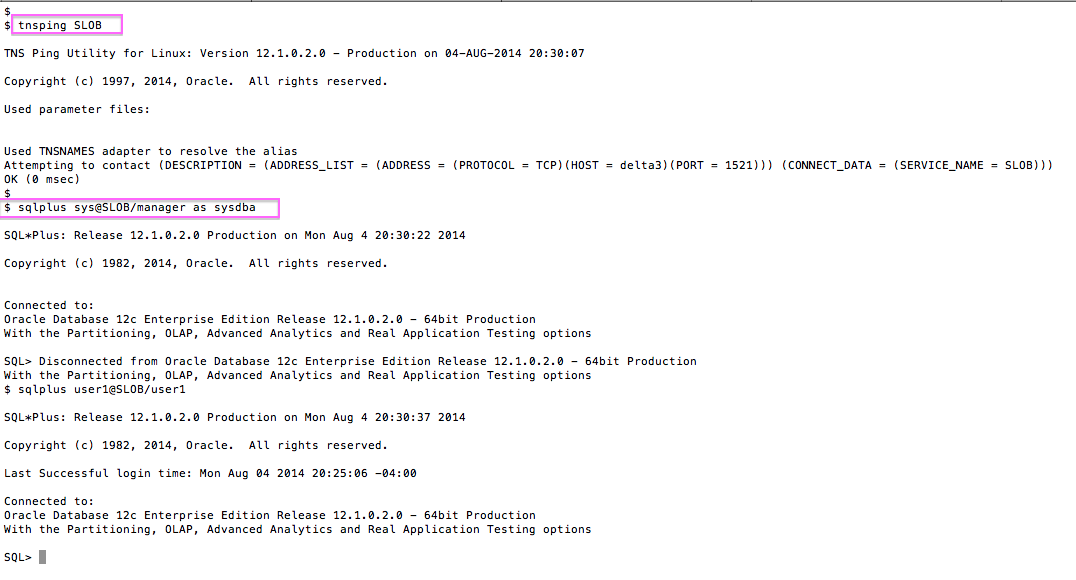
We don’t care where the SLOB database service is. If you can reach it successfully with tnsping you are mostly there.
Execute runit.sh With SQL*Net
The following is an example of a successful runit.sh test over SQL*Net.
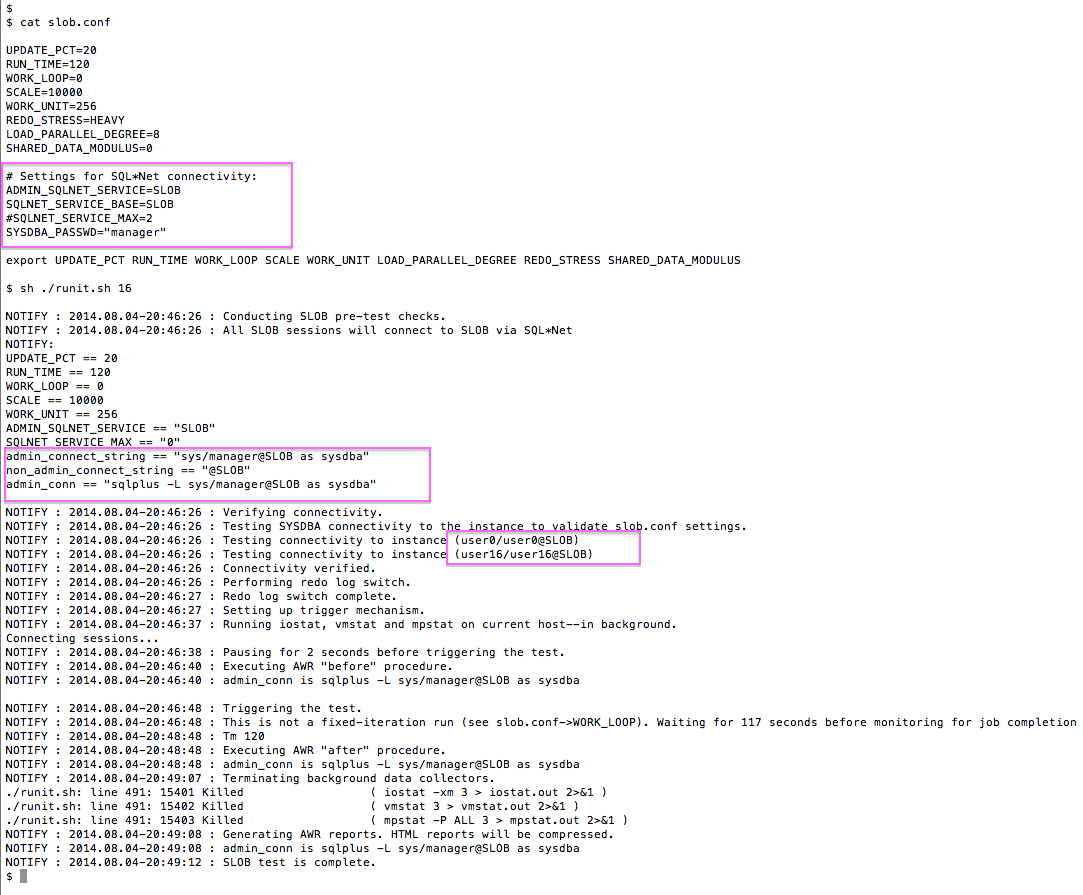
More About Testing Non-Linux Platforms
Please note, loading SLOB over SQL*Net has the same configuration requirements as what I’ve shown for data loading (i.e., running setup.sh). Consider the following screenshot which shows an example of loading SLOB via SQL*Net.
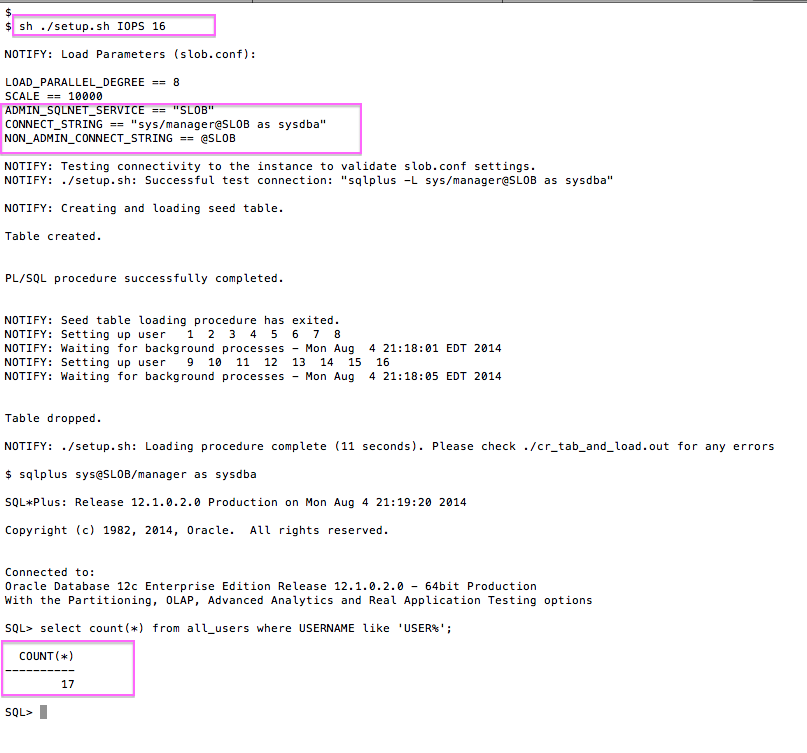
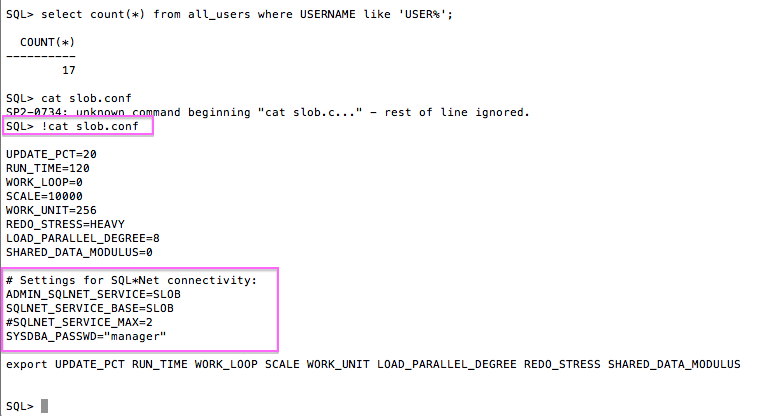
Finally, please see the next screenshot which shows the slob.conf file the corresponds to the proof of loading SLOB via SQL*Net.
Summary
This short post shows the simple steps needed to deploy SLOB in both the simple Linux host-only scenario as well as via SQL*Net. Once a SLOB user gains the skills needed to load and use SLOB via SQL*Net there are no barriers to testing SLOB databases running on any platform to include Windows, AIX and Solaris.



 Kevin Closson's Blog: Platforms, Databases and Storage
Hello Kevin, Iam getting ora-65049 when running setup.sh:-(. Is there a way i can make it work? Thanks!
Hello testconnoisseur: I’m sorry but SLOB 2.2.1.3 does not support Multitenant Option. Support for MTO is planned for SLOB 2.4.
Do you have a tentative date for SLOB 2.4 support for MTO?
I don’t yet have a tentative date. I’ll make a blog post when that date firms up.
Hi,
I see that 2.4 also does not support Multitenant 😦
“This version of SLOB does not support Oracle Multitenant Option”
Any workaround other then adding:
alter session set “_ORACLE_SCRIPT”=true;
?
I haven’t tested that parameter. Is it working for you?
hi Kevin,
After running ./setup.sh IOPS 15, I receive the error:
INSERT /*+ APPEND */ INTO cf1 SELECT * FROM user1.cf1 ORDER BY DBMS_RANDOM.VALUE()
*
ERROR at line 1:
ORA-00904: : invalid identifier
I can run dbms_random ok:
select DBMS_RANDOM.VALUE() from dual;
DBMS_RANDOM.VALUE()
——————-
.093729632
Setup.sh created a log file called cr_tab_and_load.out. Please send that to my contact info (see the top of the blog “contact”).
Setup.sh generally doesn’t cause anyone problems. However, I did put a lot of work into failure-hardening for SLOB 2.3 which I will release on 7/12/15. You might just care to wait for SLOB 2.3.
Hi can I install the slob server on e.g. a small vm (linux) and then point it at a larger server (linux) to test the I/O or should slob be on the same server.
SLOB fits nicely into a little VM. The SLOB client uses no CPU during the test so this works just fine.
I didn’t understand the schema part. Why you have selected 16 schemas?
Please study the different Schema Models: https://kevinclosson.files.wordpress.com/2013/12/slob2_readme-2012-05-04.pdf
How do you get the setup.sh to use “/ as sysdba”. I don’t see anything in your code or slob.conf to control this. It only has parameters for setting the user and password thanks.
/ as sysdba is the default if you don’t set any connect setting in slob.conf.